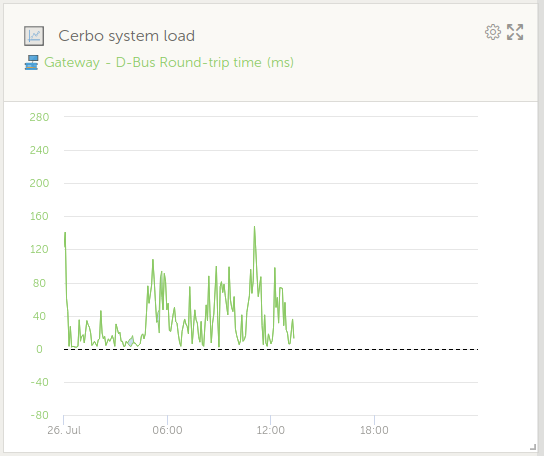
Unwanted Reboots

From time to time my Cerbo shows unwanted reboots with a loss of power production. As Venus complaints about logged in users or devices before shutting down, it does not seem to be any unexpected hardware problem. 10.10.20.158 is my PC with port 1881 connection to NR and ttypS0 connects a smart shunt.

Are there any ways to see the reason from system view?

Last login: Sat Jul 26 07:00:40 2025
root@einstein:~# last
root     pts/0        10.10.20.158     Sat Jul 26 07:59   still logged in   
root     ttyS0                         Sat Jul 26 07:00   still logged in   
reboot   system boot  5.10.109-venus-1 Sat Jul 26 07:00 - 07:59  (00:59)    

wtmp begins Sat Jul 26 07:00:30 2025
root@einstein:~# 

What is in the system/os log file?

This seems after the reboot. What file shows the events before?

root@einstein:~# 
root@einstein:~# cd /var/log
root@einstein:/var/log# cat boot
Sat Jul 26 07:00:29 2025: Starting watchdog
Sat Jul 26 07:00:30 2025: ADC/CAN firmware 5 up to date
Sat Jul 26 07:00:30 2025: INIT: Entering runlevel: 5
Sat Jul 26 07:00:30 2025: Configuring network interfaces... done.
Sat Jul 26 07:00:30 2025: Starting system message bus: Setting up watches.
Sat Jul 26 07:00:31 2025: Watches established.
Sat Jul 26 07:00:31 2025: /var/run/dbus/ CREATE system_bus_socket
Sat Jul 26 07:00:31 2025: Starting haveged: haveged: command socket is listening at fd 3
Sat Jul 26 07:00:31 2025: haveged: haveged starting up
Sat Jul 26 07:00:31 2025: [  OK  ]
Sat Jul 26 07:00:31 2025: Starting bluetooth: bluetoothd.
Sat Jul 26 07:00:31 2025: starting DNS forwarder and DHCP server: dnsmasq... done.
Sat Jul 26 07:00:31 2025: starting DNS forwarder and DHCP server: dnsmasq.ap... done.
Sat Jul 26 07:00:32 2025: Starting syslogd/klogd: done
Sat Jul 26 07:00:32 2025:  * Starting Avahi mDNS/DNS-SD Daemon: avahi-daemon
Sat Jul 26 07:00:32 2025: [ ok ]
Sat Jul 26 07:00:32 2025: Starting php-fpm  done
Sat Jul 26 07:00:32 2025: Starting Connection Manager
Sat Jul 26 07:00:32 2025: starting IPv4LL configuration daemon: avahi-autoipd... done.
Sat Jul 26 07:00:32 2025: starting resolv.conf manager: resolv-watch... done.
Sat Jul 26 07:00:32 2025: Starting crond: OK
Sat Jul 26 07:00:33 2025: dbus-daemon[689]: [system] Activating service name='fi.w1.wpa_supplicant1' requested by ':1.2' (uid=0 pid=771 comm="connmand --nodnsproxy --nodaemon ") (using servicehelper)
Sat Jul 26 07:00:33 2025: dbus-daemon[689]: [system] Successfully activated service 'fi.w1.wpa_supplicant1'
Sat Jul 26 07:00:33 2025: Checking available software versions...
Sat Jul 26 07:00:33 2025: Active rootfs: 2
Sat Jul 26 07:00:34 2025: Active version: 20250128120635 v3.54
Sat Jul 26 07:00:39 2025: Backup version: 20240730130421 v3.41
root@einstein:/var/log# 

look in messages.
If it has rolled it will be in messages.0 .1 etc

You can also check /var/log/venus-platform/current

Seems I have to change from Cerbo to Ekrano. CPU load is probably caused by big image to transfer SunSpec data from Ziehl relais. Try to increase polling intervall from 1 second to 5 or 10 seconds, maybe adding more memory or other solutions?

root@einstein:/var/log# cat messages.0
...
...
Jul 26 02:29:18 einstein daemon.info connmand[761]: ntp: time slew +0.172154 s
Jul 26 04:29:19 einstein daemon.info connmand[761]: ntp: time slew +0.174667 s
Jul 26 06:29:19 einstein daemon.info connmand[761]: ntp: time slew +0.173114 s
Jul 26 06:57:53 einstein daemon.err watchdog[555]: loadavg 7 7 6 is higher than the given threshold 0 6 6!
Jul 26 06:57:54 einstein daemon.err watchdog[555]: repair binary /usr/sbin/store_watchdog_error.sh returned 253 = 'load average too high'
Jul 26 06:57:54 einstein daemon.alert watchdog[555]: shutting down the system because of error 253 = 'load average too high'
Jul 26 06:57:54 einstein daemon.err watchdog[555]: /usr/sbin/sendmail does not exist or is not executable (errno = 2)
Jul 26 06:58:04 einstein syslog.info syslogd exiting
Jul 26 07:00:32 einstein syslog.info syslogd started: BusyBox v1.31.1
Jul 26 07:00:32 einstein user.notice kernel: klogd started: BusyBox v1.31.1 (2025-01-28 13:25:27 UTC)
Jul 26 07:00:32 einstein user.info kernel: [    0.000000] Booting Linux on physical CPU 0x0
Jul 26 07:00:32 einstein user.notice kernel: [    0.000000] Linux version 5.10.109-venus-17 (oe-user@oe-host) (arm-ve-linux-gnueabi-gcc (GCC) 9.5.0, GNU ld (GNU Binutils) 2.34.0.20200910) #1 SMP Tue Jan 28 14:19:01 UTC 2025

Or look at the mods or nodered flows you have, dial back polling intervals etc.
Sometimes mods just need an update.
If you run top, you should be able to see what is eating up the cpu time.

Try increasing the watchdog parameters first. Been there, done that, and my Cerbo GX has been stable ever since.

Of coarse, its NR as its JavaScripts are super inefficient. Sometimes dbus_systemcalc jumps to top. Probablity of reboot seems a beat frequency problem of those two. Maybe gui_v1 will save some percents? Another thing to try is always closing the NR editor tab after deploy.

Mem: 634136K used, 395948K free, 35312K shrd, 43612K buff, 226880K cached
CPU:  58% usr  14% sys   0% nic  21% idle   0% io   2% irq   2% sirq
Load average: 3.34 4.78 4.74 4/303 32050
  PID  PPID USER     STAT   VSZ %VSZ %CPU COMMAND
 1909   990 nodered  S     248m  25%  18% node-red
 1006   977 root     S     224m  22%  11% /opt/victronenergy/gui-v2/venus-gui-v2
 1062  1034 root     S    26088   3%   7% {dbus_systemcalc} /usr/bin/python3 -u /opt/victronenergy/dbus-systemcalc-py/db
 1022   996 root     S    29724   3%   6% {localsettings.p} /usr/bin/python3 -u /opt/victronenergy/localsettings/localse
 1007   967 root     S    44392   4%   5% {vrmlogger.py} /usr/bin/python3 -u /opt/victronenergy/vrmlogger/vrmlogger.py
  689   687 messageb S     4060   0%   3% dbus-daemon --system --nofork
 1827  1822 root     S     4116   0%   2% /opt/victronenergy/vecan-dbus/vecan-dbus -c socketcan:can0 --banner --log-befo
 1773  1013 www-data S     7544   1%   2% nginx: worker process
 1934  1932 root     S    55004   5%   2% /usr/bin/flashmq
 1841  1834 root     S    38308   4%   2% {dbus-modbus-cli} /usr/bin/python3 -u /opt/victronenergy/dbus-modbus-client/db
  997   969 root     S    57212   6%   1% /opt/victronenergy/venus-platform/venus-platform
 1053  1026 root     S    51172   5%   1% /opt/victronenergy/hub4control/hub4control
 1664  1628 root     S     3796   0%   1% /opt/victronenergy/mk2-dbus/mk2-dbus --log-before 25 --log-after 25 --banner -
 1068  1046 root     S    53064   5%   1% /opt/victronenergy/dbus-fronius/dbus-fronius
 1828  1824 root     S     3184   0%   1% /opt/victronenergy/can-bus-bms/can-bus-bms --log-before 25 --log-after 25 -vv
 1003   986 root     S     3176   0%   1% {serial-starter.} /bin/bash /opt/victronenergy/serial-starter/serial-starter.s
 1699  1691 root     S     3376   0%   0% /opt/victronenergy/vedirect-interface/vedirect-dbus -v --log-before 25 --log-a
 1787  1784 root     S     3184   0%   0% /opt/victronenergy/can-bus-bms/can-bus-bms --log-before 25 --log-after 25 -vv
 1069  1042 root     S    48776   5%   0% {dbus-modbus-cli} /usr/bin/python3 -u /opt/victronenergy/dbus-modbus-client/db
30929 30499 root     R     2784   0%   0% top
 1080  1048 root     S    25268   2%   0% {dbus_digitalinp} /usr/bin/python3 -u /opt/victronenergy/dbus-digitalinputs/db
 1060  1028 root     S    23136   2%   0% {dbus_vebus_to_p} /usr/bin/python3 -u /opt/victronenergy/dbus-vebus-to-pvinver
 1081  1073 root     S     3416   0%   0% /opt/victronenergy/dbus-adc/dbus-adc --banner
 1627  1625 root     S     3244   0%   0% /opt/victronenergy/vedirect-interface/vedirect-dbus -v --log-before 25 --log-a
 1648  1642 root     S     3244   0%   0% /opt/victronenergy/vedirect-interface/vedirect-dbus

NodeRed is high, but on average the CPU is capable of coping with the workload. The watchdog sitting at 6 is too trigger-happy. I’ve set it to 10 and my htop currently looks like this:

  1  [||||||||||||||||||||||||||||||||||||||||||||||||||||||||||||||||||||||||||98.9%]   Tasks: 238, 33 thr; 3 running
  2  [||||||||||||||||||||||||||||||||||||||||||||||||||||||||||||||||||||||||||95.7%]   Load average: 3.76 4.11 4.74 
  Mem[||||||||||||||||||||||||||||||||||||||||||||||||||||||||             424M/1006M]   Uptime: 100 days, 18:32:43
  Swp[                                                                          0K/0K]

  PID USER      PRI  NI  VIRT   RES   SHR S CPU% MEM%   TIME+  Command
 2085 nodered    20   0  246M  115M 29084 S 37.2 11.5     686h node-red
 1081 root       20   0  168M  116M 20340 R 28.0 11.6     552h /opt/victronenergy/gui/gui -nomouse -display Multi: LinuxFb: VNC:size=800x480:depth=32:passwordFile=/data/conf/vncp
 1133 root       20   0 22296 14648  7064 S 15.1  1.4     312h /usr/bin/python3 -u /opt/victronenergy/dbus-systemcalc-py/dbus_systemcalc.py
 1120 root	 20   0 26028 17840 10384 S 12.9  1.7     142h /usr/bin/python3 -u /opt/victronenergy/localsettings/localsettings.py --path=/data/conf
  808 messagebu  20   0  4868  4112  1944 S 10.8  0.4     292h dbus-daemon --system --nofork
 1092 root	 20   0 39388 28368 11552 R  9.7  2.8     245h /usr/bin/python3 -u /opt/victronenergy/vrmlogger/vrmlogger.py
 2174 root	 20   0 32596 22484 10112 S  9.2  2.2     228h python /data/dbus-shelly-3em-smartmeter/dbus-shelly-3em-smartmeter.py
 2176 root	 20   0 32276 22452 10184 S  7.0  2.2     215h python /data/dbus-shelly-3em-inverter/dbus-shelly-3em-inverter.py
 1167 root	 20   0 21168 13600  7288 S  6.5  1.3     147h /usr/bin/python3 -u /opt/victronenergy/dbus-generator-starter/dbus_generator.py
 2172 root	 20   0 58408 15844  6712 S  5.9  1.5     113h /usr/bin/flashmq
 2229 root	 20   0 58408 15844  6712 S  5.4  1.5     105h /usr/bin/flashmq
 5120 root	 20   0  8228  3124  2168 R  5.4  0.3  0:00.58 htop
 1112 root	 20   0 21644 12660  6188 S  3.8  1.2     100h /opt/victronenergy/venus-platform/venus-platform
 1129 root	 20   0  8840  5860  5176 S  3.2  0.6 84h35:20 /opt/victronenergy/hub4control/hub4control
 1165 root       20   0 11332  6816  6224 S  3.2  0.7 78h14:45 /opt/victronenergy/dbus-fronius/dbus-fronius
32677 root	 20   0 21036 13424  7316 S  2.7  1.3 35h03:40 /usr/bin/python3 -u /opt/victronenergy/vesmart-server/vesmart_server.py -i hci0
 1786 root	 20   0  3668  2496  2124 S  2.2  0.2 51h58:40 /opt/victronenergy/mk2-dbus/mk2-dbus --log-before 25 --log-after 25 --banner -w -s /dev/ttyS4 -i -t mk3 --settings
 9237 root	 20   0  3424  2504  1940 S  1.6  0.2  9h14:09 /opt/victronenergy/vedirect-interface/vedirect-dbus -v --log-before 25 --log-after 25 -t 0 --banner -s /dev/ttyUSB4
 1907 root	 20   0  3780  2796  2304 S  1.6  0.3 27h40:27 /opt/victronenergy/vecan-dbus/vecan-dbus -c socketcan:can0 --banner --log-before 25 --log-after 25 -vv
 2213 nodered    20   0  246M  115M 29084 S  1.6 11.5 19h49:44 node-red
 9075 root	 20   0  3424  2504  1940 S  1.1  0.2  9h17:11 /opt/victronenergy/vedirect-interface/vedirect-dbus -v --log-before 25 --log-after 25 -t 0 --banner -s /dev/ttyUSB0
 9037 root	 20   0  3424  2496  1940 S  1.1  0.2  9h01:33 /opt/victronenergy/vedirect-interface/vedirect-dbus -v --log-before 25 --log-after 25 -t 0 --banner -s /dev/ttyS7
 8977 root       20   0  3424  2500  1940 S  1.1  0.2  9h05:14 /opt/victronenergy/vedirect-interface/vedirect-dbus -v --log-before 25 --log-after 25 -t 0 --banner -s /dev/ttyS5
 1130 root	 20   0 19620 12204  7088 S  1.1  1.2 12h58:38 /usr/bin/python3 -u /opt/victronenergy/dbus-vebus-to-pvinverter/dbus_vebus_to_pvinverter.py
 9008 root	 20   0  3424  2496  1940 S  0.5  0.2  9h00:37 /opt/victronenergy/vedirect-interface/vedirect-dbus -v --log-before 25 --log-after 25 -t 0 --banner -s /dev/ttyS6
 9537 root       20   0  3424  2504  1940 S  0.5  0.2  8h32:45 /opt/victronenergy/vedirect-interface/vedirect-dbus -v --log-before 25 --log-after 25 -t 3 --banner -s /dev/ttyUSB3
 9116 root       20   0  3424  2496  1940 S  0.5  0.2  9h15:38 /opt/victronenergy/vedirect-interface/vedirect-dbus -v --log-before 25 --log-after 25 -t 0 --banner -s /dev/ttyUSB1
 4188 root	 20   0  5524  4384  3956 S  0.5  0.4  0:02.23 sshd: root@pts/0
 1154 root	 20   0 49652 20560  8404 S  0.5  2.0 12h19:05 /usr/bin/python3 -u /opt/victronenergy/dbus-modbus-client/dbus-modbus-client.py
 1173 root       20   0  3484  2368  1984 S  0.5  0.2  8h33:23 /opt/victronenergy/dbus-adc/dbus-adc --banner
 1954 root       20   0  3176  2340  2152 S  0.5  0.2 11h08:25 /opt/victronenergy/can-bus-bms/can-bus-bms --log-before 25 --log-after 25 -vv -c socketcan:can1 --banner
 2214 nodered    20   0  246M  115M 29084 S  0.5 11.5 19h48:17 node-red
 1121 root	 20   0  3044  2372  2152 S  0.5  0.2  6h31:19 /bin/bash /opt/victronenergy/serial-starter/serial-starter.sh
 1131 root	 20   0 24292 16936  6672 S  0.5  1.6 49:53.51 /usr/bin/python3 -u /opt/victronenergy/netmon/netmon
 2216 nodered    20   0  246M  115M 29084 S  0.5 11.5 19h47:27 node-red
 2170 root       20   0 42872 28300 13912 S  0.5  2.7  1h15:54 /usr/bin/python3 -u /opt/victronenergy/mqtt-rpc/mqtt-rpc.py
 9495 root       20   0  3424  2492  1940 S  0.0  0.2  8h29:10 /opt/victronenergy/vedirect-interface/vedirect-dbus -v --log-before 25 --log-after 25 -t 3 --banner -s /dev/ttyUSB2
 1175 root       20   0 64392 12888  7140 S  0.0  1.3 12h00:22 python /data/SetupHelper/PackageManager.py
F1Help  F2Setup F3SearchF4FilterF5Tree  F6SortByF7Nice -F8Nice +F9Kill  F10Quit

I found, that the gui-v1 service is occasionally consuming quite some cpu, despite i’m no longer using it.

svc -d /service/start-gui stops it, but be aware that this also terminates the vnc service, used to display the remote-console (for either version) through vrm.

Then, you can only access the local ui remotely when you have a vpn connection and can access the device ip directly.

Other than that, do a df -h and check the remaining disk space on the root partition. With the large image, there is little room, and when your device fills up that, it will become unstable.

The large image ships with signal-k, which i’m also not using at all, so I dropped that (which is quite huge as well): rm -rf /usr/lib/node_modules/signalk-server

(Advice as a user, not as victron staff, do at your own risk :face_with_tongue:)

Closing NR editors tab saves about 2% in average for the NR task.
Erasing SignalK makes a quarter of the disk space.
Going on with further ideas and observations

root@einstein:~# df -h
Filesystem                Size      Used Available Use% Mounted on
/dev/root                 1.1G      1.0G     50.5M  95% /
/dev/mmcblk1p5            1.1G     81.2M    952.6M   8% /data
tmpfs                   503.0M    956.0K    502.0M   0% /service
root@einstein:~# rm -rf /usr/lib/node_modules/signalk-server
root@einstein:~# df -h
Filesystem                Size      Used Available Use% Mounted on
/dev/root                 1.1G    767.6M    328.2M  70% /
/dev/mmcblk1p5            1.1G     81.2M    952.7M   8% /data
root@einstein:~# 

Gui-v2 with animations disabled is probably most cpu friendly.

Requires beta version though; switch to disable animations is new

What are you doing in nodered to push the cpu up so much?
There is probably some tuning that can be done.

In the meanwhile I will move this topic to modifications as it is better placed there.

1 Like
  1. Collecting Modbus-TCP/Sunspec data from various sources, Ziehl, ABB, Kaco, Fronius devices. For the moment, I try to optimize some protocol handshake overhead by reading ~200 byte array of data and dropping unused values between instead of reading 20 scattered doublewords (IEEE float version) for each value separate from each device.

  2. SOC and power regulation using PID regulator. Simple code for regulator cascade plus state machine with cycle time throttled to 10 sec only.

let error = (flow.get("pv2") - flow.get("sv2"));
msg.errsum += error;                                // integral difference
if (msg.errsum > 120000) msg.errsum =  120000;       // Integral Lock
if (msg.errsum < -120000) msg.errsum = -120000;       // Integral Lock
msg.out =   (Kp * error)+ (Ki * msg.errsum)+ Kd * (error - msg.errold); // PID Regulator
msg.errold = error;                             // save Error for next cycle
msg.out = Math.round(msg.out)*-1 ;              // negative Einspeisung, positive Akkulast
  1. Updating values to Dashboard V1 seems to occupy many time. 4 gauges, 3 radar charts, 3 dropdown menues, display approx. 2 dozen important values. The digital time watch display sometimes skips a second what is the hint for a busy http server. No other chart diagramms. I already dropped the 24 hour and shorter charts for frequency & mains voltage long ago for performance reasons. Consider this job for using Influx-DB or maybe trying to use the VRM-API therefore.

Might be worth exploring if dashboard 2.0 is more efficient. It lacks some capabilities but has most of them.

The FlowFuse dashboard is already on my todo list. Delayed as I wont try this change at my 100kWp productive installation as well as using some of the latest Venus and beta versions. On the other hand, functionallity cannot be tested without real data from devices in use.

The only installed library nodes are

  • node-red-dashboard (deprecated V1)
  • node-red-contrib-modbus (only ModbusRead node in use to access Sunpsec)
  • node-red-contrib-buffer-parser (only BufferParse node in use to convert IEEE floats)

First attempt was to start with FHEM, but for active control (not only visualisation), use of pre-installed NodeRed running with the 24/7 Venus availability seems a unbeatable benefit

To repeat myself: Average load is high, the watchdog does as it has been told and issues a reset of the system. Tweaking the workflows may or may not help, but if the CPU load is intermittent, load average will come down eventually.

In my experience, setting the watchdog threshold higher in its config file
/etc/watchdog.conf
can lead to elimination of reboots. If the workload is way too high, then other resolutions will be needed.

For more than a year now, I’ve been running the following settings:

    log-dir = /var/volatile/log/watchdog
    min-memory = 2500
    max-load-5 = 10
    max-load-15 = 8
    repair-binary = /usr/sbin/store_watchdog_error.sh
    test-prescaler = 60
    retry-timeout = 0
1 Like

Your htop headline with calculated uptime since last boot seems usefull.
How did you install this on Venus without apt-get ? Compile from source using make?

htop was installed from github following advice in Venus OS v3.31~4 available for testing - VictronEnergy

    wget -O /usr/bin/htop https://raw.githubusercontent.com/mr-manuel/venus-os_helpful-scripts/master/htop/armv7/htop
    chmod +x /usr/bin/htop

the standard uptime command should be available in venus os:

root@VictronCerboEinstein:~# uptime
 19:39:09 up 102 days,  2:55,  load average: 2.70, 3.57, 4.15

The last downtime was due to scheduled maintenance (installation of more battery capacity).
I’m running 8 MPPT 150/35 on ve.direct, a lynx shunt and a MPPT 150/70 on ve.can, a 3~ Multiplus 2-48/5000 ESS, 8x Pylontech US5000 and two shelly 3 em. The ESS is governed by node red. Load is high, but operation is stable.


  1  [||||||||||||||||||||||||||||||||||||||||||||||||||||||||||||||||||||||||||                               66.0%]   Tasks: 238, 33 thr; 6 running
  2  [||||||||||||||||||||||||||||||||||||||||||||||||||||||||||||||||||||||||||||||                           70.3%]   Load average: 2.51 2.87 3.42 
  Mem[|||||||||||||||||||||||||||||||||||||||||||||||||||||||||||||||||||||||||||||||                     424M/1006M]   Uptime: 102 days(!), 03:05:50
  Swp[                                                                                                         0K/0K]

  PID USER      PRI  NI  VIRT   RES   SHR S CPU% MEM%   TIME+  Command
 1081 root       20   0  168M  116M 20340 S 21.7 11.6     560h /opt/victronenergy/gui/gui -nomouse -display Multi: LinuxFb: VNC:size=800x480:depth=32:passwordFile=/data/conf/vncpassword.txt:0
 2085 nodered    20   0  246M  114M 29084 R 12.4 11.4     696h node-red
 1133 root       20   0 22296 14648  7064 S 10.5  1.4     316h /usr/bin/python3 -u /opt/victronenergy/dbus-systemcalc-py/dbus_systemcalc.py
  808 messagebu  20   0  4868  4112  1944 R  9.9  0.4     296h dbus-daemon --system --nofork
 2176 root	 20   0 32276 22452 10184 R  9.9  2.2     218h python /data/dbus-shelly-3em-inverter/dbus-shelly-3em-inverter.py
 2174 root	 20   0 32596 22484 10112 R  9.9  2.2     231h python /data/dbus-shelly-3em-smartmeter/dbus-shelly-3em-smartmeter.py
 1092 root	 20   0 39388 28368 11552 S  6.2  2.8     249h /usr/bin/python3 -u /opt/victronenergy/vrmlogger/vrmlogger.py
22212 root	 20   0  8368  3432  2304 R  5.0  0.3  0:02.48 htop
 1120 root	 20   0 26028 17840 10384 R  5.0  1.7     144h /usr/bin/python3 -u /opt/victronenergy/localsettings/localsettings.py --path=/data/conf
 1112 root	 20   0 21644 12660  6188 S  4.3  1.2     101h /opt/victronenergy/venus-platform/venus-platform
 1167 root	 20   0 21168 13600  7288 S  3.7  1.3     149h /usr/bin/python3 -u /opt/victronenergy/dbus-generator-starter/dbus_generator.py
 2172 root	 20   0 58408 15844  6712 S  3.1  1.5     114h /usr/bin/flashmq
 2229 root	 20   0 58408 15844  6712 S  3.1  1.5     106h /usr/bin/flashmq
 1165 root	 20   0 11332  6816  6224 S  2.5  0.7 79h18:21 /opt/victronenergy/dbus-fronius/dbus-fronius
 1786 root	 20   0  3668  2496  2124 S  2.5  0.2 52h40:58 /opt/victronenergy/mk2-dbus/mk2-dbus --log-before 25 --log-after 25 --banner -w -s /dev/ttyS4 -i -t mk3 --settings /data/var/lib/mk2-dbus/mkxport-ttyS4.settings
 1907 root	 20   0  3780  2796  2304 S  2.5  0.3 28h03:08 /opt/victronenergy/vecan-dbus/vecan-dbus -c socketcan:can0 --banner --log-before 25 --log-after 25 -vv
 1129 root	 20   0  8840  5860  5176 S  1.9  0.6 85h44:10 /opt/victronenergy/hub4control/hub4control
32677 root	 20   0 21036 13424  7316 S  1.9  1.3 36h03:23 /usr/bin/python3 -u /opt/victronenergy/vesmart-server/vesmart_server.py -i hci0
 9116 root       20   0  3424  2496  1940 S  1.9  0.2  9h36:23 /opt/victronenergy/vedirect-interface/vedirect-dbus -v --log-before 25 --log-after 25 -t 0 --banner -s /dev/ttyUSB1
 9037 root	 20   0  3424  2496  1940 S  1.9  0.2  9h22:04 /opt/victronenergy/vedirect-interface/vedirect-dbus -v --log-before 25 --log-after 25 -t 0 --banner -s /dev/ttyS7
 9537 root	 20   0  3424  2504  1940 S  1.9  0.2  8h52:10 /opt/victronenergy/vedirect-interface/vedirect-dbus -v --log-before 25 --log-after 25 -t 3 --banner -s /dev/ttyUSB3
 8977 root	 20   0  3424  2500  1940 S  1.9  0.2  9h25:56 /opt/victronenergy/vedirect-interface/vedirect-dbus -v --log-before 25 --log-after 25 -t 0 --banner -s /dev/ttyS5
 9237 root	 20   0  3424  2504  1940 S  1.9  0.2  9h35:11 /opt/victronenergy/vedirect-interface/vedirect-dbus -v --log-before 25 --log-after 25 -t 0 --banner -s /dev/ttyUSB4
 9495 root	 20   0  3424  2492  1940 S  1.2  0.2  8h48:30 /opt/victronenergy/vedirect-interface/vedirect-dbus -v --log-before 25 --log-after 25 -t 3 --banner -s /dev/ttyUSB2
F1Help  F2Setup F3SearchF4FilterF5Tree  F6SortByF7Nice -F8Nice +F9Kill  F10Quit

Obviosly, Modbus TCP operations sometimes occupy many CPU time. After changing the data transfer from single scattered float values to 100 byte transfers, the occasional peaks in CPU time for NR seems to be less. Typical average of NR task is now about 15-20% CPU time. There is still one reboot about once a day.

Using vi (is there anything else in Venus?) I changed watchdog.conf. What are the values max-load-5 and max-load-15 and do I have to change both?

root@einstein:/etc# cat watchdog.conf
watchdog-device = /dev/watchdog

log-dir = /var/volatile/log/watchdog
min-memory = 2500
max-load-5 = 10
max-load-15 = 6
repair-binary = /usr/sbin/store_watchdog_error.sh
test-prescaler = 60
retry-timeout = 0
root@einstein:/etc# 

While I am writing here, reboot happened again why I also changed max-load-15 = 8;

Another thing to understand is my flow. It works like expected if using the “Deploy” button while same script reports a NaN problem if autostart after reset happens.