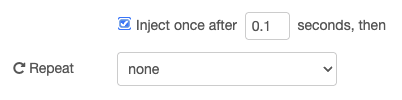
After installing VenusOS v3.64, my Node Red flows signal an error: “Not connected to dbus”. This message is only shown with change-setting-nodes, not with query-nodes.
At first all seems ok, but after a short period of time (guess: 10-20 seconds) the error appears.
Restarting the Cerbo didn’t change anything.
Disabling and re-enabling Node Red in the Cerbo/VenusOS settings also changed nothing.
Same here but in reverse: after 10-20 seconds the error goes away.
So far I’ve only seen this on the node to control my Victron MPPT SmartSolar charger.
I haven’t done the full verification/validation testing yet, but can’t recall having seen this message in previous versions.
TL;DR:
Yesterday I was playing & tweaking with one of my Node Red flows when I encountered the “Not connected to dbus” message on my SmartSolar Charger Control node.
At first I thought I had made an error in my flow so I reworked it some more so the error disappeared.
I did notice that it took 10-20 seconds for values to appear in my flow so something seems to have changed.
Since I’m now triggered, I started doing some tests.
After initial startup on VenusOS v3.64, the node status in the flow below (part of a bigger flow but the rest doesn’t seem relevant) is green and “connected”, but the injected value isn’t displayed - seems the node input remains in tri-state.
The injection is done once after 0.5 seconds.
Toggling the “MPPT enable” slider Off (input 4 to the node) results in proper node behavior and all works fine from then on.
Re-deploying the flow results in the “Not connected to dbus. Publish was unsuccessful” message.
After toggling the slider the node works as expected.
When deploying the same flow on v3.63, the MPPTs box very briefly shows “disconnected”, then almost immediately goes green with the injected value.
“Quick analysis” seems to point to a timing / initialization hickup between Node Red and dbus in v3.64.
It seems that with all of your flows, the “Not connected to dbus” is corrected after a while. This does not occur with my flow, the error is permanent with my flow (tested for up to an hour).
I can try that. Just have to find the right moment to re-update to v3.64. The flow is regulating my AC PV. The PV (18kW) is much larger than what I am allowed to feed-in into the grid (9.5kW). Oh, and I have to be at home, too.
(Anybody else thinking about setting up a development system? Nah, just kidding)
Just updated to 3.64 and the connected nodes are showing connected and are displaying info. I’ve had one gridmeter node disconencted but with an edit and resave it is back. If there is an issue when they all run tonight I’ll report.
I’m experiencing the same problem on 3.64. I rolled back to 3.63, did a reboot, and the issue didn’t return. I then simply changed the parameters in the non-working nodes back to what they were and performed a full deploy in Node-RED. The non-working nodes reconnected.
@dfaber I’ve got my nodes running fine in 3.64. However the consumtion and solar generation forecasts appear to have about doubled! So not sure if that is another bug.
Just to reiterate I’m running Large Image Node Red and the flows and nodes are fine. It’s my VRM Dashboard which has doubled the forecasts for both consumption and PV..
As @BartChampagne mentioned, I have been investigating and testing the issue (on the dbus error) on his system.
The root cause has been found: it happens when you re-deploy often and quickly, which causes an increasingly delay in (re-)establishing the underlying dbus connection (up to 60 seconds).
That delay only gets reset after restarting Node-RED (or the GX). So while creating your flow, the problem gets bigger and more irritating.
I’ll make a patch that will be part of 3.65. While that isn’t out yet (and not sure when that will become available), be assured that the problem will self-correct after a max of 60 seconds.
Also here are few things to work around this problem:
Update to the latest beta (3.70~25 right now) - but running a beta version obviously has other disadvantages and risks.
Significantly increase that default “Inject once after” to 5 seconds or so. That should reduce the amount of problems.
A big thanks to @BartChampagne for allowing me to investigate on his system! I’ve already applied the patch on his system.