Hello,
I am having an issue where my MultiPlus-II will not enter Search Mode (AES) and I have exhausted all configuration options. I would be very grateful for some expert assistance.
System Details:
- Inverter: MultiPlus-II GX 24/3000/70-32
- Inverter Firmware: Updated from v508 to the latest, v556.
- GX Device: Separate Cerbo GX (Product ID C00F), firmware v3.63.
Problem: The inverter will not enter Search Mode.
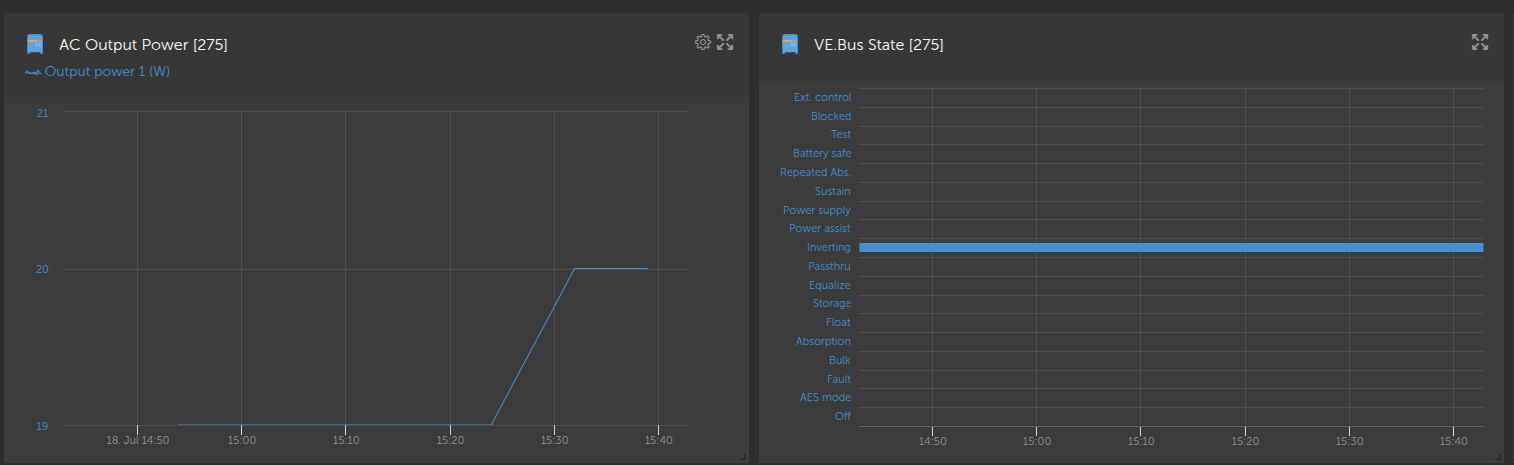
- My measured no-load power draw is consistently 20W (with nothing physically connected to the AC-out terminals).
- The Search Mode “Start AES when load lower than” threshold is set to 25W.
- The condition (20W < 25W) is met, but the inverter remains permanently in the “Inverting” state and never switches to “AES mode”.
Troubleshooting Steps Already Performed:
- Firmware Updated: Successfully updated the MultiPlus-II firmware to the latest version (v556) via VRM remote update.
- Settings Re-applied: Confirmed that the Search Mode settings were re-enabled and correctly configured after the firmware update.
- Virtual Switch Disabled: Confirmed the Virtual Switch is fully disabled (set to “Do not use VS” and the “Invert” option is unchecked).
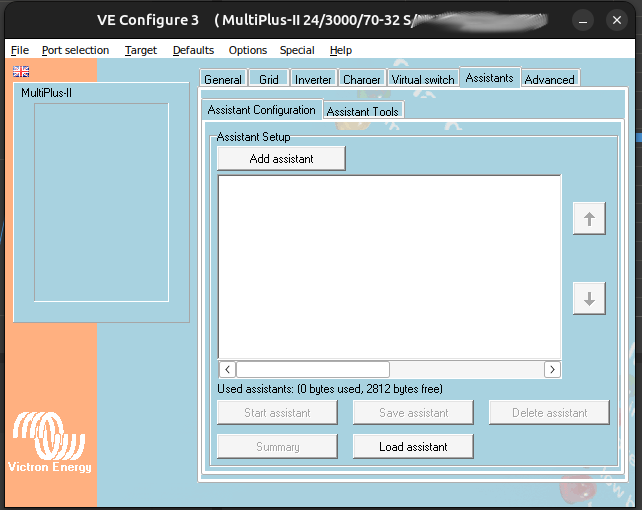
- No Assistants: Confirmed that there are absolutely zero Assistants loaded on the device.
I have reached the end of all possible user configurations. The settings appear to be perfect, yet the feature does not work. Could this be a potential bug in firmware v556 for this hardware, or is there anything else I can check?
I have attached screenshots of my Inverter, Virtual Switch, and Assistants tabs for your verification. I also have the full serial number available and can provide it in a private message to a Victron staff member if needed.
Thank you for your time and assistance.