Is there a way to get a CCGX which is not connected to the internet to use solar power “before” shore power? (that I know of, and hasn’t in 5+ years, per VRM “Installation last seen 5 yrs ago”)
I’m interested in customizing energy usage further via Node-RED or other, but will prioritize stable Solar Priority usage before I try to get fancy.
Our Victron System specs:
2019 pro install of:
Quattro 5000W
MPPT 150|80
BMV712 Smart
CCGX (Gen1?)
1800W solar on roof
4x150Ah 24V batteries
VE.bus battery manager? (it’s in a corner, and dusty, can’t read, never touched it before)
AM SOLAR in Oregon did the install. Highly Recommend. I’ve reached out but want to try the community here, too!
Where I’m at
My system engagement has been as follows: I use Victron Connect app occasionally, CCGX daily, and occasionally physically toggle off the whole system.
I should be considered novice and an eager learner.
What I’ve done so far
I have downloaded the Solar Priority manual for my Quattro here Manuals - Victron Energy but there is no “Advanced” tab in the Victron Connect app (v6.19) that I’m currently using, and I can’t connect to my CCGX (presumably because it doesn’t have BT or WiFi capabilities).
What I need
I think I need a “Solar Priority guide for older off-grid RV CCGX systems run by dummies.”
Any first steps are greatly appreciated. I notice there are many BT & WiFi dongles of varying physical connection type available online, but would love some reliable answers on what it is that I need to do, before I start buying and connecting things at random.
I think I need my CCGX to have connectivity becauge GPT tells me so.
Where our Victron system is installed:
All installed in 2019 on 42-foot 2007 Newmar All-Star (Class A RV), and have been DIY running it since. 50-50 off-grid / shore, living and working in it full-time. We have high daily draws. Multiple AC units, multiple desktop computers on 24/7, etc. We work full-time from the computers. We spend most of our time in AZ, UT, & CO, USA.
Personal specs
PhD in Physiology and novice software engineer (can write C, Python, SQL, css/js/html, flutter/dart, at a junior SWE level). Reasonable construction skills, rudimentary (dangerous unless watched) electrical skills.
Update the system firmware and use solar wind priority is the simplest way forward for mobile installs.
[Manual here] will reveal why you don’t have the advanced tab.(Solar & Wind Priority). Spoiler is the firmware… Plenty on you tube about it.
Chat GPT is woe fully incorrect on alot of stuff for solar. It is still a baby.
The CCGX need to have a WiFi dongle added or a wired ethernet connection to get it online and to use node red.
If you want to use node red to automate connecting and disconnecting from shore, then you will have to run it on a different device.
The other way is to use the generator start stop to ignore AC. Wire it into the aux and use the aux signal to drive the primary relay. There are a few threads here on the forum about it. That way you can interact with it from the gx as well and have it auto connected on load and/or soc.
Never, ever use an LLM for technical guidance for systems like these. It is flat out wrong more often than it’s over generalised responses are right.
There is good reason Victron are developing their own AI tools.
All the docs and information you need is available online in a victron manual, news/blog or on this forum. Just some legwork required.
Question @lxonline
Can’t the OP just use the genny assistant with the general flag assistant in the quattro directly instead of wiring the CCGX to the quattro aux, which is a possibility too? Once Node Red is sorted, that also can be used instead.
@DrAlexHarrison The CCGX “cannot” run venus os large Venus OS Large image: Signal K and Node-RED [Victron Energy] so maybe worth exploring another GX device first before investing in a wi-fi dongle. Also, it is now officially discontinued and currently stuck on v3.55 firmware due it’s processing limitations.
How do I get firmware updates on CCGX? The manual doesn’t say. My VRM hasn’t seen CCGX in 5 yrs.
Do CCGX have connectivity to access firmware updates without a dongle?
If so, how?
Can someone link me to the cheapest product that reliably works with my CCGX to add the necessary connectivity?
If not, what info do you need to figure out reliable connectivity adaptor compatibility for my CCGX?
(let me know if each of these questions should be new posts, I have read the forum’s complete Guidelines page)
The manual requirements don’t say how to know if my Quattro and CCGX (and other things??) can do Solar Priority. I have no idea how to check for microprocessor 26/27 in my Quattro or if it’s even relevant. What do I need to check here?
Is a firmware update all that I’ll need to do, to be able to follow the rest of the manual? Please assume I follow instructions well, and have no issue being comprehensive. I’d prefer not to get into the project and have my system dysfunctional while looking for answers. I rely on it for work.
I read the manual top to bottom before posting originally.
I did not use AI to generate any part of my original post. I am a human. Just an autistic one.
My ideal scenario is (plz ignore if not helpful):
I’d love to just drop $50, wait for amazon delivery, plug some USB thing in, then tap some app buttons, and have the Solar Priority working because firmware is now updated, etc etc.
If that’s an option, can someone link me to something that lays that out stepwise, or write it out for me? I’m happy for any direct answers to the questions at the top and I appreciate everyone’s time, and I apologize profusely for taking so many words to say all this.
PS. Are the folks labeled “Victron Expert” adjacent their usernames employees of Victron, or just trusted online community members? In either case, I trust you!
PPS. Would it be helpful if I dropped in the 5-10 different URLs to the various dongle/connector things that seem like they might work but which I currently have low certainty on?
(I will probably get this VE.Bus Smart Dongle (Bluetooth) if it’s what it takes to use the “Charge to 100%” feature in the Victron Connect app.)
Other Commentary (definitely ignore if you don’t care!)
If I have erred, it is not a problem of laziness or apathy. I have spent >4 hours online reading this forum and others, on YouTube, reading the manual and every link in it, including watching the official video, investigating my system, and updating all my system’s firmware that I could, in my Victron Connect app.
It is a problem of lacking information, understanding, or context, which I came to this forum to get clarity on.
I so appreciate direct answers to questions above. I’m not shy of legwork. And I’m certainly not dumb enough to wire something up using “GPT-spec” and call it good.
Can we give a guy (me) benefit of the doubt here? That was my original intention of sharing this:
^^^ Thus, I am aware of the ubiquitous niche shortcomings of LLMs & text-genAI. I hope any reasonable person would assume it can be deadly if followed blindly for electrical advice.
I said that bit ^^^ about needing connectivity because GPT said connectivity was needed to get firmware… which seems pretty straightforward to me. What am I missing?
I would love a response that is more helpful than critical of my current approach.
Apologies if it was an overshare for an initial post. Ironically, GPT has been accurate, more helpful, and more efficient than this forum which has actually seemed ever-so-slightly insulting (or at least misunderstanding) of the work that I’ve done so far and the care I took to share necessary info to me so that my issue could be diagnosed.
Suffice it to say, I now feel misunderstood! But I understand that guarding the forum against inundation from spam and genAI drivel is important (and daunting), and I appreciate everyone is doing their best amidst what is probably an onslaught of AI-generated content.
Errors Galore:
I think I’ve run up against 5 or 6 warnings for reasons I can’t post. Holy cow this is tightly run ship. Here’s the most recent.
(I have since removed what I thought were some helpful links for understanding the content I’ve consumed in an effort to self-educate on this topic. lol)
If I downgrade my goals to exclusively “Just get Solar Priority running as simply and standard as possible” would some dongle to get firmware be the ‘answer?’
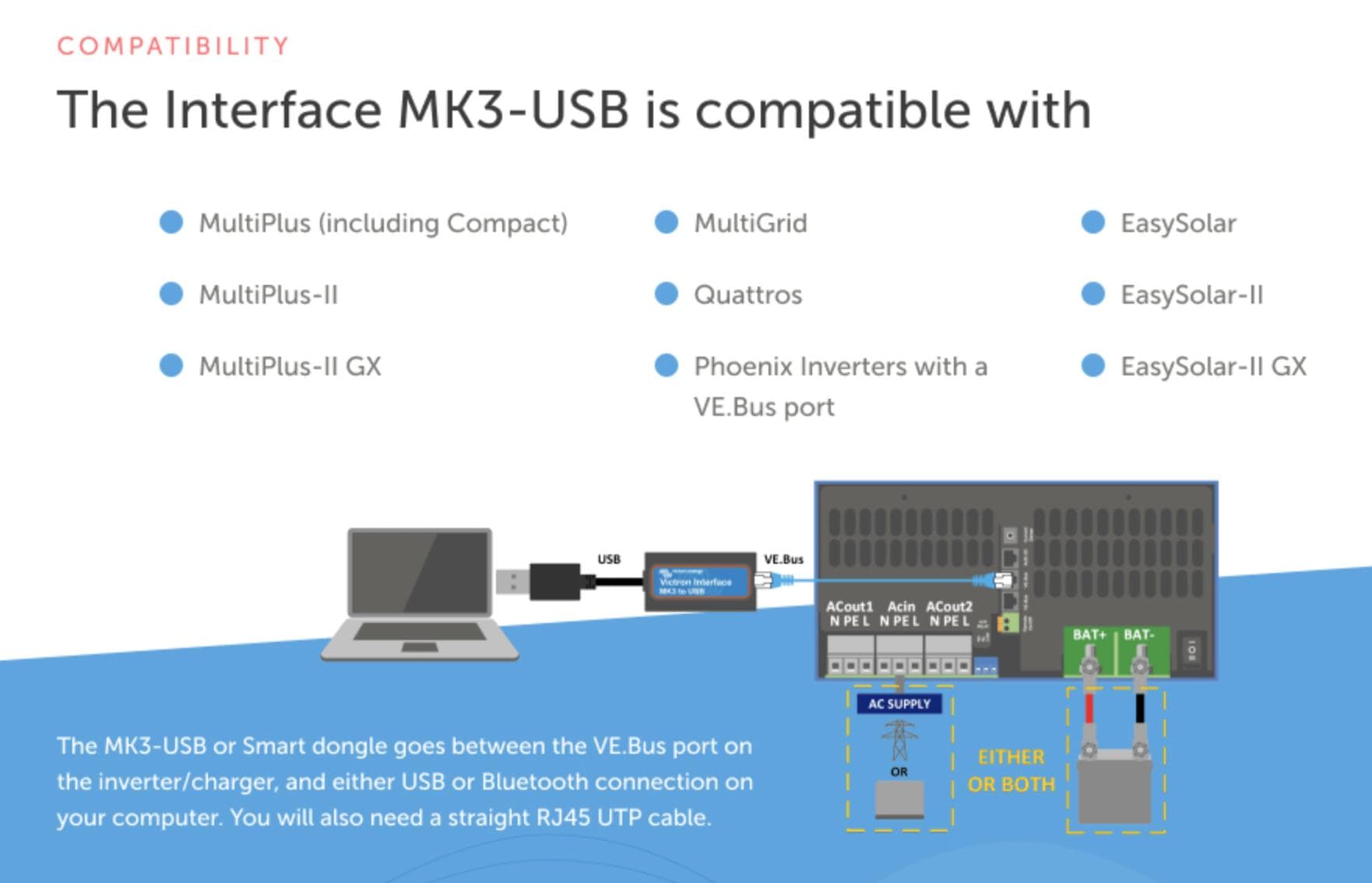
The MK3 dongle would be the answer and you can also use it with VictronConnect to directly configure Quattro from a laptop or your mobile device. As the updated firmware is “embedded” in the application, it is ideal for such off-grid scenarios.
If I plug that into my Quattro per below image, does that connection allow me to update firmware on just the Quattro, or does it allow updates to the CCGX, too?
I think the firmware update on the CCGX is a primary blocker to using Solar Priority. Current CCGX firmware version is 1.64… a long way short of current 3.55! Quattro probably hasn’t ever been updated since 2019 either because I’ve never plugged anything into it.
All other firmware is updated as far as Victron Connect will take it.
This is necessary. There is a minimum firmware requirement. The numbers are specific and mentioned in the solar wind manual.
You can check what your is on. Generally though you would be treating it as a new install and firmware uodates al round would minimise troubleshooting.
The structure of your posts is triggering the spam bot big time (now it has its eye on you ). Maybe aim for a little less headings etc.


 ). Maybe aim for a little less headings etc.