config.ini von serial battery
DEFAULT
[DEFAULT]
; --------- Set logging level ---------
; ERROR: Only errors are logged
; WARNING: Errors and warnings are logged
; INFO: Errors, warnings, and info messages are logged
; DEBUG: Errors, warnings, info, and debug messages are logged
LOGGING = INFO
; --------- Battery Current Limits ---------
; +++ Limits apply to each individual battery/BMS. +++
; +++ If you have multiple batteries, you need a battery aggregator. +++
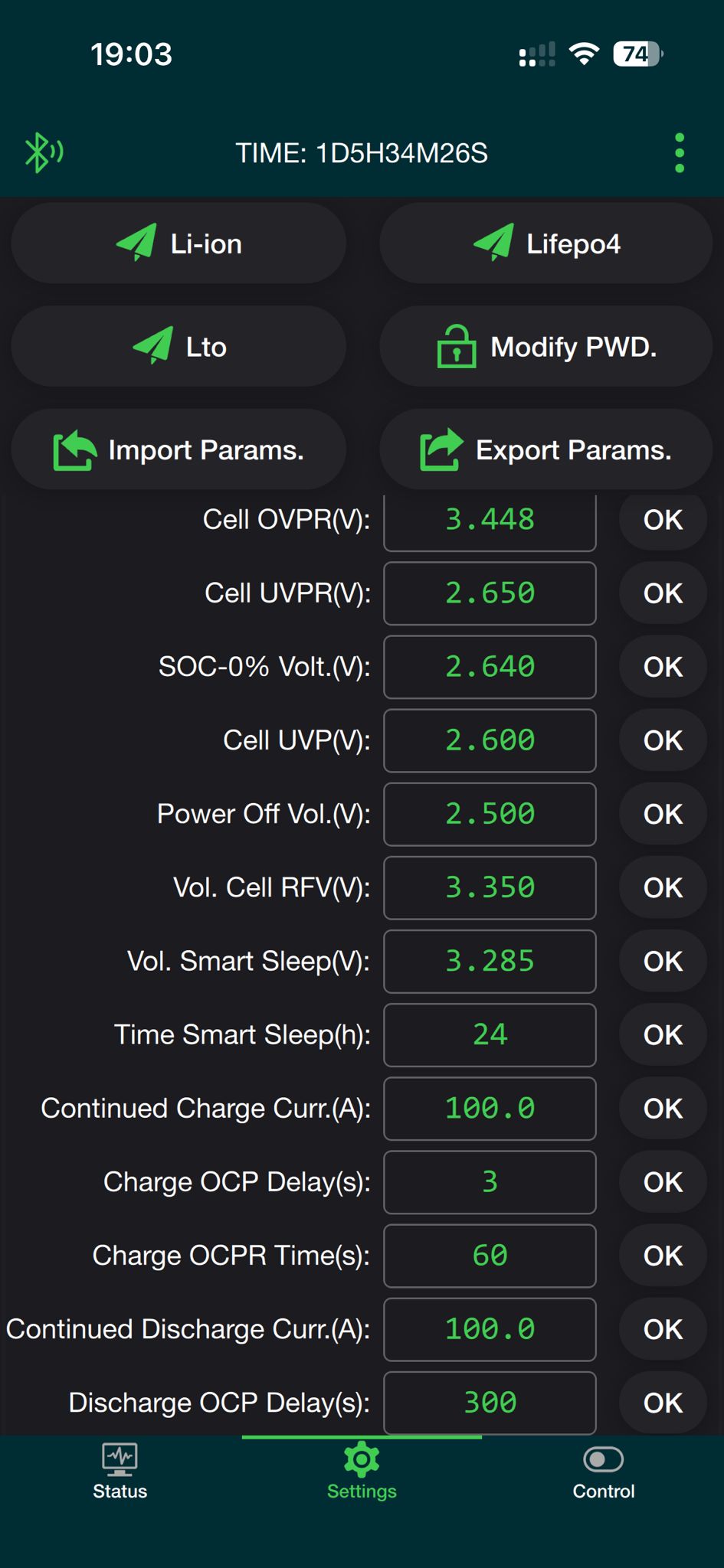
MAX_BATTERY_CHARGE_CURRENT = 100.0
MAX_BATTERY_DISCHARGE_CURRENT = 100.0
; --------- Cell Voltages ---------
; Description:
; Calculates the minimum and maximum battery voltage based on the number of cells and their voltage.
; ATTENTION: This does not prevent overcharging or overdischarging of individual cells.
; To prevent overcharging and overdischarging, use these features (enabled by default):
; - Charge Voltage Limitation (prevents overcharging)
; - Cell Voltage Current Limitation (prevents both overcharging and overdischarging)
;
; Example:
; 16 cells * 3.45 V/cell = 55.2 V max charge voltage
; 16 cells * 2.90 V/cell = 46.4 V min discharge voltage
;
; Minimum voltage (can NOT be seen as cut-off voltage)
; Used to:
; - Ensures that the charge voltage limit (CVL) does not fall below the threshold if calculated dynamically
; - Set SOC to 0%, if SOC_CALCULATION is enabled
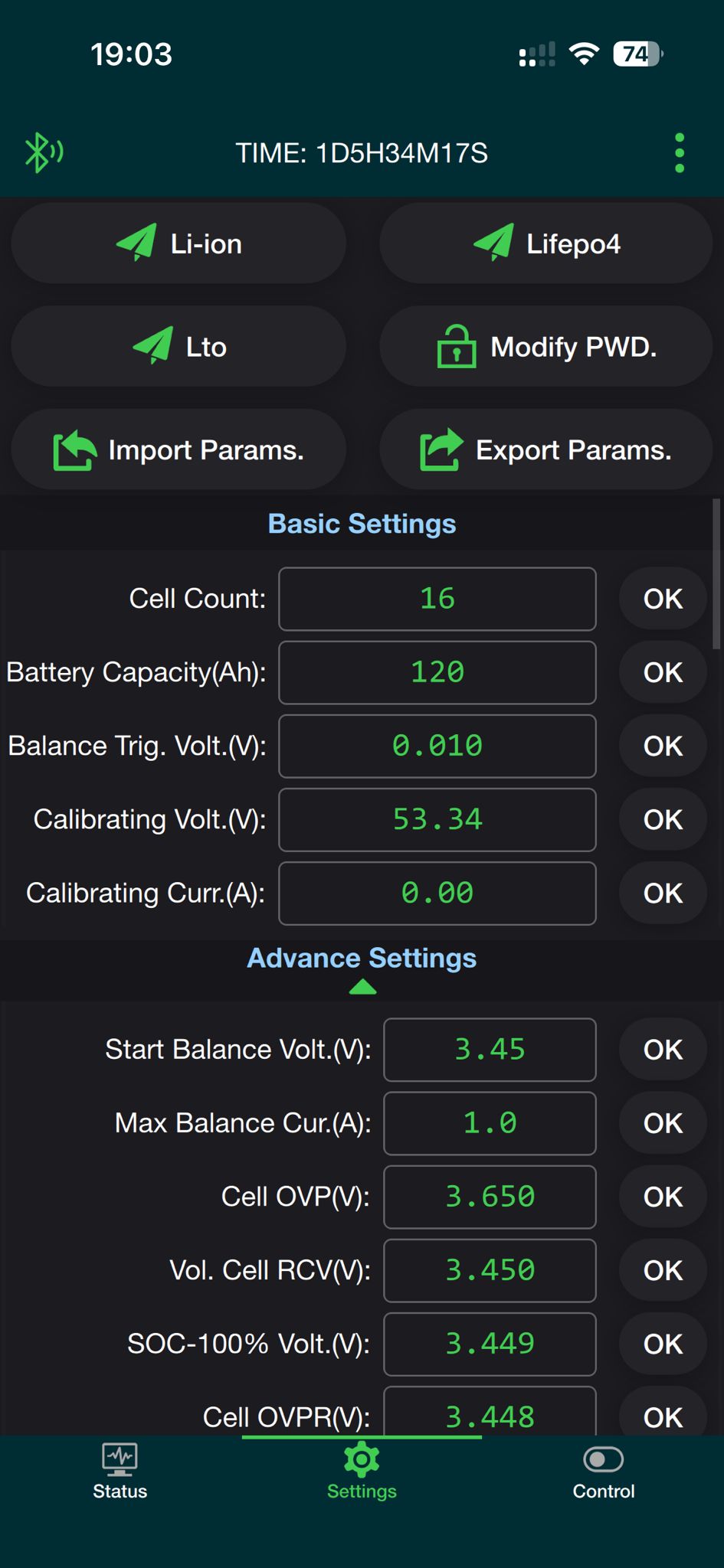
MIN_CELL_VOLTAGE = 2.900
; Maximum voltage (can be seen as bulk/absorption voltage)
; Used to;
; - Set the maximum charge voltage limit (CVL).
; - Set SOC to 100%, if SOC_CALCULATION is enabled
MAX_CELL_VOLTAGE = 3.450
; Float voltage (can be seen as resting voltage)
; Used to:
; - Set the maximum charging voltage (CVL) after the battery is fully charged
FLOAT_CELL_VOLTAGE = 3.375
; --------- SoC Reset Voltage (must match BMS settings) ---------
; +++ This section is independent and unrelated to the “SoC calculation” section below. +++
; This is used to reset the SoC to 100% periodically to correct SoC drift.
; Description:
; Some BMS systems may need to reset the SoC to 100% periodically due to SoC drift.
; For example, JKBMS resets its internal SoC value if it reaches the upper voltage level.
; Using this method, the charging voltage can be raised regularly to achieve that.
; (Other BMS systems like Daly need an active overwriting of the SoC parameter. This happens each time
; when the charging mode changes from bulk/absorption to float and the cells are equalized. They do
; not need this feature here.)
; Specify the cell voltage at which the SoC should be reset to 100% by the BMS.
; - JKBMS: SoC is reset to 100% if one cell reaches the Over Voltage Protection (OVP) voltage.
; It is recommended to start with OVP voltage - 0.030 (see Example).
; - Increase (add) by 0.005 in steps if the system does not switch to float mode, even if
; the target voltage SOC_RESET_CELL_VOLTAGE * CELL_COUNT is reached.
; - Decrease (lower) by 0.005 in steps if the system hits the OVP too fast, before all
; cells could be balanced and the system goes into protection mode multiple times.
; Example:
; If OVP is 3.650, then start with 3.620 and increase/decrease by 0.005.
; Note:
; The value must be higher than the MAX_CELL_VOLTAGE.
; You also have to set CELL_VOLTAGES_WHILE_CHARGING accordingly if you set CCCM_CV_ENABLE to true,
; otherwise the charging current will be reduced to 0 before the target voltage is reached and the
; battery will never switch to float.
SOC_RESET_CELL_VOLTAGE = 3.620
; Specify after how many days the SoC reset voltage should be reached again.
; The timer is reset when the SoC reset voltage is reached.
; Leave empty if you don’t want to use the SoC reset feature.
; Example:
; Value is set to 15
; day 1: SoC reset reached once
; day 16: SoC reset reached twice
; day 31: SoC reset not reached since it’s very cloudy
; day 34: SoC reset reached since the sun came out
; day 49: SoC reset reached again, since last time it took 3 days to reach SoC reset voltage
SOC_RESET_AFTER_DAYS =
; --------- SoC Calculation ---------
; +++ This section is independent and unrelated to the “SoC reset voltage” section above. +++
; Description:
; Calculate SoC in driver instead of using BMS reported SoC.
; Cannot be used with EXTERNAL_SENSOR_DBUS_PATH_SOC.
; True:
; Calculate SoC in driver.
; - Integrate current reported.
; - Set SoC to 100% when battery switches to float mode (requires CVCM_ENABLE to be enabled).
; - Set SoC to 0% if:
; * Lowest cell voltage <= MIN_CELL_VOLTAGE.
; * Battery is discharging for at least 300 seconds.
; False:
; Use SoC reported from BMS.
SOC_CALCULATION = False
; --------- Current correction ---------
; Correct the current reported by the BMS using a correction list.
; CURRENT_REPORTED_BY_BMS: List of current values reported by the BMS.
; CURRENT_MEASURED_BY_USER: List of current values measured by the user.
; If the lists are the same, this feature is disabled.
; Example to set small currents to zero:
; CURRENT_REPORTED_BY_BMS = -300, -0.5, 0.5, 300
; CURRENT_MEASURED_BY_USER = -300, 0.0, 0.0, 300
; Example to set zero current to a small current:
; CURRENT_REPORTED_BY_BMS = -300, -1, 0.0, 0.1, 1, 300
; CURRENT_MEASURED_BY_USER = -300, -1, -0.4, 0.0, 1, 300
CURRENT_REPORTED_BY_BMS = -300, 300
CURRENT_MEASURED_BY_USER = -300, 300
; --------- Bluetooth BMS ---------
; +++ Bluetooth connections may be unstable on some systems. +++
; +++ For a stable connection, use the serial connection. +++
; Description:
; Specify the Bluetooth BMS and its MAC address that you want to use. Leave empty to disable.
; Available Bluetooth BMS:
; Jkbms_Ble, LiTime_Ble, LltJbd_Ble
; Example for one BMS:
; BLUETOOTH_BMS = Jkbms_Ble C8:47:8C:00:00:00
; Example for multiple BMS:
; BLUETOOTH_BMS = Jkbms_Ble C8:47:8C:00:00:00, Jkbms_Ble C8:47:8C:00:00:11, Jkbms_Ble C8:47:8C:00:00:22
BLUETOOTH_BMS =
; Force to use polling instead of active callbacks.
; Setting to False/True may help with unstable Bluetooth connections.
; False: Use active callbacks, if supported by the BMS
; True: Use polling
BLUETOOTH_USE_POLLING = False
; Try to reset the BLE stack if the connection is lost or a crash is detected.
BLUETOOTH_FORCE_RESET_BLE_STACK = False
; --------- Bluetooth use USB ---------
; +++ Works only on Rabpery Pi devices. +++
; Description:
; Some users reported issues with the built-in Bluetooth module. You can try to fix it with a USB
; module. After changing this setting, reboot the GX device.
; The USB Bluetooth module must support BLE (Bluetooth version >= 4.0).
; Other Bluetooth devices such as Ruuvi tags have not been tested yet.
; False: Use the built-in Bluetooth module
; True: Disable the built-in Bluetooth module and use a USB module
BLUETOOTH_USE_USB = False
; --------- CAN BMS ---------
; Description:
; Specify the CAN port(s) where the BMS is connected. Leave empty to disable.
; Show available CAN ports with: canshow
; Available CAN BMS:
; Daly_Can, Jkbms_Can
; Example for one CAN port (Cerbo GX MK2, Ekrano GX):
; CAN_PORT = vecan0, vecan1
; Example for one CAN port (Cerbo GX, Raspberry Pi):
; CAN_PORT = can0
; Example for multiple CAN ports:
; CAN_PORT = can0, can8, can9
CAN_PORT =
; --------- Daisy Chain Configuration (Multiple BMS on one cable) ---------
; Description:
; Specify the battery addresses as hexadecimal numbers for which a BMS should be searched.
; If left empty, the driver will connect only to the default address specified in the driver.
; Check the documentation for more information:
; How to connect and prepare the battery/BMS | dbus-serialbattery
; Example:
; BATTERY_ADDRESSES = 0x01, 0x02, 0x03, 0x04
BATTERY_ADDRESSES =
; --------- BMS Disconnect Behavior ---------
; Description:
; Block charge and discharge when communication with the BMS is lost. If you are removing the
; BMS intentionally, you must restart the driver/system to reset the block.
; False:
; Charge and discharge are not blocked for 20 minutes if cell voltages are between
; BLOCK_ON_DISCONNECT_VOLTAGE_MIN and BLOCK_ON_DISCONNECT_VOLTAGE_MAX. Otherwise, the driver blocks charge and discharge
; after 60 seconds.
; True:
; Charge and discharge are blocked immediately on BMS communication loss. They are unblocked when the connection is re-established
; or the driver/system is restarted. This is the default behavior for Victron Energy devices.
BLOCK_ON_DISCONNECT = False
; Specify in minutes how long the driver should continue to charge and discharge after BMS communication is lost.
BLOCK_ON_DISCONNECT_TIMEOUT_MINUTES = 20
; Specify a voltage range where the last fetched values of the driver should be to avoid blocking charging and discharging.
; This is needed since during this time the driver has no information about the battery status.
; The range should be safe for the battery to operate without information for 20 minutes.
BLOCK_ON_DISCONNECT_VOLTAGE_MIN = 3.25
BLOCK_ON_DISCONNECT_VOLTAGE_MAX = 3.35
; --------- External Sensor for Current and/or SoC ---------
; Description:
; Specify the dbus device where the external sensor is connected. Then specify the path to the current and/or SoC value.
; You can find this information by executing the dbus-spy command.
; EXTERNAL_SENSOR_DBUS_PATH_SOC does not work with SOC_CALCULATION enabled.
; Example for a SmartShunt as external current sensor:
; EXTERNAL_SENSOR_DBUS_DEVICE = com.victronenergy.battery.ttyS2
; EXTERNAL_SENSOR_DBUS_PATH_CURRENT = /Dc/0/Current
; EXTERNAL_SENSOR_DBUS_PATH_SOC = /Soc
EXTERNAL_SENSOR_DBUS_DEVICE =
EXTERNAL_SENSOR_DBUS_PATH_CURRENT =
EXTERNAL_SENSOR_DBUS_PATH_SOC =
; --------- Charge Mode ---------
; Choose the mode for voltage/current limitations.
; 1: Linear mode with smoother values.
; For CCL and DCL, values between steps are calculated for smoother transitions.
; 2: Step mode with limitations on hard boundary steps.
CHARGE_MODE = 1
; Specify in seconds how often the linear values should be recalculated.
CVL_RECALCULATION_EVERY = 60
; Specify the percentage change that triggers an immediate recalculation of linear values.
; Example:
; 33 means an immediate change when the value changes by more than 33%.
CVL_RECALCULATION_ON_MAX_PERCENTAGE_CHANGE = 33
; --------- Charge Voltage Limitation (affecting CVL) ---------
; Description:
; Limit the maximum charging voltage (MAX_CELL_VOLTAGE * cell count), switch from max voltage to float
; voltage (FLOAT_CELL_VOLTAGE * cell count) and back.
; False: Max charging voltage is always maintained.
; True: Max charging voltage is reduced based on charge mode.
; After max voltage is reached and cell voltage difference is smaller or equal to
; SWITCH_TO_FLOAT_CELL_VOLTAGE_DIFF, it switches to float voltage after SWITCH_TO_FLOAT_WAIT_FOR_SEC
; additional seconds.
; After cell voltage difference is greater or equal to SWITCH_TO_BULK_CELL_VOLTAGE_DIFF
; OR
; SoC is below SWITCH_TO_BULK_SOC_THRESHOLD,
; it switches back to max voltage.
; Example when set to True:
; The battery reaches a max voltage of 55.2 V and the max cell difference is 0.010 V, then switch to float
; voltage of 53.6 V after 900 additional seconds to reduce stress on the batteries. Max voltage of
; 55.2 V is allowed again if the max cell difference exceeds 0.080 V or SoC drops below 80%.
; Enable charge voltage control management (True/False).
CVCM_ENABLE = True
; – CVL switch to float
; INFO: If SWITCH_TO_FLOAT_WAIT_FOR_SEC and SWITCH_TO_FLOAT_CELL_VOLTAGE_DIFF are disabled, the battery will switch instantly to
; float voltage when max voltage is reached.
; ---- Based on time ----
; Specify how long the max voltage should be maintained.
; If cells are balanced, maintain max voltage for an additional SWITCH_TO_FLOAT_WAIT_FOR_SEC seconds.
; To disable, leave empty or set to 0.
SWITCH_TO_FLOAT_WAIT_FOR_SEC = 900
; ---- Based on cell voltage difference ----
; Specify the cell voltage difference where CVL is maintained until the difference is equal or lower.
; To disable, leave empty or set to 10.
SWITCH_TO_FLOAT_CELL_VOLTAGE_DIFF = 0.010
; Specify the cell voltage difference threshold for restarting SWITCH_TO_FLOAT_WAIT_FOR_SEC.
; Example:
; If SWITCH_TO_FLOAT_CELL_VOLTAGE_DIFF is 0.010 and SWITCH_TO_FLOAT_CELL_VOLTAGE_DEVIATION is 0.003,
; the timer will restart if the cell voltage difference exceeds 0.013 V (0.010 + 0.003).
SWITCH_TO_FLOAT_CELL_VOLTAGE_DEVIATION = 0.003
; – CVL switch to bulk/absorption
; WARNING: If SWITCH_TO_BULK_SOC_THRESHOLD and SWITCH_TO_BULK_CELL_VOLTAGE_DIFF are disabled, the battery will stay at the float
; voltage until the driver/system is restarted.
; ---- Based on SoC ----
; Specify the SoC level where CVL is reset to max voltage (bulk/absorption).
; To disable, leave empty or set to 0.
SWITCH_TO_BULK_SOC_THRESHOLD = 85
; ---- Based on cell voltage difference ----
; Specify the cell voltage difference where CVL is reset to max voltage (bulk/absorption) if the value exceeds this threshold.
; As a guideline: Cells are considered imbalanced if the cell difference exceeds 5% of the nominal cell voltage.
; Example: 3.2 V * 5 / 100 = 0.160 V
; To disable, leave empty or set to 10.
SWITCH_TO_BULK_CELL_VOLTAGE_DIFF = 0.080
; --------- Cell Voltage Limitation (affecting CVL) ---------
; This function prevents overcharging of single cells in a poorly balanced battery, which could cause the BMS to switch off due to overvoltage.
;
; Example:
; 15 cells are at 3.4 V, 1 cell is at 3.6 V. The total battery voltage is 54.6 V, and the Victron System sees no reason to
; lower the charging current as the control voltage (absorption voltage) is 55.2 V.
; In this case, the cell voltage limitation kicks in and lowers the control voltage to keep it close to the MAX_CELL_VOLTAGE.
;
; In theory, this can also be done with CCL, but doing it with CVL has 2 advantages:
; - In a well-balanced system, the current can be kept quite high until the end of charge by using MAX_CELL_VOLTAGE for charging.
; - In systems with MPPTs and DC-feed-in activated, the Victron systems do not respect CCL, so CVL is the only way to prevent the
; highest cell in a poorly balanced system from overcharging.
;
; There are different methods implemented to calculate CVL when a cell exceeds MAX_CELL_VOLTAGE:
; 1. P-Controller (penalty sum method)
; The voltage overshoot of all cells that exceed MAX_CELL_VOLTAGE is summed up, and the control voltage is lowered by this “penalty sum”.
; This is calculated every CVL_RECALCULATION_EVERY seconds.
; 2. I-Controller
; An I-Controller tries to control the voltage of the highest cell to MAX_CELL_VOLTAGE + SWITCH_TO_FLOAT_CELL_VOLTAGE_DIFF.
; (for example, 3.45 V + 0.01 V = 3.46 V). If the voltage of the highest cell is above this level, CVL is reduced. If the voltage is below, CVL is
; increased until cell count * MAX_CELL_VOLTAGE.
; An I-Part of 0.2 V/Vs (CVL_ICONTROLLER_FACTOR) has proven to provide stable and fast control behavior.
; This method is not as fast as the Penalty Sum Method but is usually smoother and more stable against toggling and has no stationary deviation.
; More info: Enhancement of CVL-controller by cflenker · Pull Request #882 · Louisvdw/dbus-serialbattery · GitHub
; 3. Clipped sum controller
; A “cell voltage capped sum” controller, designed to limit the total charging voltage based on individual cell overvoltage, with a small margin
; to allow balancing/trickle charging. It is not a standard P, I, or PI controller, but a logic-based limiting controller.
;
; Note:
; For optimal operation, ensure there is a margin of approximately 0.05 V to 0.10 V between MAX_CELL_VOLTAGE (or SOC_RESET_CELL_VOLTAGE, if used)
; and the BMS Over Voltage Protection (OVP) threshold.
;
; 0: Disabled
; 1: P-Controller (penalty sum method)
; 2: I-Controller
; 3: Clipped sum controller
CVL_CONTROLLER_MODE = 2
; I-Controller factor (V/Vs)
CVL_ICONTROLLER_FACTOR = 0.2
; --------- Cell Voltage Current Limitation (affecting CCL/DCL) ---------
; Description:
; The maximum charge/discharge current will be increased or decreased depending on the minimum and maximum cell voltages.
; Example:
; 18 cells * 3.55 V/cell = 63.9 V max charge voltage
; 18 cells * 2.70 V/cell = 48.6 V min discharge voltage
; In reality, not all cells reach the same voltage at the same time. The (dis)charge current
; will be (in-/)decreased if even one single battery cell reaches the limits.
; Enable charge current control management based on cell voltage (True/False).
CCCM_CV_ENABLE = True
; Enable discharge current control management based on cell voltage (True/False).
DCCM_CV_ENABLE = True
; Set steps to reduce battery current.
; The current will be changed linearly between these steps if CHARGE_MODE is set to 1 (linear).
CELL_VOLTAGES_WHILE_CHARGING = 3.550, 3.450, 3.425, 3.400, 3.375
MAX_CHARGE_CURRENT_CV_FRACTION = 0.000, 0.100, 0.600, 0.900, 1.000
CELL_VOLTAGES_WHILE_DISCHARGING = 2.800, 2.900, 3.000, 3.100, 3.190
MAX_DISCHARGE_CURRENT_CV_FRACTION = 0.000, 0.100, 0.600, 0.900, 1.000
; --------- Temperature Current Limitation (affecting CCL/DCL) ---------
; Description:
; The maximum charge/discharge current will be increased or decreased depending on temperatures.
; NOTE: The temperatures are in °Celsius. Temperature sensors 1 to 4 are used for the calculation.
; Example:
; The temperature limit will be monitored to control the currents. If there are two temperature sensors,
; the worst case will be calculated, and the more secure lower current will be set.
; Enable charge current control management based on temperature (True/False).
CCCM_T_ENABLE = False
; Enable discharge current control management based on temperature (True/False).
DCCM_T_ENABLE = False
; Set steps to reduce battery current.
; The current will be changed linearly between these steps if CHARGE_MODE is set to 1 (linear).
TEMPERATURES_WHILE_CHARGING = 0, 2, 5, 10, 40, 45, 50, 55
MAX_CHARGE_CURRENT_T_FRACTION = 0.00, 0.25, 0.50, 1.00, 1.00, 0.50, 0.25, 0.00
TEMPERATURES_WHILE_DISCHARGING = -10, 0, 5, 10, 40, 45, 50, 55
MAX_DISCHARGE_CURRENT_T_FRACTION = 0.00, 0.25, 0.50, 1.00, 1.00, 0.50, 0.25, 0.00
; --------- MOSFET Temperature Current Limitation (affecting CCL/DCL) ---------
; Description:
; The maximum charge/discharge current will be increased or decreased depending on MOSFET temperatures.
; NOTE: The temperatures are in °Celsius. MOSFET temperature sensor is only used if available.
; Example:
; The MOSFET temperature limit will be monitored to control the currents.
; Enable charge current control management based on MOSFET temperature (True/False).
CCCM_T_MOSFET_ENABLE = False
; Enable discharge current control management based on MOSFET temperature (True/False).
DCCM_T_MOSFET_ENABLE = False
; Set steps to reduce battery current.
; The current will be changed linearly between these steps if CHARGE_MODE is set to 1 (linear).
MOSFET_TEMPERATURES_WHILE_CHARGING = 70, 80, 90
MAX_CHARGE_CURRENT_T_MOSFET_FRACTION = 1.00, 0.25, 0.00
MOSFET_TEMPERATURES_WHILE_DISCHARGING = 70, 80, 90
MAX_DISCHARGE_CURRENT_T_MOSFET_FRACTION = 1.00, 0.25, 0.00
; --------- SoC Current Limitation (affecting CCL/DCL) ---------
; Description:
; The maximum charge/discharge current will be increased or decreased depending on the State of Charge (SoC).
; Since the SoC is not as accurate as the cell voltage, this option is disabled by default.
; Example:
; The SoC limit will be monitored to control the currents.
; Enable charge current control management based on SoC (True/False).
CCCM_SOC_ENABLE = False
; Enable discharge current control management based on SoC (True/False).
DCCM_SOC_ENABLE = False
; Set steps to reduce battery current.
; The current will be changed linearly between these steps if CHARGE_MODE is set to 1 (linear).
SOC_WHILE_CHARGING = 98, 95, 90, 85
MAX_CHARGE_CURRENT_SOC_FRACTION = 0.10, 0.20, 0.50, 1.00
SOC_WHILE_DISCHARGING = 5, 10, 15, 20
MAX_DISCHARGE_CURRENT_SOC_FRACTION = 0.10, 0.20, 0.50, 1.00
; --------- CCL/DCL Recovery Threshold ---------
; Description:
; This threshold applies if any of the following limitations are enabled:
; - Cell Voltage Current Limitation (CCCM_CV_ENABLE, DCCM_CV_ENABLE)
; - Temperature Limitation (CCCM_T_ENABLE, DCCM_T_ENABLE)
; - SoC Limitation (CCCM_SOC_ENABLE, DCCM_SOC_ENABLE)
; Once the current reaches 0, it will only increase again if it exceeds this threshold.
; The threshold is a percentage of the maximum charge/discharge current.
; This prevents rapid switching (flapping) between allowing and blocking charge/discharge, which can cause system instability and excessive notifications.
; Example:
; If the maximum charge current is 50 A and the threshold is set to 0.02 (2%), the current must exceed 1A (50A * 0.02) before charging resumes.
; If the maximum discharge current is 60 A and the threshold is set to 0.02 (2%), the current must exceed 1.2A (60A * 0.02) before discharging resumes.
CHARGE_CURRENT_RECOVERY_THRESHOLD_PERCENT = 0.015
DISCHARGE_CURRENT_RECOVERY_THRESHOLD_PERCENT = 0.015
; --------- Time-To-Go ---------
; Description:
; Calculates the time remaining until the battery reaches a specific SoC, shown in the GUI.
; If ESS is enabled and an “Optimized…” option is selected, it uses the SoC limit of the ESS system.
; Otherwise, it uses SOC_LOW_WARNING from the config file.
; Recalculation is done based on TIME_TO_SOC_RECALCULATE_EVERY.
TIME_TO_GO_ENABLE = True
; --------- Time-To-Soc ---------
; Description:
; Calculates the time remaining until the battery reaches specific SoC levels.
; Example:
; TIME_TO_SOC_POINTS = 50, 25, 15, 0
; 6h 24m remaining until 50% SoC
; 17h 36m remaining until 25% SoC
; 22h 5m remaining until 15% SoC
; 28h 48m remaining until 0% SoC
; Set of SoC percentages to report on dbus and MQTT. The more you specify, the more it will impact system performance.
; [Valid values 0-100, comma-separated list. More than 20 intervals are not recommended]
; Example: TIME_TO_SOC_POINTS = 100, 95, 90, 85, 75, 50, 25, 20, 10, 0
; Leave empty to disable.
TIME_TO_SOC_POINTS = 100, 80, 50, 30
; Specify TimeToSoc value type [Valid values 1, 2, 3]
; 1 Seconds
; 2 Time string d h m s
; 3 Both seconds and time string “ [d h m s]”
TIME_TO_SOC_VALUE_TYPE = 1
; Specify in seconds how often the TimeToSoc should be recalculated.
; Minimum is 5 seconds to prevent CPU overload.
TIME_TO_SOC_RECALCULATE_EVERY = 60
; Include TimeToSoC points when moving away from the SoC point [Valid values True, False]
; These will be shown as negative time. Disabling this improves performance slightly.
TIME_TO_SOC_INC_FROM = False
; --------- History ---------
; Description:
; Calculate the history values of the battery, that are not available from the BMS.
HISTORY_ENABLE = True
; --------- Additional settings ---------
; Specify one or more BMS types (separated by a comma) to load, or leave empty to try to load all available.
;
; Available serial BMS:
; Daly, Daren485, Ecs, EG4_Lifepower, EG4_LL, Felicity, HeltecModbus, HLPdataBMS4S, Jkbms, Jkbms_pb, KS48100, LltJbd, Pace, Renogy, Seplos, Seplosv3
; Disabled by default (just enter one or more to enable):
; ANT, MNB, Sinowealth
;
; Available CAN BMS:
; Daly_Can, Jkbms_Can, RV_C_Can, Ubms_Can
;
; Available Bluetooth BMS:
; Jkbms_Ble, Kilovault_Ble, LiTime_Ble, LltJbd_Ble
BMS_TYPE =
; Exclude these serial devices from the driver startup.
; Example:
; /dev/ttyUSB2, /dev/ttyUSB4
EXCLUDED_DEVICES =
; BMS poll interval in seconds.
; If the driver consumes too much CPU, you can increase this value to reduce the refresh rate
; and CPU usage.
; Default for most BMS is 1 second; some BMS may have a higher value.
; Leave empty to use the BMS default value; decimal values are allowed.
POLL_INTERVAL =
; Publish the config settings to the dbus path “/Info/Config/”.
PUBLISH_CONFIG_VALUES = False
; Make all battery data available on MQTT as JSON under the topic “/N/<VRM_ID>/battery/<BATTERY_INSTANCE>/JsonData”.
; This topic can be used to feed dbus-mqtt-battery or other MQTT clients.
PUBLISH_BATTERY_DATA_AS_JSON = False
; Select the format of cell data presented on dbus.
; 0 Do not publish all the cells (only the min/max cell data as used by the default GX)
; 1 Format: /Voltages/Cell (also available for display on Remote Console)
; 2 Format: /Cell/#/Volts
; 3 Both formats 1 and 2
BATTERY_CELL_DATA_FORMAT = 1
; Simulate Midpoint graph (True/False).
MIDPOINT_ENABLE = False
; Battery temperature
; Specify how the battery temperature is calculated.
; Provide a comma-separated list of temperature sensor numbers to use for the calculation.
; The temperature will be calculated as the average of the specified sensors.
; Example: TEMPERATURE_SOURCE_BATTERY = 1, 2, 3, 4
; This will use temperature sensors 1, 2, 3, and 4 to calculate the average battery temperature.
TEMPERATURE_SOURCE_BATTERY = 1, 2, 3, 4
; Temperature sensor 1 name
TEMPERATURE_1_NAME = Temp 1
; Temperature sensor 2 name
TEMPERATURE_2_NAME = Temp 2
; Temperature sensor 3 name
TEMPERATURE_3_NAME = Temp 3
; Temperature sensor 4 name
TEMPERATURE_4_NAME = Temp 4
; Show additional info in GUI → Serialbattery → Parameters.
; This will show additional information to better understand how the driver works
; and what values are currently set which are not shown elsewhere in the GUI.
; You have to scroll down to see the additional information.
GUI_PARAMETERS_SHOW_ADDITIONAL_INFO = False
; Telemetry settings
; To help us improve the driver, we are collecting telemetry data. This data is anonymous and
; will only be used to improve the driver. The data is sent once every week.
; You can disable this feature by setting this value to False.
; Some data we collect: Venus OS version, driver version, driver runtime, battery type, battery count.
TELEMETRY = True
; --------- Voltage drop ---------
; If there is a voltage drop between the BMS and the charger due to wire size or length,
; you can specify the voltage drop here. The driver will then add the voltage drop
; to the calculated CVL to compensate.
; Example:
; Cell count: 16
; MAX_CELL_VOLTAGE = 3.45
; Max voltage calculated = 16 * 3.45 = 55.20 V
; CVL is set to 55.20 V, and the battery is charged until the charger reaches 55.20 V.
; The BMS measures 55.05 V due to a voltage drop of 0.15 V on the cable.
; Since the dbus-serialbattery reads 55.05 V from the BMS, the max voltage of 55.20 V is never reached,
; and max voltage is maintained indefinitely.
; By setting the VOLTAGE_DROP to 0.15 V, the voltage on the charger is increased, and the
; target voltage on the BMS is reached. In this case CVL is set to 55.35 V.
VOLTAGE_DROP = 0.00
; --------- BMS specific settings ---------
; – Unique ID settings
; If you see “DRIVER STOPPED! Another battery with the same serial number/unique identifier” in the log, enable this option.
; Description:
; Some BMS versions do not provide a unique ID and do not allow setting a custom one.
; In such cases, you can use the port and address as the unique ID by setting this option to True.
; Note:
; VRM IDs and custom names may not be saved or restored correctly when using this option.
USE_PORT_AS_UNIQUE_ID = False
; – Battery Capacity
; Some BMS do not support reading the battery capacity. Specify the battery capacity in Ah.
; This is applicable for:
; - Daly
; - Felicity
BATTERY_CAPACITY = 50
; – Auto Reset BMS SoC
; If enabled, the BMS SoC is reset to 100% when the voltage switches from absorption to float.
; Requires CVCM_ENABLE to be enabled.
; This is applicable for:
; - Daly BMS
; - JKBMS BLE
AUTO_RESET_SOC = True
; – DVCC from battery
; Use min/max cell voltage, CVL, CCL, and DCL values from the BMS.
; This is applicable for:
; - Felicity
; - Seplos V3
USE_BMS_DVCC_VALUES = False
; – LltJbd settings
; SoC low levels
; Note:
; SOC_LOW_WARNING can be used to calculate the Time-To-Go, even if you are not using an LltJbd BMS.
SOC_LOW_WARNING = 20
SOC_LOW_ALARM = 10
; – Daly settings
; Invert Battery Current. Default is non-inverted. Set to -1 to invert.
INVERT_CURRENT_MEASUREMENT = 1
; – ESC GreenMeter and Lipro device settings
GREENMETER_ADDRESS = 1
LIPRO_START_ADDRESS = 2
LIPRO_END_ADDRESS = 4
LIPRO_CELL_COUNT = 15
; – UBMS settings
; Predefines for Valence U-BMS (Ubms_can)
; This BMS supports multiple strings of modules (of 4 cells each) in series and parallel.
; And while the number of communicating modules can be established from data on bus, its safer
; to specify the module configuration directly, i.e. series/parallel
; The configured battery (dis)charge voltage and currents are applied to this configuration
UBMS_CAN_MODULE_SERIES = 4
UBMS_CAN_MODULE_PARALLEL = 2