Nodered using VRM PV forecasts

This is beyond my skillset so definitely stuck :wink:
It is probably also too much of an ask, but I am leaving the data here if anyone comes cross this with the skillset to tackle it in their own pursuits.
The object I should probably use is:
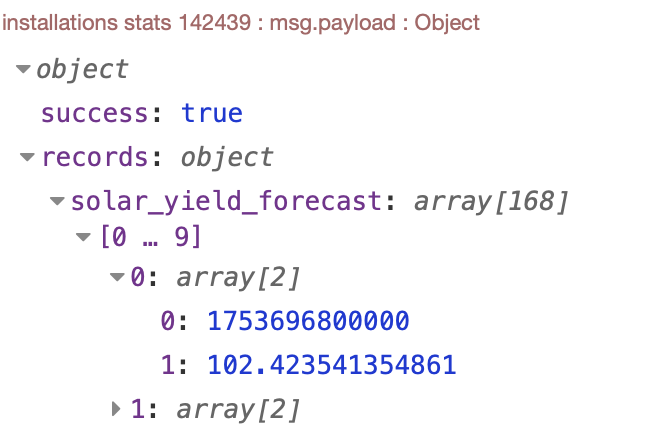
solar_yield_forecast: array[168]


It consists of 168 2-line arrays with an hourly timestamp and a payload value in watts.
I want to format that into 7 daily kWh sums and a chart that actively plots the coming week alongside it.
The today value should also start with now, so you can see what is left for the day.
I will leave this here and hope that someone clever can do something at some point along those lines and maybe share it here.
Many thanks.

I have moved this to its own topic.
Can you explain specifically what you are trying to do?
The api node referenced in the original topic is pulling hourly forecast data from VRM.
So it returns 48 records, each with a timestamp (epoch time) like so (record 40 expanded):

records: object

solar_yield_forecast: array[49]

[0 … 9]

[10 … 19]

[20 … 29]

[30 … 39]

[40 … 48]

40: array[2]

0: 1753765200000

1: 480.2713895612618

41: array[2]

42: array[2]

43: array[2]

44: array[2]

45: array[2]

46: array[2]

47: array[2]

48: array[2]

So 0: is time and 1: is Watt hours = 480.
You can also use the totals object to get the combined value for all the records (also Watt hours):

totals: object

solar_yield_forecast: 48548.30004084777

Now we can chart all of those, a bar chart probably best.

If you use the node config you did for VRM shown previously and connect it to this flow, it will format the data correctly and draw a bar chart.

[
    {
        "id": "0fa1146700efe238",
        "type": "function",
        "z": "9170653ac436c1aa",
        "name": "Chart PV",
        "func": "\nlet input = msg.payload.records.solar_yield_forecast;\nlet formattedArray = [];\n\n// Iterate through each element in the array\nfor (let item of input) {\n    let date = new Date(item[0]);\n    let dayName = date.toLocaleDateString('default', { weekday: 'long' }); // Get the weekday in the local language\n    let dayOfMonth = date.getDate(); // Get the day of the month\n\n    formattedArray.push({\n        day: `${dayName} ${dayOfMonth}`,  // Format the day as \"DayName DayOfMonth\"\n        yield: (item[1] / 1000).toFixed(1),\n        series: \"yield\"\n    });\n}\n\n// Return the formatted array as payload\nmsg.payload = formattedArray;\n\nreturn msg;\n",
        "outputs": 1,
        "timeout": 0,
        "noerr": 0,
        "initialize": "",
        "finalize": "",
        "libs": [],
        "x": 440,
        "y": 1000,
        "wires": [
            [
                "59b72fee48c13546",
                "5cd9f8cafabe2dde"
            ]
        ]
    },
    {
        "id": "59b72fee48c13546",
        "type": "ui-chart",
        "z": "9170653ac436c1aa",
        "group": "90a5c95cd3c30a40",
        "name": "VRM API forecast",
        "label": "VRM PV forecasted",
        "order": 6,
        "chartType": "bar",
        "category": "series",
        "categoryType": "property",
        "xAxisLabel": "Day",
        "xAxisProperty": "day",
        "xAxisPropertyType": "property",
        "xAxisType": "category",
        "xAxisFormat": "",
        "xAxisFormatType": "auto",
        "xmin": "",
        "xmax": "",
        "yAxisLabel": "kWh",
        "yAxisProperty": "yield",
        "yAxisPropertyType": "property",
        "ymin": "0",
        "ymax": "40",
        "bins": "",
        "action": "replace",
        "stackSeries": false,
        "pointShape": "circle",
        "pointRadius": "2",
        "showLegend": true,
        "removeOlder": "7",
        "removeOlderUnit": "86400",
        "removeOlderPoints": "",
        "colors": [
            "#1f77b4",
            "#aec7e8",
            "#ff7f0e",
            "#2ca02c",
            "#98df8a",
            "#d62728",
            "#ff9896",
            "#9467bd",
            "#c5b0d5"
        ],
        "textColor": [
            "#666666"
        ],
        "textColorDefault": true,
        "gridColor": [
            "#e5e5e5"
        ],
        "gridColorDefault": true,
        "width": "8",
        "height": "8",
        "className": "",
        "interpolation": "linear",
        "x": 730,
        "y": 1020,
        "wires": [
            []
        ]
    },
    {
        "id": "90a5c95cd3c30a40",
        "type": "ui-group",
        "name": "Charts",
        "page": "1f3f6aba836b135f",
        "width": "10",
        "height": "1",
        "order": 3,
        "showTitle": true,
        "className": "",
        "visible": "true",
        "disabled": "false",
        "groupType": "default"
    },
    {
        "id": "1f3f6aba836b135f",
        "type": "ui-page",
        "name": "Home",
        "ui": "20a0d5584e491036",
        "path": "/page1",
        "icon": "Home",
        "layout": "grid",
        "theme": "199c1371468ee29c",
        "order": 1,
        "className": "",
        "visible": true,
        "disabled": false
    },
    {
        "id": "20a0d5584e491036",
        "type": "ui-base",
        "name": "Home",
        "path": "/dashboard",
        "includeClientData": true,
        "acceptsClientConfig": [
            "ui-notification",
            "ui-control"
        ],
        "showPathInSidebar": false
    },
    {
        "id": "199c1371468ee29c",
        "type": "ui-theme",
        "name": "Default",
        "colors": {
            "surface": "#ffffff",
            "primary": "#0094ce",
            "bgPage": "#eeeeee",
            "groupBg": "#ffffff",
            "groupOutline": "#cccccc"
        },
        "sizes": {
            "pagePadding": "12px",
            "groupGap": "12px",
            "groupBorderRadius": "4px",
            "widgetGap": "12px"
        }
    }
]

Looks like so:

I thought I explained reasonably in the first post in this topic.
I would like daily kWh sums for the coming week, which the mentioned node gives if you set it like so:


if we can sum the daily hourly wH to daily sums.

… and some form of chart graphic that show the same week.
I might assume this is something a few people would like also.

Corrected to output 7 days of forecasts.

Change your vrm node to:

@houser anyway, hope this helps.

1 Like

It does. Many thanks!

Hi @nickdb
I appreciate this so much!
But unable to see anything in the chart so far.
There are also still 168 arrays if you look at the payload from the function.
I would assume there should be only 7 arrays. Am I missing something obvious?
Many thanks!

Set yours identically to mine above, your interval is probably still set to hours not days. Remember to deploy afterwards.

1 Like

Yes, I made a mistake in the copying between the dev and the live install.
All working, Fab!

This works. Very grateful for this!
Just one more thing when/if you have a moment?
If we want 1 decimal in the chart, can we put something like .toFixed(1) somewhere in your function to achieve this? Or some other way?

Indeed. It is taking Wh and dividing by 1000 to get kWh. Values already have 3 decimals, so adjusting the function to round is easy enough.

Change the yield line in the function to:
yield: (item[1] / 1000).toFixed(1),

1 Like

Great!
Is it also possible to use locale and moment in your function?
If we want weekdays rather than dates and with local language name for days?

Also: can the today value for kWh be up to date per hour rather than the whole day?

That would be ideal. Thanks very much regardless!

That can be changed. Not sure about language though. It may translate by itself depending on locale.
I updated the flow to show the day by name. It should, in theory, try use locale for language.

1 Like

That gets more challenging, as the daily stat rolls, so you tend to have a blank day before or after as VRM sorts itself out.
So the function would need to pull an hourly total for today and then combine it with daily stats for tomorrow. Alternatively could use just hourly stats and then total each day.

I have an existing flow that shows remaining PV for the day.

Sounds like wha we need.
Would you care to share that flow by any chance?

Posted it here:

1 Like

I have been using the Solcast API directly for a number of years, and they have an endpoint that when called tells you what is left for the day in kWh. I guess I can continue to use just that for now for this.
As Victron is using Solcast for their own VRM API these days, perhaps that endpoint or something like it could be made available also at some point. Many thanks!

You can do that if you configure the node to use the interval of “days” with a start of “now” and finishing at “end of day”.

1 Like

This is all great.
I noticed over at the flow fuse dash v2 git that they are looking at full locale support.
So maybe we will have that too down the road.