Ardano
16 October 2025 09:09
1
Hello all,
I was fiddling with my Cerbo last night to add dummy meters to vrm: GitHub - Marv2190/Victron_DummyMeter_NodeRed: With this DummyMeter you can use every Datasource NodeRed support to publish Data to Victron Dbus (Gridmeter) .
I changed the run script so i could add multiple meters for heatpump and EV charger.
The scripts itself worked if i ran them manually via ssh but when booting it only did the first meter.
To fix this i tried to run it in the background so i changed the run script to:
python /data/DummyGridMeter/EVcharger.py &
This withheld the Cerbo from booting so now i cant acces the console or ssh.
What is the easiest way of restoring, i didnt make any backup
I just need root acces to change the run file, but that seems harder than i thought.
I tried using the reset button on the bottom of the Cerbo but that didnt help, still no acces (wifi and bluetooth leds are not on).
I also tried installing a fresh install on a sd card but i dont think it boots from the sd card.
Greetings,
Arjan
How much time do you want to spend on it?instructions are here
If that doesn’t work further down the page is a full OS reinstall.
Ardano
16 October 2025 10:13
3
Yea i know that, i was hoping i could acces it somehow without losing all my settings.
I guess this a lesson for me to backup my stuff!
Yeah its a bit of kick in the behind
kwindrem
16 October 2025 15:58
5
What you need to do depends on where in the boot process your system is crashing. You can try the reset to factory defaults but that may never get executed. You may need to follow the procedure to reinstall Venus OS included in the same link in the LX reply.
FYI:
Running a program in the background as you indicated probably will not work since it requires the process that calls the background operation to remain running.
Running each meter as a service is a better approach however, and the code you got from GitHub is already set up to run as a service.
As the GitHub instructions suggest, you could add lines to /data/rc.local to copy (don’t use sim links any more they may not work) /data/DummyGridMeter/service /service/EVcharger. You would need separate copies for HeatPump also.
Ardano
16 October 2025 19:21
6
I should have just waited for your response because everything you said i have have found through trail and error haha.
You’re right, the factory default didn’t work so i needed a Venus reinstall.
I’m also copying the whole folder for each meter and a seperate service.
I’m not really sure what a simlink is and what would be an alternative.
Is “ln -s /data/DummyGridMeter/service /service/DummyGridMeter ” the simlink?
Thank you!
MikeD
17 October 2025 01:27
7
Download the einstein firmware onto an sd card, insert that into the cerbo, and apply power. The Cerbo should reload its firmware from the sd card, BUT you will lose all settings etc - which you seem to have done anyway.
opened 10:26PM - 07 Nov 23 UTC
### Introduction
I've (quickly) made these notes to help people that ran in t… o trouble when using v3.20~16 or later in combination with Guimods or SetupHelper. More information about that in issue #55 here.
Note that this will reset the device to its defaults, all settings need to be redone. Also on VRM you'll need to reset the authentication code.
And, on somewhat older Cerbos, this will break the onboard wifi access point.
WARNING: don’t reinstall guimods or another third party add on until a new version has been released that prevents this.
### 0. Warnings
- Everything on the data partition will be lost, including Node-RED flows.
### 1. Download a recent install image here:
https://updates.victronenergy.com/feeds/venus/release/images/einstein/
Note that files in that folder are for the Cerbo GX. For other devices, go one dir up and use the right folder.
For Cerbo-S GX, use the cerbosgx folder.
For other devices, use the other folders, but knowing bit what is going on here, I expect/hope that really only the Cerbo and Cerbo S are affected.
### 2. Install the image on a usb stick or sdcard
I use RaspberryPi imager for that. Find it in Google. The option to select your own file is at the bottom of the list, see here:
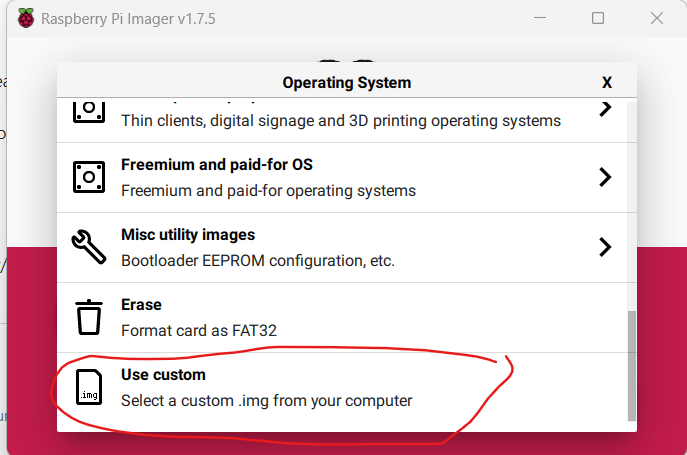
Note that there is no need to unzip the zip file.
Once done, you'll see this:

### 3. Installing the image
Remove the sdcard from the computer, insert it in the Cerbo and power cycle it.
Now wait for a while, 5 minutes.
Or if you have a GX Touch, wait for it to say "Remove installer medium".
Then remove the sdcard and powercycle it again.
### 4. Completed.
1 Like
kwindrem
17 October 2025 15:01
8
You only copy the small service directory not the entire directory containing the .py file,etc
Yes the ln-s line is the symbolic link
Use cp instead of ln -s


