I have been running a CCGX that sends data to the VRM via a GX LTE. This GX LTE has a “Three” sim card. In preparation for installing a Cerbo GX I had to move the position of the GX LTE.
I removed its power, repositioned it, and powered it up again.
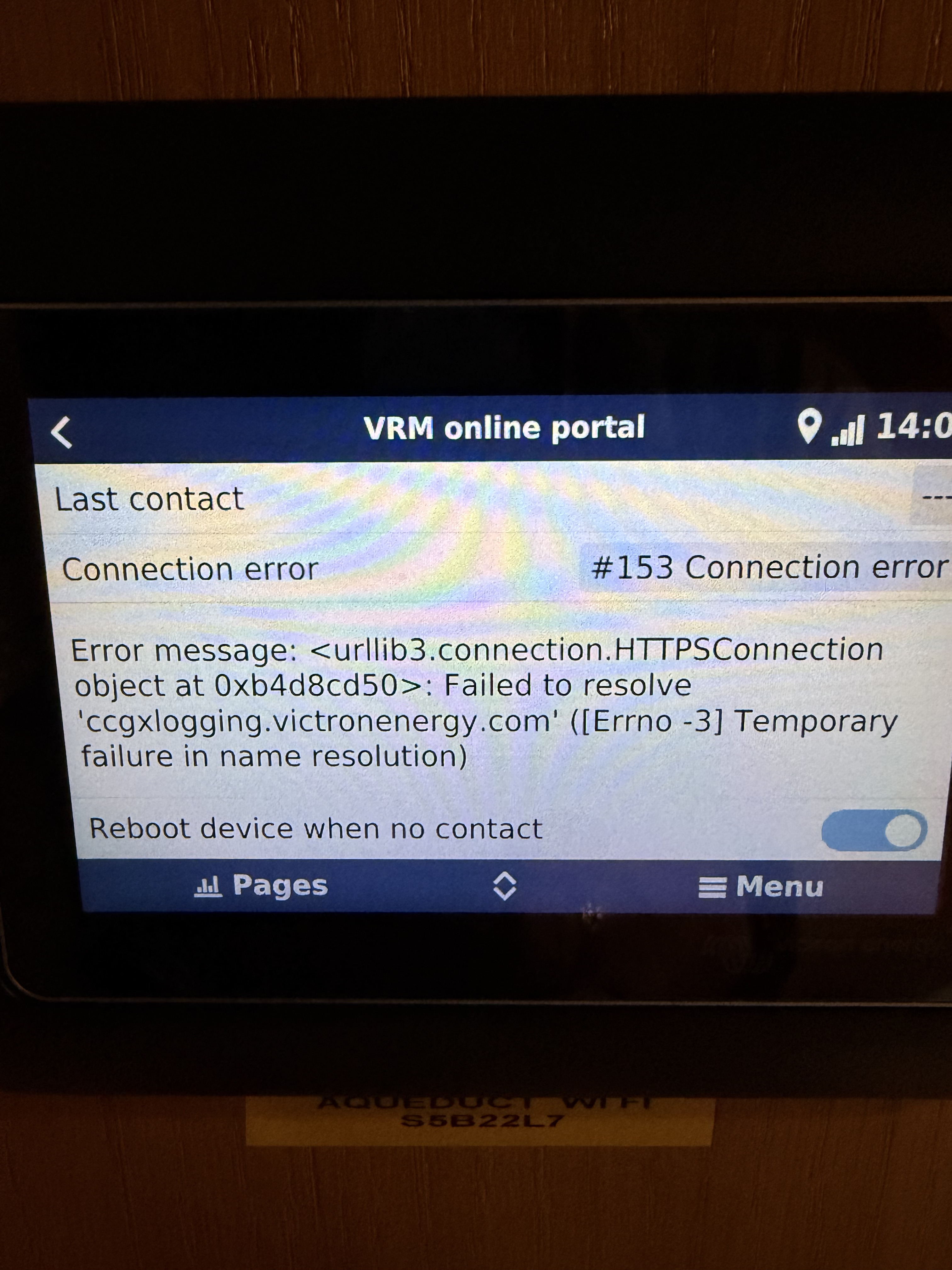
Now it fails to connect with VRM via the CCGX and shows fault code “153 Connection Error”
The GSM page is showing 4 bars on the signal but the internet is showing Offline.
I have taken the sim out and tried it in my iPad, no problem it works.
I have tried using the “O2” sim from my phone in the GX LTE and it works, so I don’t think it’s a Router problem.
When I put the Three sim back in (It has worked perfectly for the last 4 years) I get fault code 153 again.
I have tried various APN changes given to me by the Three help line but no improvement.
The catalyst for the problem seems to have been the removal of DC power to the GX LTE
I have now fitted the new Cerbo GX in the hope it may fix my communication problem via the GX LTE. It failed to communicate again with fault 153.
I have updated to the latest firmware via WiFi and tried multiple reboots.
After the 153 what is the message that usually is the key to working out what is happening.
Usually it is a routing/connection problem. Try switching off https i have found with mibile connections that helps.
The manual has a short bit on the issue. There is an image there showing an example of a 153 error and the following message.
Summary
Error #153 Connection error: This error may indicate a routing issue. For more information, review the specific error message displayed. In the example below, the GX device was not permitted internet access through the router.
Error #153 Connection problem: And then specifically an SSL related issue. This error may indicate an SSL-related issue. Check the date, time, and time zone settings on the GX device, as incorrect settings can cause SSL errors. Also, ensure that your router does not display a special disclaimer, login, or acceptance page, which is common on public WiFi networks in places like airports and hotels.
I will go to the boat tomorrow and try switching off the https again. I worked my way through the Victron troubleshooting advice for over 4 hours including multiple reboots without any success. An experienced installer may be able to decode the message after Error 153, but I had no idea where to start. I am also confused as to why replacing the Sim from “Three” with an “O2” Sim provides almost instant contact without any change of settings.
As I said in my original post, the problem arose after I removed the dc power from the GX LTE in order to move its location. No changes were made to any other components but on re-applying the dc power it failed to establish a connection.
So it is most likely a settings or a service provider issue. As you would have ruled out a physical function problem.
And there is no sim pin on there? And a change in the apn was done?
Frustrating i am sure. And worse you have to be there to do anything about it.
The original APN I used for over three years was “three.co.uk” I was also advised to try “3internet” and also one other that I can’t remember. I have left it with my notes on the boat. None of them fixed the problem
The “three” pre-paid sim only had two months remaining of its 24 month validity.
So, now that I have established communication with VRM via a new EE sim, the old one is resting at the bottom of the canal !!