cell voltage of individual cells
Hello all, a heads-up: later tonight we’ll put v3.65~3 beta version out as a release candidate.
v3.70 won’t be available for install anymore as long as we’re testing on v3.65.
To help, please do install and help testing and build confidence on v3.65.
The plan is to release v3.65 officially next week, whereafter we’ll resume v3.70.
v3.65 contains:
- node-red various stability fixes and improvements
- RV-C update
- Few more minor fixes and improvements
Why don‘t you change VRM also to dark?
simply I like the VRM screen white and the remote console as it is in dark. I don´t understand why this has been changed
BTW the brief page on 3.64 still doesn’t show the centre variable (e.g. hot water temperature) with 4 outer ring ones, only with 3… 
I’m uncertain as to why my system is currently self-consuming at the moment. The DESS plan indicates consumption from grid, the target SOC is 89% (vs. actual of 85%), and we’re on Reactive Strategy “20” (not sure which this is). 3.70~28
EDIT: I ‘downgraded’ to 3.65~3 within the scheduled hour, and the system started properly consuming from grid (under Reactive Strategy 15). Maybe this is a bug with the new strategy introduced in 3.70 @dognose ?


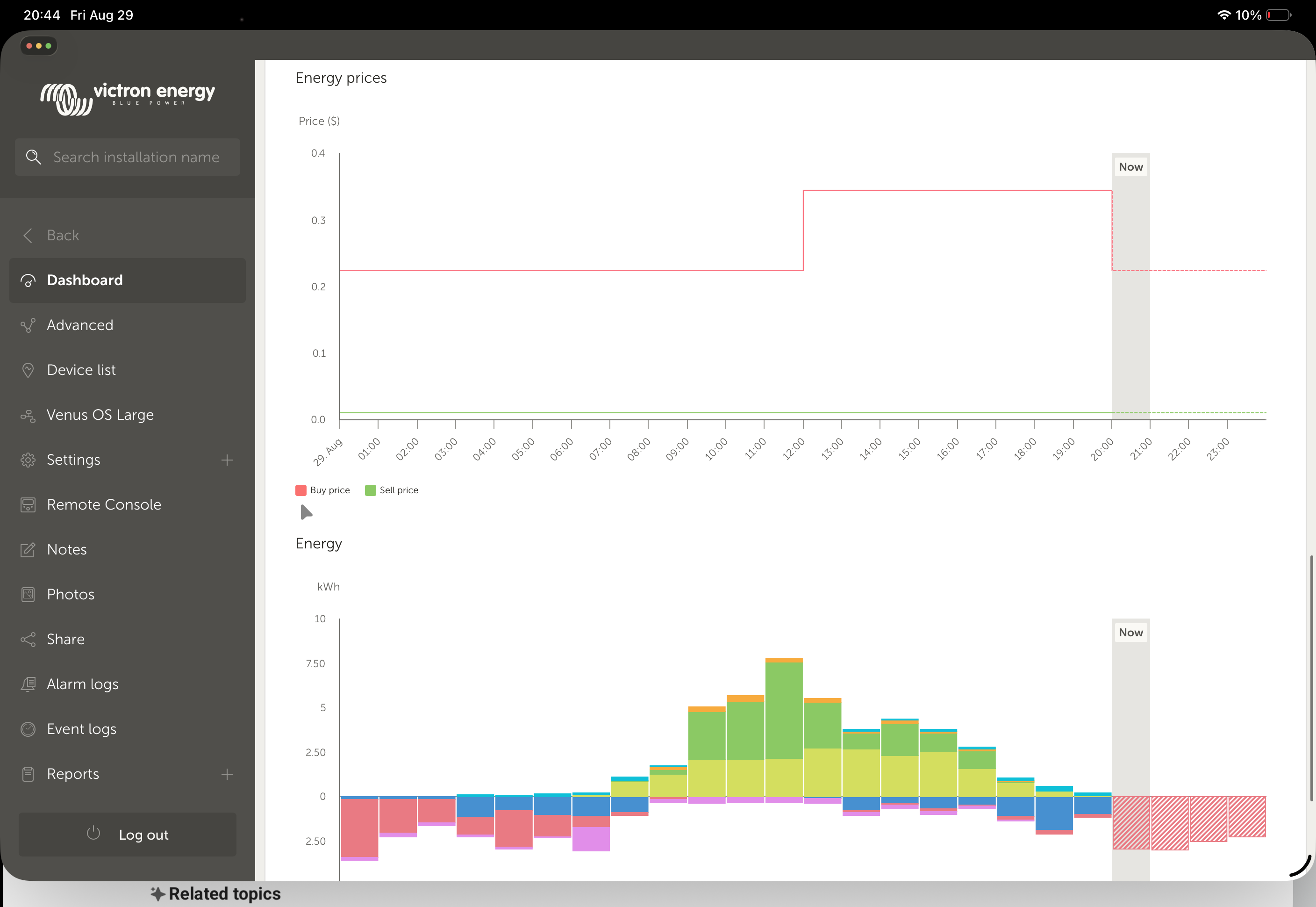
I turned DESS on a few days ago and it seems that the grid power value is ignored then …
With DESS OFF the -20W is reached pretty good … with DESS ON its something about 30-50W
Is it a bug or does anyone knows what I am doing wrong?
I am using “Green Mode” with no selling to grid

Edit: Enabling selling to grid with 0 kW seems to fix the behaviour …
20 is SELF_CONSUME_ACCEPT_BELOW_TSOC.
That is a change introduced somewhere in 3.70~9 iirc. It is indented, it kicks in, when there is (temporary) more consumption than solar, but the strategy implies missing energy should be taken from the battery.
That matches 1431 consumption vs 6W Solar.
The scheduler could have chosen another strategy, causing idling - but in this case it didn’t, so the overall roadmap says “There is enough headroom to use battery over grid here”.
In a nutshell, the bug was in 3.68, where two strategies lead to RS 15 (idling).
Now, that has been fixed to either lead to 15 or 20 based on the selected strategy.
—
The schedulers idea in this example basically is to say: “Charge the battery to 89% maximum, feedin above. But it is fine to use energy and not reaching 89%”.
What is wrong here, is the forecasted grid2consumption. That logic seems to be unaware of “consumption beeing allowed bellow tsoc”. I’ll pass that on to the forecasting team.
Which version are you on?
There was a small fix for this in v3.70~27
v3.70~28
Ok, then there’s no more difference betweeen regular ESS and DESS in a self-consume state.
Ofc, when DESS is charging, idling or discharging, the configured setpoint has no meaning, setpoint at the battery then takes precedence and grid “is-what-it-is”.
Does DESS still keep resetting the ESS setpoint to 0W periodically in this new beta? On 3.64 it does. Usually I have a positive setpoint (somewhere between 10 and 30W) during the darker seasons to minimize unnecessary feed-in.
DESS does never touch the user settings. Generally I’m also not aware with any setpoint-persistence-issues , so can’t tell if there’s something fixed on this. (Never seen that on my system as well)
Pretty sure that’s a know issue, I bumped into it a few days ago.
Well - then may I ask why my setpoint is being reset to 0W on every full hour (aka when a new DESS window starts)?
I have nothing in place that will touch the setpoint, like NodeRed or some Homeassistant script.
This is a plot of the setpoint being reported via MQTT (venus/N/caffebabe42/settings/0/Settings/CGwacs/AcPowerSetPoint):
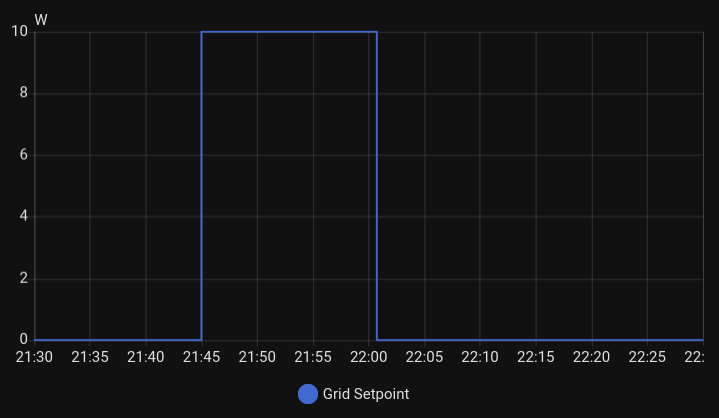
And again: As soon as I disable DESS, it will not be reset to 0W anymore.
In dynamicess.py there is a bunch of lines setting HUB4_SERVICE, '/Overrides/Setpoint to 0:
Wouldnt’ it make more sense to set it to None instead? Because I assume an “override” of 0 is exactly this: overriding any user grid set point with 0.
Edit: when DESS is getting deactivated, it will indeed set the override to None
DESS is just setting a temporary override (/hub4/Overrides/Setpoint), it doesn’t modify your settings in /settings/0/Settings/CGwacs/AcPowerSetPoint
So, if you are tracking the settings-path: Whatever is resetting that path to 0, it’s not DESS…
I will review that else-line in discharge(), but it should not be used at all anyway. It dates back to the 3.5x delegate, and has been left there as a double-safety-doesn’t-hurt-check to prevent feedin from happening when not allowed. The new delegate shouldn’t even call the discharge() method, when feedin is not allowed, as the scheduler won’t (aka shouldn’t) generate a strategy advising “grid coping”, when feedin is restricted. (But that’s suspect to review)
Hi Felix,
have there been any changes in the value display?
No one else has reported similar issues, so it might be something related to our setup.
Ok, turned out to be my fault - had a script that I totally forgot about which was supposed to maximize consumption from grid and battery charging whenever prices become negative but setting charge / discharge power via MQTT stopped to work with some Venus OS update so I started to mess with grid set point as a temporary work around and totally forgot about it. Don’t remember prices ever going negative this year, but one effect of that script was that on every price change (which happens every full hour) it was resetting grid setpoint to 0W 
Sorry, my caravan is currently being repaired. As soon as it’s back, I’ll try again with the current beta release - until then it will stay on ~26, which runs without any problems and I don’t want to take any risks as long as I don’t have access to the system. However, have not changed anything in the meantime. Same hardware, no other software/addons.