Subject says all I presume. Please respond or simply like this post and I will contact you for details.
Jan
PS Victron explicitely invited to join, but not required to do so.
Subject says all I presume. Please respond or simply like this post and I will contact you for details.
Jan
PS Victron explicitely invited to join, but not required to do so.
Sure, go ahead. Not sure what you are going to fork from exactly, but curious to follow.
Why don’t you tell us what we need to fork from to build our own solutions according to our own needs and priorities? It’s not about competition, it is about real world requirements and solving real issues in an open collaborative setting that allows us to set our own priorities when these do not align with those of Victron. I would think it would be wonderful to see a focussed effort to get ahead of the curve ourselves as a pathway to help not only ourselves but Victron as well.
Clearly it has been proven to be difficult to draw attention to DESS operational issues for edge use cases, unless those issues can be made undeniably obvious to have a wide impact. I just think we have arrived at a point where it will be easier to develop, build and test the solutions first, instead of arguing the validity of the issues ad infinitum. Solutions being the ultimate ‘eating of the pudding’ proof of the issues. And I hope to see those solutions then find their way back into the official baseline or beta releases.
Sure. The main background process is GitHub - victronenergy/dbus-systemcalc-py: Publishes system data (bat. voltages, PV watts, etc) on the D-Bus. Gets this data from other D-Bus services. , which is already open source and free to branch and fork from and make PR’s for. Main focus there would be delegates/dynamic.ess.
If you want to modify the schedules that are used, just set mode to 4 (Node-RED) and push schedules in using Node-RED. You can get the calculated schedules from VRM via the GitHub - dirkjanfaber/victron-vrm-api: Interface with the Victron Energy VRM API node (also open source and free to branch and fork from and make PR’s for) or you can use an alternative algorithm to make schedules for.
All of this is open source and you can already contribute. That is also how @dognose started doing things that ended up in the code.
Thanks, that is good starting point from a code point of view. One thing that would be most helpful aside the existing access to GitHub, is to see any functional requirements, design and process documentation. An overview of all those ‘moving parts involved’. I’m sure most can be deducted given enough time but there parts that I’m curious about, top level requirements and the choices made to implement them foremost.
Not having to revert to mode 4 is one my own primary requirements as it implies a) no VRM DESS Dashboard and b) uncertain future with Node-RED DESS flagged to be phased out.
Also I’m not so much interested in a personal ‘fork’ to ‘contribute’, the idea is to facilitate a bottom up collaborative platform as a counter balance to the current topdown approach that doesn’t show much interest in further DESS developments, or at least treats it as a low priority.
Hi @dfaber
Would you have a little more information on “push schedules in”. Do you mean there is an API to provide a self-calculated schedule to VRM? In Experimental DESS algorithm using linear programing - #31 by nortciv we’re experimenting with different strategies and would love to take the step from theoretical calculations to putting them in practice.
I never tried it but I am pretty sure pushing schedules in works the same way as fetching schedules. You can try this fetch flow and adapt it to ‘Modify Dynamic ESS Schedules’ instead of ‘Fetch Dynamic ESS Schedules’ after changing the fetched object to your liking of course.
I use fetch to store the schedule in the global context, then function nodes to extract metric, store them in the global context as well and use the msg.timeslot for further extraction of values of interest of the current timeslot. At the moment we use it to set corrected target SoC values for DESS execution process and to force the scheduler to reach a maxSoC target (when the new prices roll in, read the scheduled maxSoc, then increase/decrease minSoC every hour until maxSoC matches a set targetMaxSoC (of 95% for instance) or other conditions such a forward SoC average, depending on forward price (low price high average, high price low average). It lets DESS do the heavy lifting of calculating the short term (quart hourly) buy and sell slots, while keeping control over the medium term (1 to 2 days) general strategy. I call it a Node-RED SoC Monkey  ,
,
/**
 * Processes schedule object to compute length, start/end times, min/max with indices, and averages.
 * Outputs single msg.payload with all metrics; stores in flow context.
 * @param {Object} msg Node-RED message with payload.schedule (array of [timestamp, value] pairs)
 * @returns {Object} msg with payload {length, startTime, endTime, minIndex, minTime, minValue, maxIndex, maxTime, maxValue, currentIndex, currentTime, currentValue, fullAverage, forwardAverage}
 */

let payload = msg.payload   //usually timestamp

let schedules_key = 'vrm_soc_plan'
let topic = 'vrmdess_' + schedules_key

let global_get = 'installations.fetch-dynamic-ess-schedules'

let get_schedules = global.get( global_get )
let is_schedules = !( get_schedules == undefined || get_schedules == null )

let get_records = null

if ( is_schedules )
{
    get_records = get_schedules.records[schedules_key]
}
let schedule = get_records

//

const length = schedule.length;

if (!length || !Array.isArray(schedule)) {
    node.warn("Invalid or empty schedule array");
    msg.payload = { error: "Invalid or empty schedule array" };
    return msg;
}

const currentTimeSec = Math.floor(Date.now() );  // / 1000);
let startTime = null;
let endTime = null;
let minIndex = null;
let minTime = null;
let minValue = null;
let maxIndex = null;
let maxTime = null;
let maxValue = null;
let minfwdIndex = null;
let minfwdTime = null;
let minfwdValue = null;
let maxfwdIndex = null;
let maxfwdTime = null;
let maxfwdValue = null;
let currentIndex = null;
let currentTime = null;
let currentValue = null;
let fullSum = 0;
let fullCount = 0;
let forwardSum = 0;
let forwardCount = 0;

for (const [idx, [timestamp, value]] of schedule.entries()) {
    // Validate data pair
    if (!Array.isArray([timestamp, value]) || typeof timestamp !== "number" || !Number.isInteger(timestamp) || typeof value !== "number" || isNaN(value)) {
        node.warn(`Invalid data at schedule[${idx}]`);
        continue;
    }
    // Update start/end times
    if (startTime === null || timestamp < startTime) startTime = timestamp;
    if (endTime === null || timestamp > endTime) endTime = timestamp;
    // Update min/max
    if (minValue === null || value < minValue) {
        minIndex = idx;
        minTime = timestamp;
        minValue = value;
    }
    if (maxValue === null || value > maxValue) {
        maxIndex = idx;
        maxTime = timestamp;
        maxValue = value;
    }
    // Update averages
    fullSum += value;
    fullCount++;
    if ( (timestamp + 900*1000) >= currentTimeSec) {
        if (currentIndex === null) {
            currentIndex = idx;
            currentTime = timestamp;
            currentValue = value;
        }
        // Update minfwd/maxfwd
        if (minfwdValue === null || value < minfwdValue) {
            minfwdIndex = idx;
            minfwdTime = timestamp;
            minfwdValue = value;
        }
        if (maxfwdValue === null || value > maxfwdValue) {
            maxfwdIndex = idx;
            maxfwdTime = timestamp;
            maxfwdValue = value;
        }
        forwardSum += value;
        forwardCount++;
    }
}

// Compute metrics
const fullAverage = fullCount > 0 ? fullSum / fullCount : 0;
const forwardAverage = forwardCount > 0 ? forwardSum / forwardCount : 0;

// Validate results
if (length === 0 || startTime === null || minValue === null) {
    node.warn("No valid data found");
    msg.payload = { error: "No valid data found" };
    return msg;
}

// Set output
const result = {
    length,
    startTime,
    endTime,
    minIndex,
    minTime,
    minValue,
    maxIndex,
    maxTime,
    maxValue,
    minfwdIndex,
    minfwdTime,
    minfwdValue,
    maxfwdIndex,
    maxfwdTime,
    maxfwdValue,
    currentIndex,
    currentTime,
    currentValue,
    fullAverage,
    forwardAverage
};
//msg.payload = result;

// Store in flow context
//flow.set("scheduleMetrics", result);
global.set("vrm_soc_plan", result);

msg.timeslot = currentIndex;
msg.timestamp = payload;
msg.topic = topic;
return msg;
//
@dfaber how about consumption and PV forecasts - is it possible to retrieve them via VRM API? As far as I can tell the answer is no, but I’m looking forward to being taught the opposite.
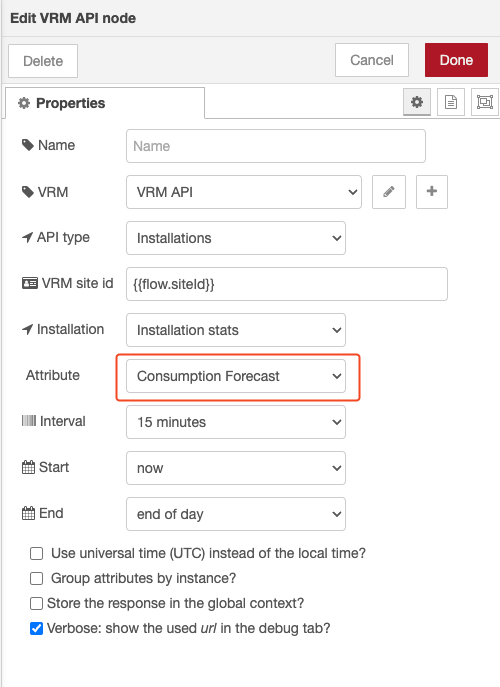
consumption yes: vrm_consumption_fc
solar probably: vrm_ffcs and/or solar_yield_forecast (no solar here, don’t know for sure)
If you take that bit of fetch flow I linked to and paste the code above in a function node (plus inject node before it), then change ‘vrm_soc_plan’ in ‘vrm_consumption_fc’ you should see the consumption metrics in your global context. (or as msg if you enable it at the end of the code).
Haven’t made a release of it (yet), but feel free to check the latest changes to victron-vrm-api, which un-deprecates the Dynamic ESS stats:
That last checkbox Transform price schedule to second output? can be used to add a second output to the node, which gives you more info on the scheduling and can be easily used in a flow like:
Also the “Fetch Dynamic ESS schedules” now actually returns parsable schedules (from another VRM endpoint).
So that would look something like:
These are importable examples, so should be pretty easy to work with. E.g. filtering the proposed schedule by adding your own logic in between. See here and here.
Still would like to add some more documentation to the node before tagging the release. Feedback is welcome.
And @HansDampf : Consumption forecast can be queried already, just as PV Inverter Yield Forecast.
We could use some additional information:
Other than that, looking forward to see what is the goody bag, thanks.
If I am not mistaken @Sarowe1990 gave some instructions on that before. It is a matter of copying the files on the GX.
I need to check, but the fetching of the schedules does change. Also with the stats being un-deprecated, that might cause some flows to need adjustment.
Yes, check victron-vrm-api/examples at main · dirkjanfaber/victron-vrm-api · GitHub
Release notes will be provided in the beta channel updates.
Other than that, probably not all details will be covered. It isn’t always clear what side-effects get introduced. In essence the production release is the stable one. The beta releases of Venus always come with a risk of some things breaking.
With the addition of the unit testing to the code, we try to reduce the risk of breaking things. Totally avoiding that is unfortunately impossible.
I have trouble finding it, dess topics are pretty noisy and scattered all over the forum (hi top level dess catagory request), do you or @Sarowe1990 still have a link at hand?
What’s the ETA for the update itself for those not ready to cross that bridge (yet).
check
Honestly, I don’t feel addressed and I don’t think I’m meant to be. I think there’s been some confusion.
That would explain why searching on your name didn’t work. I know what @dfaber refers to, I saw it a whle back, maybe he meant @snowwie
Yep, there it is
But doesn’t sound as easy as:
As snowwie already noted:
Indeed, I meant @snowwie. Had you mixed up. I am working on an easier way to install it next to the existing version.
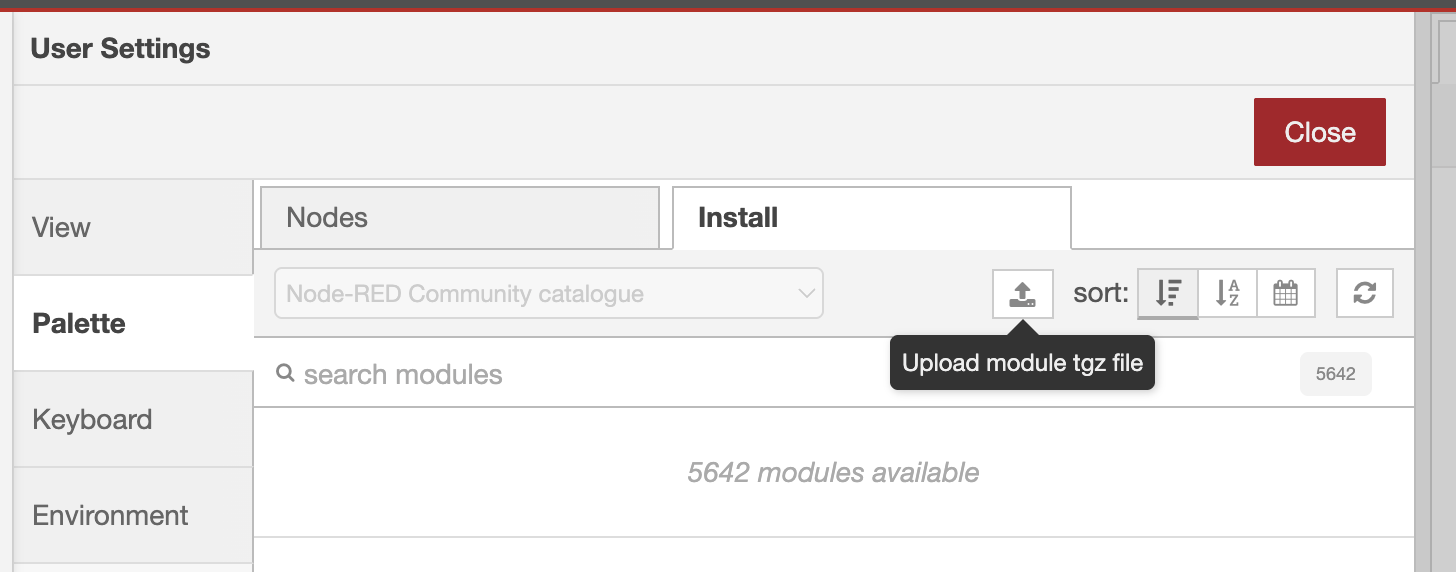
Can you try installing the alpha file from here?
Installing can be done by uploading the victron-vrm-api-alpha-0.3.6-alpha.1.tgz file via the palette manager
You’ll get a new node, that works independent of the other node:
Which can be easily tested. The plan is to get the actual 0.3.7 released this week.
Thanks, that works wonderfully and does seem to return a structure I can feed 1:1 into the /Settings/DynamicEss/Schedule/*
I will play around with it later this week and see how it can complement the “old /dess node-red” flow I’m trying to migrate.
The function I’d like (and made in node-red) is to force the system from trade into green-mode (strategy=1) when a certain SOC is reached or when no trading is expected and the price is high enough.
It should also always charge when the price is below a certain price, even when there is no trade opportunity yet.
For switching mode, check victron-vrm-api/examples/switch-dess-mode.json at main · dirkjanfaber/victron-vrm-api · GitHub. Linking that to a switch node that acts on SOC is easy enough.
If you end up with some good example code I can add to the project, please let me know (or make a PR).