I have installed a Victron system using a rPi on a remote mountain shelter, along with a complete DC-voltage grid that’s running along the whole building used for lighting, ventilation and devices charging, free of charge. The shelter is located 90min from the closest proper settlement, so we thought it would be a good idea to have the system connected to VRM in order to detect any urgencies in time. This is a super-minimal set up, just two panels vertical on the southern wall, a BlueSolar MPPT controller and a heated lithium battery.

However, it’s been giving me headaches. I am suspecting the a possible incompatibility or some strange network issue is at play here. The site is connected to the internet through a typical 5G router and the rPi is connected to the router through WiFi, since the two devices are across the hall.
The rPi used is a model B+ unit, and both WiFi and Bluetooth worked perfectly upon setting up VenusOS on it.

However, something seems to be off regarding its connectivity. As seen on the attached image, the system thinks it is offline; ethernet is indeed unplugged, however the WiFi was connected to the hotspot while I was on location and since the device as been kind of online.


Selecting “connect” on the WiFi setting does nothing, and of course I wouldn’t select to “forget” the WiFi network, since that would expectedly cut me off completely.
I guess that due to this connectivity mess, the system date/time is way off (12 days back) and also thinks it has also been 12 days since it connected to the VRM, although it is clear that I’m online through the console right now remotely! I can find no way to manually adjust the system time on the device. However “local time” on the VRM is correct.


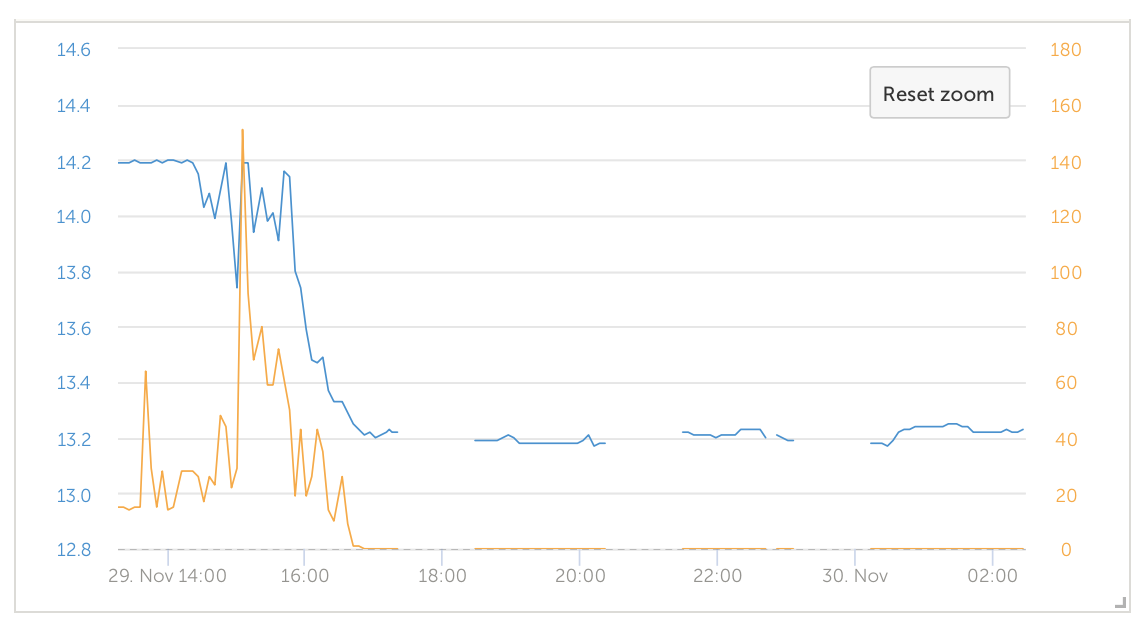
I am also suspecting this connectivity issue has something to do with the other issues I am facing on this installation, where I often see gaps on the advanced graphs and general VRM information. I understand that the gx_device would keep local records of the VRM data during a network outage, in order for it to be transmitter later.
Available “internal storage” according to remote console is over 5GB, which would be enough for at least a few days’ worth of network outage, imho.

Actual free “disk space” on the device is even higher, around 23GB, according to df when run locally through ssh. Please disregard “-500 records” on last screenshot, it’s back to zero now.
How should I proceed, except from going up there and setting everything up from scratch?
