Sorry about late response,can you give us vrm. We want to see the max and min voltage during the soc change suddenly. Also share the cell maximum and minimum voltage
Hello @PytesEnergy,
jun****li [at] pytesgroup.com already has access to the VRM. If another user should have access to the VRM, please let me know.
Best regards
No problem, i will ask him to connect with you.
Hello @PytesEnergy,
hello @HansDampf,
I now have the log files of the boot procedure of each battery, including the output of the info command.
Master battery (0 Master.log):
PYTES>info

@

Device address      : 1

Manufacturer        : PYTES

Device name         : E-BOX-48100R-C

Board version       : SQBMSV15

Main Soft version   : SPBMS16SRPV1.5.26.C16

Iterate version     : SPBMS16SRPV1.5.26.C16.T5

Soft version        : V26.3

Boot version        : V1.14

Comm version        : V2.0

Release Date        : 24-11-25

Barcode             : 4418000000002089

Board ID            : GD353633370A3040A402306B64

Board SRAM Size     : 96KB

Board FLASH Size    : 512KB

Specification       : 51.2V/100AH

Cell Number         : 16

Max Dischg Curr     : -102000mA

Max Charge Curr     : 102000mA

Console Port rate   : 115200

Command completed successfully
Slave 1 battery (1 Slave.log):
PYTES>info

@

Device address      : 1

Manufacturer        : PYTES

Device name         : E-BOX-48100R-C

Board version       : SQBMSV15

Main Soft version   : SPBMS16SRPV1.5.26.C16

Iterate version     : SPBMS16SRPV1.5.26.C16.T5

Soft version        : V26.3

Boot version        : V1.14

Comm version        : V2.0

Release Date        : 24-11-25

Barcode             : 6418000000002081

Board ID            : GD3831384E1638320C0230338E

Board SRAM Size     : 96KB

Board FLASH Size    : 512KB

Specification       : 51.2V/100AH

Cell Number         : 16

Max Dischg Curr     : -102000mA

Max Charge Curr     : 102000mA

Console Port rate   : 115200

Command completed successfully
Slave 2 battery (2 Slave.log):
PYTES>info

@

Device address      : 1

Manufacturer        : PYTES

Device name         : E-BOX-48100R-C

Board version       : SQBMSV15

Main Soft version   : SPBMS16SRPV1.5.26.C16

Iterate version     : SPBMS16SRPV1.5.26.C16.T5

Soft version        : V26.3

Boot version        : V1.14

Comm version        : V2.0

Release Date        : 24-11-25

Barcode             : 2418000000002080

Board ID            : GD353633370A3040A4023069B4

Board SRAM Size     : 96KB

Board FLASH Size    : 512KB

Specification       : 51.2V/100AH

Cell Number         : 16

Max Dischg Curr     : -102000mA

Max Charge Curr     : 102000mA

Console Port rate   : 115200

Command completed successfully
Furthermore, I recorded one log with BMS.CAN connected and one with disconnected BMS.CAN while start-up.
@PytesEnergy Please advice if a firmware update is necessary. And if so, please send us the firmware file and the documentation.
Best regards
0 Master.log (3,8 KB)
4 All with BMC.Can.log (4,0 KB)
3 All without BMS.Can.log (7,0 KB)
2 Slave.log (3,6 KB)
1 Slave.log (3,6 KB)
Our analysis confirms there are no hardware issues with your battery, and the cell voltages are healthy.
The discrepancy you’re observing, where the State of Charge (SOC) shows 38% while the cell voltage drops to 3.17V, is a common software calibration issue. This typically occurs when a battery has not been fully charged for an extended period, causing the battery management system (BMS) to lose accurate reference points.
To resolve this, we recommend the following two steps:
-
Update the Battery Firmware: Please install the latest firmware version for your battery. This will ensure the battery management algorithms are optimized. Our technical team will send you the latest firmware file and a step-by-step update guide shortly.
-
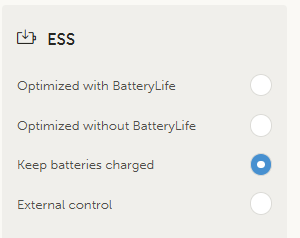
Perform a Full Charge Calibration: We recommend using the “Keep Battery Charged” feature (or a similar full-charge function) approximately once every one to two months. Allowing the battery to charge to 100% and complete its full balancing cycle will help the system re-calibrate and restore accurate SOC readings.
Hi @PytesEnergy,
is there any update on this issue? I am still waiting for instructions and firmware file from your technical team.
Thank you in advance!
Best regards
please give your email address.
Hi @PytesEnergy,
I really dont want to make my private e-mail address public here. Therefore I kindly ask you to reach out to your colleague jun****li [at] pytesgroup.com. He/She is the one that has VRM access already and he/she has the e-mail address that belongs to this matter.
Another option is if you send me your commercial e-mail address, where I can reply to.
Best regards
We updated the firmware to the newest file we got from pytes successfully yesterday.
Now we will take a look at the SOC behavior for a while again.
Thank you all for your effort!