Good-day.
I have 2 x Multiplus 5k running in parallel as a single-phase config with a Cerbo GX, 3 x SmartSolar chargers and a Pylontech battery bank with 6 shelves and a 548 Ah capacity. I am struggling to get the ESS behaviour to stabilise. I have set the ESS to Optimised without Battery Life and the minimum SOC to 30%.
But without warning, the system stops discharging before reaching the low threshold, and starts charging from the grid. If I actively reconfigure all of the ESS settings it reverts to discharge and continues.
I think I have correlated this behaviour to the “low battery” condition in the VE.Bus Warnings and Alarms graph.
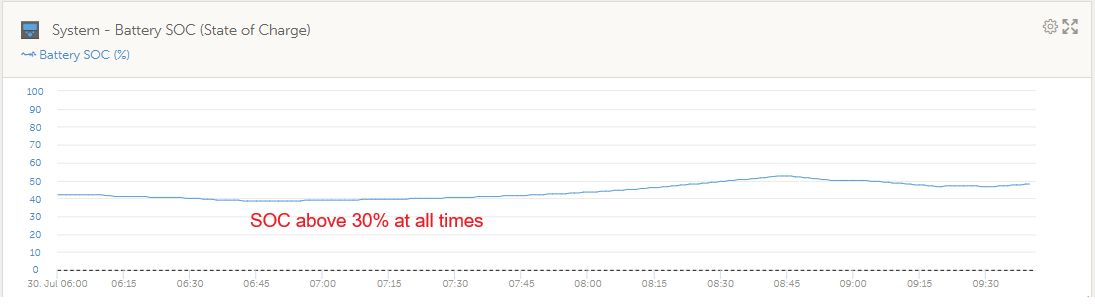
However, the SOC of the battery is still at 50% as shown by the BMS. So I assume that it relates to the battery voltage level which is out of limits.
I have carefully followed all the settings in the Victron/Pylontech application note, but I assume something is incorrect.
Any help would be appreciated.


Have you configured the inverters and ESS assistant to the setup doc specs?
It sounds like your cutoff voltages are either incorrect, not configured the same across systems or (less likely) the battery voltage is dropping below thresholds.
Are you sure all batteries are visible and online?
Does the console show any ess or inverter status changes or codes at this time?
Any supporting charts?
Battery voltage is more relevant here than SOC.
If the system is showing low battery, then its thresholds are either incorrectly configured or you have a battery issue.
Maybe upload your remote config file.
- Yes. I have specifically followed the Victron tech note on PylonTech
- I agree. Where do I access the cutoff voltage settings ?
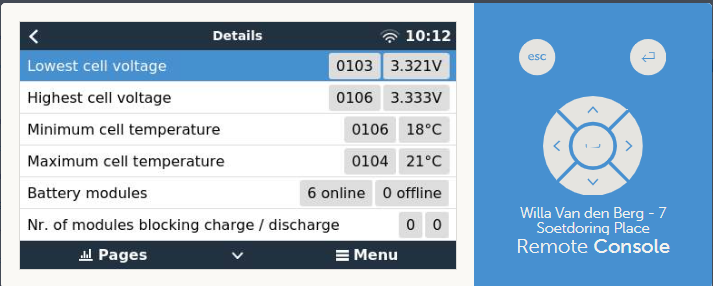
- Remote console shows them all as o.k. - see image
Willa_Van_den_Berg_7_Soetdoring_Place_c8df84cabbd0_inst_ttyO5_Interfaces.rvms (6.2 KB)
I hope this is what you need ?

It is, let me look and will revert.
I have assumed that with 2 inverters in parallel, if you upload 1 remote veconfigure file it propagates to both inverters. If this is incorrect, it could explain what is happening ?
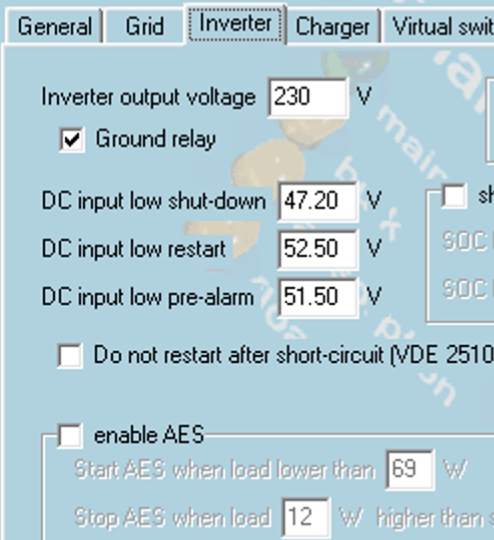
None of your inverter settings match the pylontech document, neither the inverter tab, charger nor ESS assistant.
All voltages are way too high which is why you are having issues.
The config file (can be the same) is pushed to each inverter. I do this manually and not the send to all.
Always check it has applied properly.
Follow the doc to the letter and it will work.


Thanks for this. I went through it carefully, but I accept that something went wrong. I guess you confirm the process by downloading the config afterwards from the inverters and comparing with the document ?
It happens.
Always pays to pull the file down again and just step through it for each system.
Tis at least an easy fix.
Thanks - I will update this thread in due course.
Willa_Van_den_Berg_7_Soetdoring_Place_c8df84cabbd0_inst_ttyO5_Interfaces_Mk2_Tunnel_V3.rvms (6.2 KB)
Hi. I have tried to update the configuration as suggested and save it to the uploaded .rvms file. I am not confident that it has worked. What happened this afternoon was although the battery was discharging into the load as the PV output reduced, as soon as it reached zero, the battery started to charge strongly from the grid. As before, I changed the ESS settings to “keep battery charged” and then back to “optimised without batterylife” and it reverted back to correct operation. This can be seen in the attached graphs.

In the next image the red line shows how the battery stopped discharging when the PV output stopped.
Then the green line shows when refreshing the ESS mode parameter caused the charging of the battery from the grid to cease after which the battery started to discharge into the load again and the use of the AC grid stopped.

You still haven’t applied the settings in the pylon config document.
Your config remains incorrect.
Until that changes it will not work as expected.
Hi. I am confused. When I use invoke Remote VEconfigure from the VRM portal, and activate download, it creates a .rvms file. But the documentation refers to .rsvc and .vsc files. Is there an up-to-date manual explaining how to work with .rvms files ?
I now know the difference between .rvms and .rsvc files - ignore the query