And which channel are you using?
I already answered that: channel 6; it was showing the least activity when I checked and reduced the bandwidth to 20 MHz.
Hello. I have a similar problem and I made changes to the Wifi settings and I will let you know if it helped and what I changed. I will test it for about a week. It usually stops communicating with me within 2 days.
Same probleblem. For me works power off wifi repieter. When will victron finally fix it? Very frustrating when I can’t even set the charging power remotely. No connection, it’s just an overpriced blue box.
for victron: don’t ask for details and don’t write private messages, we all have the same problem. Write instructions here how to fix it.
I rather doubt that.
Many people are reporting the same outcome but that outcome could be caused by many different problems.
I’m aware from a previous life in a different industry that when equipment from different manufacturers is connected together - each having implemented their own interpretation of the same technical standard - that sometimes the interfaces don’t play nicely together.
And it’s sometimes the smaller manufacturer (having a closer adherence to the standard) that feels obliged to make a change that matches a shortcoming in the larger manufacturer’s implementation.
In this thread, many of the posters (myself included) are using TP-Link WiFi network equipment. My problem began when I swapped out one TP-Link WiFi product and started using different TP-Link product. The solution I found and reported earlier in this thread has been rock solid since that time.
Hope this helps.
My solution is a wifi smart socket with a wifi repeater connected to it. When it gets buggy I turn off the repeater remotely and it works again. It’s tedious but at least it’s something. I hope Victron will solve it as soon as possible. I’ll try to update FW v2.0 but we all know it will be useless.
I have one mesh from TP link. about half a year without any problems. Other devices run smoothly ID.4, Škoda wallbox, Goodwe inverter. I don’t know why I should look for a problem in hw. If victron must have some voodoo settings or specifications, let them write it somewhere and I’ll check with the wifi manufacturer. Until then, it’s their incompetence in sw.
Long story short, it looks to be a poor Wi-Fi implementation in the EVCS Charger ( Espressif32 module), that causes the abrupt WiFi disconnection. The ESP32 implementation does’nt appear to be fully compatible with smart Wi-Fi technology, such as Mesh or Wi-Fi 6.
Here is a drawing showing what is  NOT working, in my case (The router is a mesh type Wifi 6)
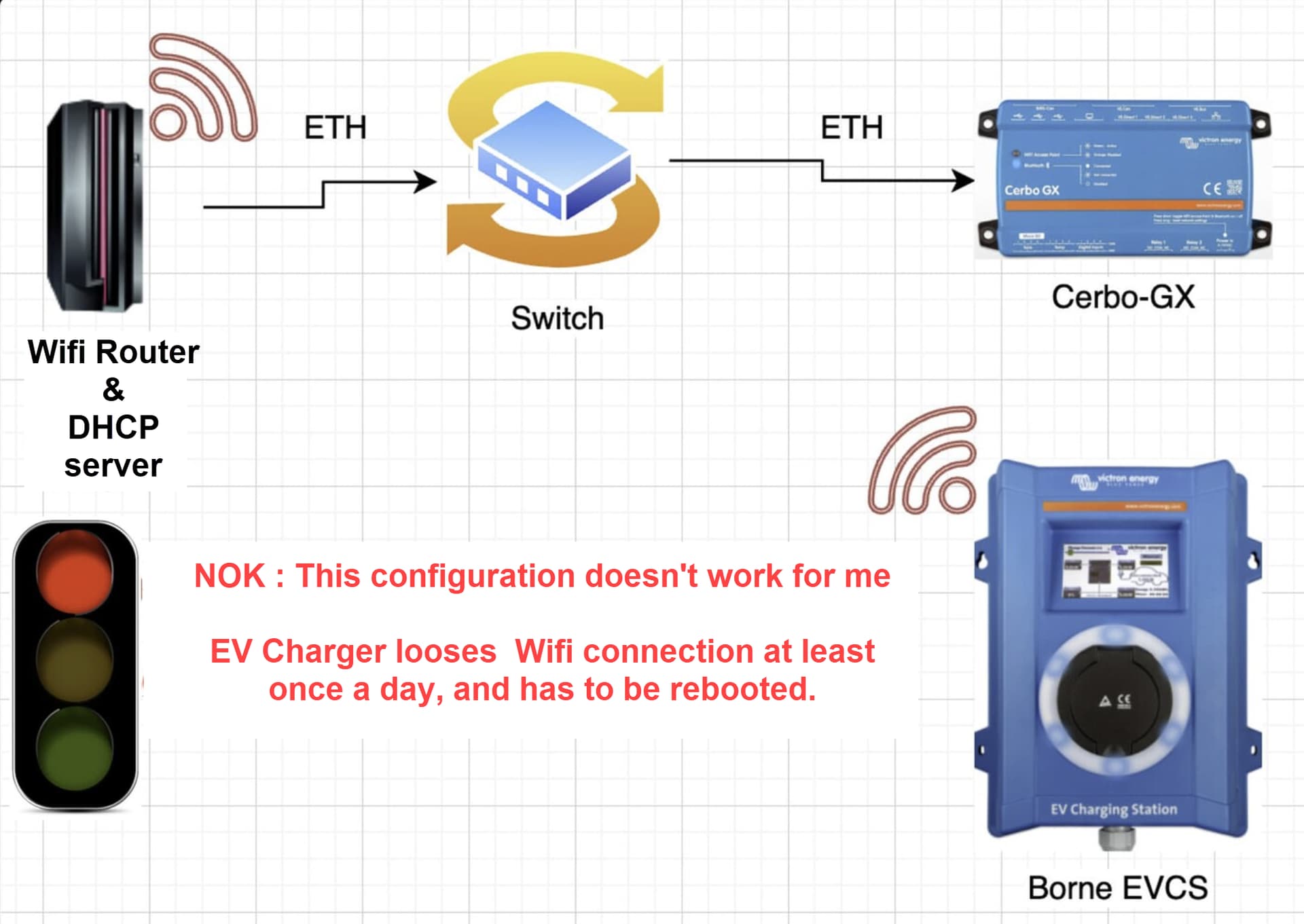
I have set up an additional Wi-Fi access, point dedicated solely to the EVCS terminal, few meters away from the charger, connected to Ethernet. The AP replaces the Wi-Fi router to communicate with the EVCS.

I am using a TP-Link TL-WR802N nano router (<€20), which is a 2.4 GHz only, single-band, very basic, non-smart router – the most basic I could find. If my assumptions are correct, this should eliminate many of the recurring disconnection problems with this terminal.
The Nano Routeur is configured as Access Point (and DHCP relay)
 This structure has been up and running for 18 days , and everything is working fine
  ! There have been no more disconnections of the EVCS from the access point, at all.
I hope this can help concretely some Victron customer having the same issue I had…
PS: I would recommend keeping the EV charger configured in DHCP, but with an IP address reservation on the DHCP server, so that IP address won’t change The benefit is that, if there is a problem, the charger will send a DHCP request and force the router to reallocate this address. This would not necessarily be the case with a hard-coded fixed IP address in the terminal. (Perhaps an excessive precaution.)
There are probably other AP that might fit, but I can testify that THIS ONE works well for me. 
Cerbo GX: v3.66, EVCS: v2.04
I’ve been quiet in here for quite sometime as everything has been working well, I have been reading along as more people have these issues, with still no clear solution.
For many months on firmware 2.01 we have had no issues.
A week or two ago i updated to 2.04 I don’t remember why, but I wish I hadn’t as we are now back to having all the drop outs we had at the start. This is such a pain as have to keep checking the charger is online before trying to use it, mostly because we use node red to change the chargers mode every morning and evening.
I too have this issue. After months without any issue it started 3 weeks ago on FW 2.01. A reboot and FW upgrade to 2.04 got the EVCS working again. A week later (to the day) it dropped again and a reboot allowed it to connect again. Two days ago it suddenly stopped working while charging and has not connected ever since. Things I tried:
- Check router channel congestion
- Disable wifi 6 on router
- Upgrade router (access point) firmware
- Change settings to use DHCP instead of static IP
- Software reboot of the EVCS
I have to admit that the signal strength is not that great, but it has worked fine for months without me changing anything to the network. The PV inverter that is even further away also works. I will see if another access point can solve this, but I am not hopeful.
EDIT: I got it working again by assigning a new static ip and then software rebooting the EVCS.
EDIT 2: never mind, still broken

Thanks for the tip, sadly it did not make a difference. I factory reset everything but it still does not allow me to connect. It keeps giving me An error (107/2) occurred while saving WiFi settings! Please verify settings and try again.I cannot find anything in the manual about this error code. I can see for the few seconds I got it working it contacted time.google.com, but that is it. In total I changed the WiFi settings to 10 different options: different IP, DHCP or static, custom DNS or not. Nothing worked, I will check signal strength next, but I do not see how that would break all of a sudden.
EDIT: In the end I managed to get it working by using a different router. Now the evcs also connects to the previous router again. I have no idea what is going on, but it works again.
Last week i updated to the last fw. This evening i lost connection to the GX device. BT is working fine so still usable to charge my car. But it was impossible to delete the configured WiFi network. Even after a factory reset, this network did not want to connect anymore. I had to configure a new SSID in my WiFi accesspoint to connect to. So now it is is working again. I wish so much there was an ethernet option for the EVC. Wireless is always trouble. I cannot understand that you want to use wireless connections for stationary objects……
It’s hell. I bought an expensive wallbox to get the most out of the FVE and it works worse than the VW wallbox I bought new for 200 euro. Signal strength is not important, I have the wallbox 2 meters from the wifi extender. All I need to do is restart the box or the extender.
Edit:
Following Lucian’s advice, EVCS works without disconnecting for one week.
My only change in setup is:
Unique access point name SSID for garage wifi
Scan period 0 (s)
I would write this as a regular answer, but I guess I got a ban from Victron and I can’t write an answer to this topic anymore.
At least, this one works perfectly for me
At least, I found a solution that worked perfectly for me (20€)
The EVCS can only work with 2.4Ghz. WIfi6 is enabled with advanced settings like WIFI6E, especialy in mesh configiration it can cause issues.
What you should try:
-
Separate SSIDs: If your mesh allows it, create distinct SSIDs for 2.4 GHz and 5 GHz so the ESP32 connects only to 2.4 GHz.
-
Disable band steering / fast roaming for that SSID.
-
Fix the channel width on 2.4 GHz to 20 MHz (some ESPs dislike 40 MHz).
-
If possible, limit EVCS to a nearby node (or place that node close to it).
-
some routers (like UNIFi) can be configured in IOT compatibily mode
“it looks to be a poor Wi-Fi implementation in the EVCS Charger “ - that’s not corect, if the AP is configured for modes that are not supported by the EVCS, there is nothing we can do on the EVCS side
All,
I do have unifi network, with a network called “ Victron”. This Victron network is only broadcasted by a single AP (Nano HD, 2.4Ghz, 20 Mhz, Ch 1, Medium power) with ‘Enhanced IoT Connectivity” (2.4Ghz) set to ON. The distance between access point and EVCS is about 2m with a concrete wall and wooden door in between.
I do see on the EVCS display constantly updating the status of the energy flows. But when I look in node red, it often gives red warning signals on the variables, indicating that these are not updated.
I am also curious how to improve the communication as to my knowledge it can’t be better.
JOhn
nodered issues can be caused by lots of things. Try to ping the EVCS and see if there are dropped packages.
If nodered is receiving the data is not necesary caused by the same as described above.