*************************
**                     **
** MAJOR UPDATE v4.0.5 **
**                     **
*************************
The driver has been completely re-architected to be modular with support of other brands of Digital Inputs and Relays modules, through an API.
RemoteGPIO API.pdf (30,6 Ko)
The DigitalInputs are handled at kernel level with no polling process (better CPU footprint) and exposed like any embedded DI of a Cerbo GX.
Version 4.0 brings several changes:
1/ The communication with Dingtian Module is now using MQTT
This is much more efficient with lower CPU footprint
It allows also higher number of Relays and Digital Inputs (limit currently not identified)
2/ Supports Venus OS GUI v2
It means that this version requires Venus OS 3.6.x minimal version to work
It also means there are no more dependencies with GUIMODS
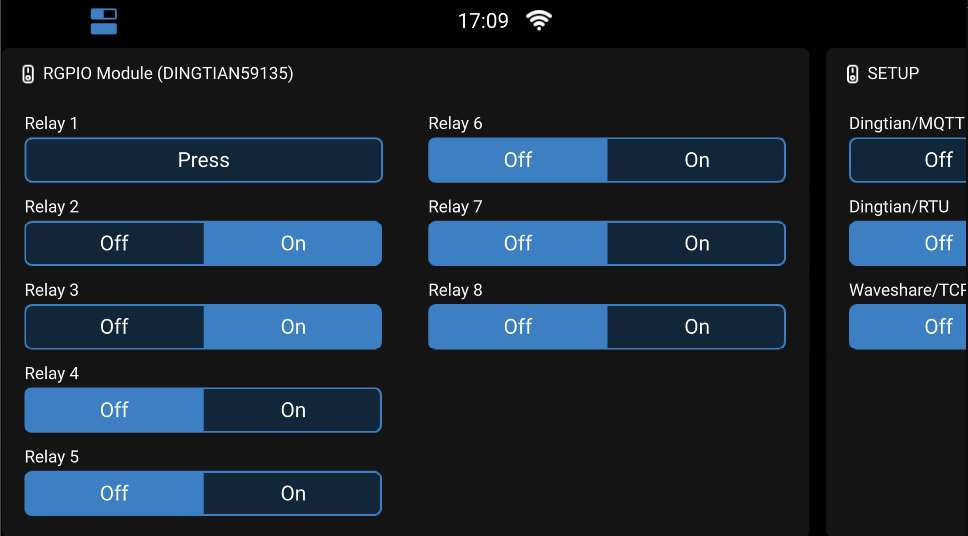
3/ Supports Interrupt based DigitalInputs
In the past RemoteGPIO was relying on a regular polling for updating the DI status
With interrupt support, ePoll is enabled in Venus OS and is much more efficient
4/ Zero configuration
Dingtian module is automatically discovered, with numbers of Relays and Inputs, assuming Dingtian module is correctly configured: See DingtianConfiguration.png (put exact same configuration, except IP address that needs to be the Venus OS one)

5/ Bi-directionnal relay status
If user configure his Dingtian with Input Link Relay configurtion, or if relay position is modified by external process, the correct actual state is repported in Venus GUI
6/ RemoteGPIO becomes modular with the possibility for third party modules to add support for other Relays and Digital Inputs vendors. Currently only Dingtian is supported, but an API documentation is here for third party integration.
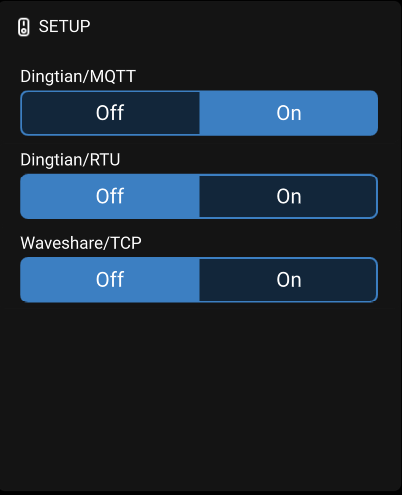
7/ For enabling or disabling various communication modules, a virtual switch call SETUP is included and services can be turned ON or OFF
8/ The driver is native DBUS. No needs to run Large image with Node-Red, but Node-Red can play nicely with the additional DI and Relays

*** IMPORTANT NOTES ***
RemoteGPIO is currently only available as beta version and supports only Venus OS version 3.63
For the user of previous RemoteGPIO version, and using USB link, hold on as I have to develop the Dingtian/Modbus module communication.
So far I have tested with CerboGX and only one Dingtian module. Multiple Dingtian modules should work fine.
And I don’t see why i would not work with Raspberry Pi.
Your feedback is welcome!
*** SETUP ****
First, install, if not already done, PackageManager : GitHub - kwindrem/SetupHelper: Helper functions to simplify writing setup scripts that modify VenusOs functionality. The package includes automatic reinstallation of the package after a VenusOs update.
From there there are 2 options:
1/ Setup using the GUI
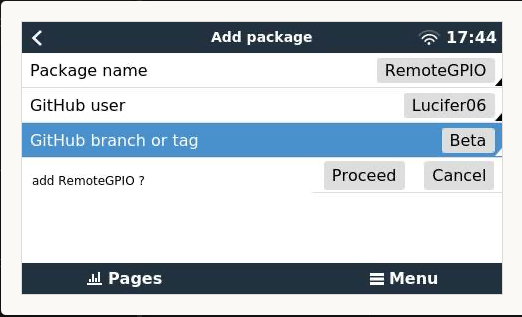
You need to configure Venus OS to default to GUI V1
Install RemoteGPIO
a: Go to settings > package manager > inactive packages.
b: Find RemoteGPIO in the list (at the bottom)
hit space so you can change the branch from main to Beta (!! Beta not beta!!)
add it to active packages.
c: Go to Active packages, seleect RemoteGPIO, download and install version 4.x
You then can revert your default setup to GUI Vé and enjoy the new switch interface
2/ setup from the CLI
You need to have root access and ssh to your VenusOS
cd /data
wget https://github.com/Lucifer06/RemoteGPIO/archive/refs/tags/v4.0.9.tar.gz
tar -xvf v4.0.9.tar.gz
mv RemoteGPIO-4.0.9 RemoteGPIO
rm v4.0.9.tar.gz
cd /data/RemoteGPIO
./setup # and select install (i)
For unistalling:
Either from GUI, or from the CLI, issue /data/RemoteGPIO/setup # and select unistall (u)

