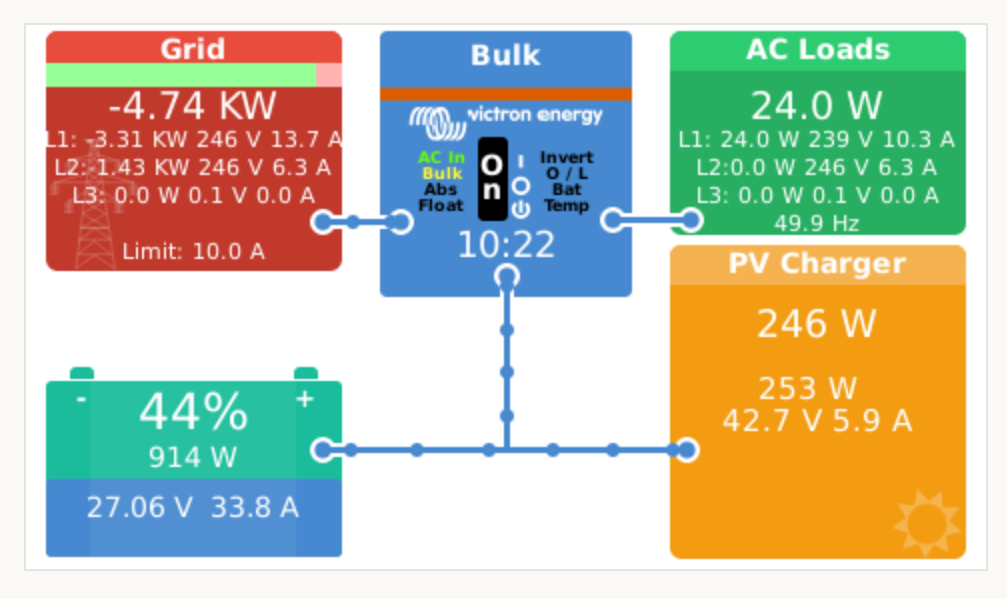
First thanks for your input and reply
The solar output is going to the FIT meter the RCBO for my solar is ONLY there powering the Solar Edge solar inverter
You have an RCBO on AC in and AC out goes to the consumer unit and in there is a change over switch?
YES CORRECT see my detailed new reply/post
Can I not configure the system to see the ET112 measuring solar energy and that triggering charging the batteries
NOW LOOKIE HERE
what i discovered when I googled my problem
PLUS a Write-Up of my system
BSS
The issue of a Victron MultiPlus-II and an AC solar inverter “fighting” each other, even on separate RCBOs, is a common problem in AC-coupled systems and
typically stems from incorrect wiring or configuration issues, especially concerning system synchronization and earthing, rather than the separate breakers themselves.
The MultiPlus-II is designed to manage AC power, and if the AC solar inverter is not correctly integrated into the system’s control loop, conflicts arise.
Likely Causes and Solutions
The primary reason for this conflict is often a misconfiguration in how the MultiPlus-II manages the AC input/output and coordinates with the external AC solar inverter.
-
Incorrect AC-Coupling Setup: The MultiPlus-II needs to be aware of the AC solar inverter’s presence and generation capabilities to manage power flow correctly. If they are on completely separate circuits with no communication or shared reference, they operate independently, leading to conflicts.
- Solution: Ensure the AC solar inverter is connected to the AC output (AC Out 1) of the MultiPlus-II, not the AC input or a completely separate circuit. When the grid fails, the MultiPlus-II creates a local micro-grid and needs the solar inverter’s output to be on its output side to manage its frequency and voltage. The MultiPlus cannot manage an inverter on its AC input when off-grid.
-
Missing or Misconfigured Energy Meter/ESS Assistant: The Victron Energy Storage System (ESS) assistant and a grid meter (like an ET112 energy meter) are essential for the MultiPlus to measure the power flow at the grid connection point and control the AC solar inverter via frequency shifting.
- Solution: Install and configure a Victron grid meter at the main AC input (before any loads or PV inverter connection) and configure it as the ‘Grid meter’ in the GX device (e.g., Cerbo GX). This allows the system to balance power and prevent backfeed issues.
-
Grounding/Earthing Issues: When the MultiPlus switches between grid-connected and inverting modes, the neutral-to-ground bond inside the unit is switched by a relay. If both inverters are on separate circuits with different grounding points or RCDs, this can cause nuisance tripping or “fighting” due to ground loops or unexpected leakage currents.
- Solution: Adhere to Victron’s recommended wiring diagrams for AC coupling. Use double-pole RCBOs/breakers for complete isolation of both Live and Neutral lines where necessary to ensure proper neutral management.
-
Firmware Mismatch: Outdated firmware can lead to communication errors and unexpected behavior between devices.
- Solution: Update the firmware on all connected Victron devices (MultiPlus-II, GX device, MPPTs if applicable) to the latest versions using the Victron Configurator or VRM portal.
-
Configuration Settings (Weak AC, UPS mode):
- Solution: In the MultiPlus-II’s settings (via VEConfigure), try enabling “Accept wide AC frequency” and “Weak AC” options. This can help the MultiPlus better synchronize with the potentially unstable waveform from the AC inverter or generator sources. Also, ensure the UPS function is not interfering if unnecessary for your application.
MY SYSTEM CONFIGURATION
GRID CONNECTIONS
G. 1 This connection is to the change over switch (mains on side)
G. 2 This connection is to a 50A RCBO (to power the inverter AC IN connection)
G. 3 This connection is from the output of my Solar Edge solar system (VIA the FIT Meter)
MULTIPLUS II CONNECTIONS
AC IN This is connected to G2 (the 50A RCBO connected to the grid) via a 100A AC Isolator located beside the Multiplus 11 inverter
AC1 OUT This is connected to G1 (the change over switch {mains off side}) via a 100A AC Isolator located beside the Multiplus 11 inverter
AC2 OUT NO CONNECTION
DC Positive This is connected to the Lynx 1000 distributor via a DC isolator
DC Negative This is connected to the Lynx 1000 distributor
VE-BUS This is connected to the CERBO GX
CERBO GX CONNECTIONS
48V power in from the Lynx 1000 distributor
VE-BUS from the Multiplus II
VE-CAN from Master Pylontech US5000 battery
RS485 USB connection from ET112
HDMI connection for GX Touch 70 screen
USB power feed to GX Touch 70 screen
CONSUMER UNIT CONNECTIONS
Change over switch (common feeding consumer unit)
20A RCBO power feed to the Solar Edge solar inverter
ET112 CONNECTIONS
RS485 cable
Power lines to the solar FIT meter
SOLAR EDGE CONNECTIONS
AC power in from 20A RCBO in Consumer Unit
AC power out to AC isolator
AC power to ET 112
AC power from ET112 to FIT Meter
FIT Meter to grid (G3 connection)
I think that is everything and I do hope that i got everything correct!! So my basic question stands how do I connect my Solar Edge AC output so that these RCBO’s are not in any conflict
My ET112 is working great NOW and is measuring the Solar energy BUT DO I NEED to MOVE THE ET112 to measure the GRID or do I need another ET112 to measure the grid for this system to work and let me see my solar energy and for the RCBO conflict to go away