I have nearly 80 installations I oversee in VRM. The fleet dashboard in VRM is nice, but I’ve assigned installation groups to my installations, and I’d like to organize the VRM dashboard to follow the “installation group” paradigm instead of just displaying all installations alphabetically. If I could organize the long list of installations I monitor, based on their installation group instead of the installation name, this would make for a much easier to use dashboard.
We have two VRM dashboards, so I might be referring to the wrong one here, let me know.
You can filter the installation overview by group using the following filter.
The way this works is by adding to the URI of the page, which you can then bookmark so you don’t need to repeat the filter every time.
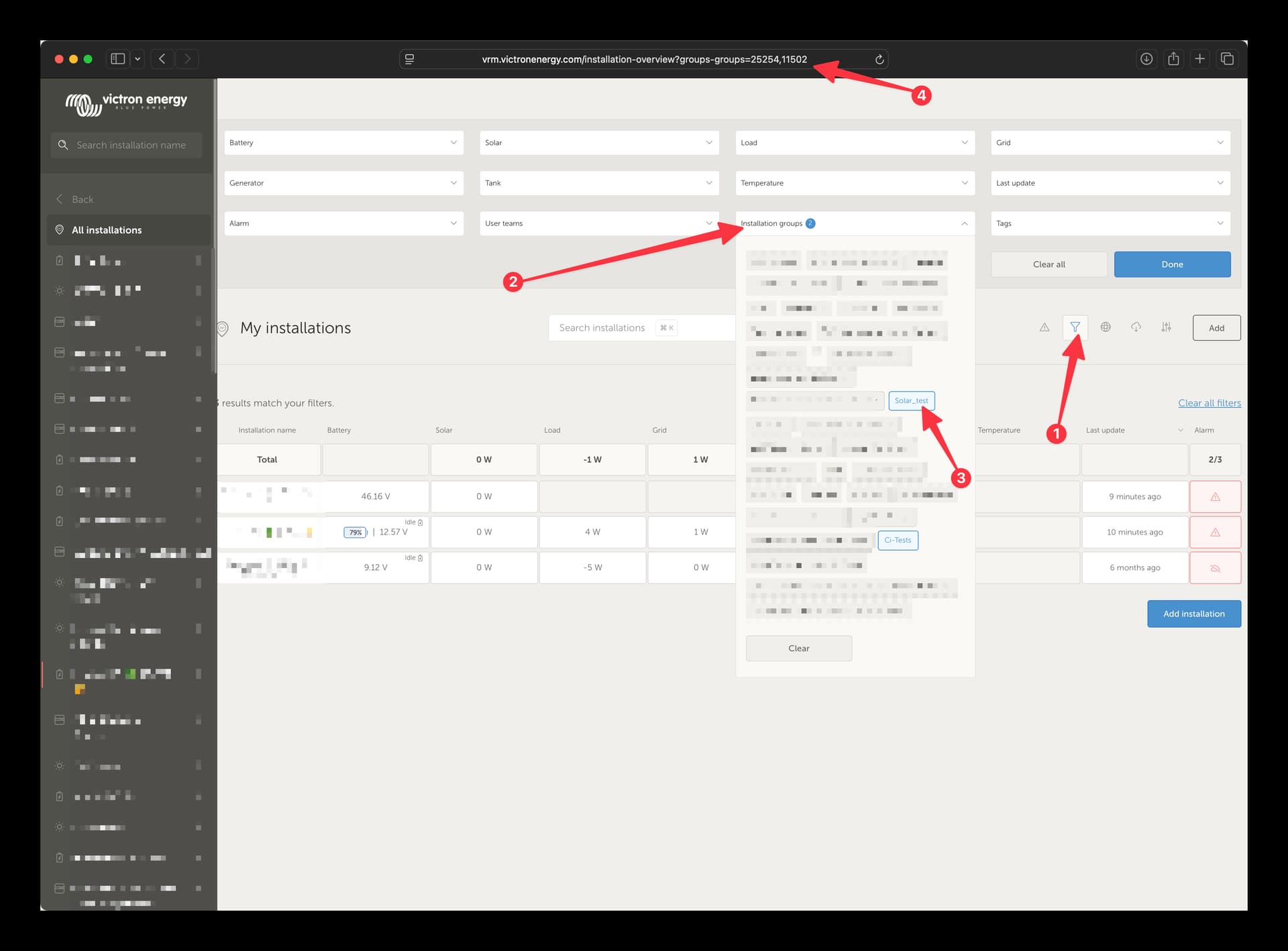
Wow - thanks for the fast reply!! Using the filter in the ‘my installations’ dashboard, just as you picture describes, meets my core requested need. Thank you!
(That being said, in the ‘fleet monitor’ dashboard, it would be powerful to be able to ‘tune’ what is displayed based on a similar filter approach. For example, of the 80-ish installations I oversee, there are a dozen installations that are ‘external’ to my organization (products we’ve shipped to customers, but we still support) - it would be helpful if I could remove that installation group from my ‘fleet monitor’ dashboard, through a filter, similar to how the ‘my installations’ dashboard allows filtering.)