BETA: Connect your Electrical Vehicle to VRM

We are currently BETA-testing a much-requested feature in VRM: Linking your electric car to VRM.

In this post, I’ll explain to you what this unlocks, and how you can get started on testing.

Why would I link my EV to VRM?
You are probably checking both your car manufacturer’s app as well as VRM while your car is charging. Seeing the state of charge of your car in VRM saves you switching apps.VRM will offer some features that most car brand apps don’t offer, like:

  • Being able to historically see the energy flows to your car

  • See the state of charge over a period of time

  • Being able to see your car’s location history*

How can I start testing?
To connect your car to VRM, head over to VRM Portal - Victron Energy .You connect your car through authentication of VRM in your car app.After your car app is linked, you can select which VRM site your car belongs to.After you have your car linked, you VRM dashboard will show the car’s state of charge and range, while your advanced page will now include widgets for energy, state of charge and location information over time.
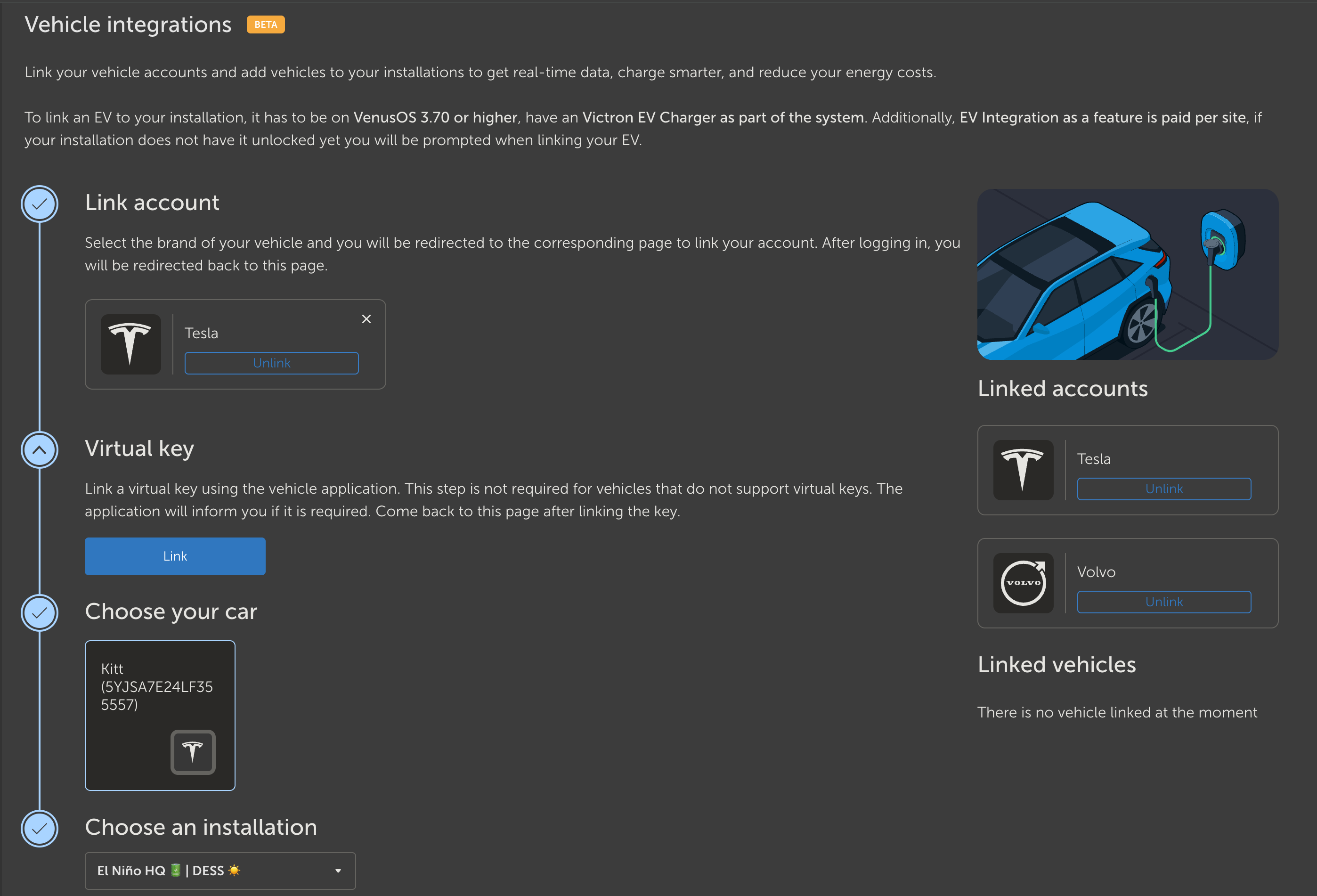
Which payment card to use

As long as this feature is in BETA, you can use a test payment card to ‘pay’ for this feature. You can find the information for these test cards through the link on top of the payment modal you see when trying to add a car to an installation:

*Sharing options
During set up, you can decide whether your EV’s data should be visible for other users of your VRM site. You can also share the EV data with other users of your site, but not allow them to see the location history of your EV.

Got feedback?

The VRM team would love to hear what you think of this feature. Please share your thoughts in this thread.

The future of this feature
We are working hard to integrate this EV data further into VRM. In the future, we will use your EV connection to control your EVCS through Dynamic ESS, allowing you to charge your car on the most cost-efficient moment.

Paid feature
For the BETA period, the EV integration is free of charge. After this feature hits production, it will be a paid feature at around €60 per year.

Supported cars
As far as we know, we support all electric cars. If your car brand is missing from the list, do let us know.

Looks like it accepts my car, but does not find any Victron Installations. I am logged into VRM and I have 1 installation on my account.

I also have mixed feelings about this being a paid feature. I paid for my hardware with the mindset that I pay to access an ecosystem that does not have recurring charges. I suppose as long as the existing feature set is not going behind a paywall, I’ll accept the situation, but that does not mean I feel good about it.

Hello @Barbara ,

I have clicked around betavrm for quite some time and could not find the link. Looks like it is not yet discoverable from the Prefernces/Integrations.

Finally I discovered your direct link in the forum (which is not for some reason present in the email the forum sends out) and after I tried linking my BMW it failed as “temporarily unavailable”…

Just my .2 EUR cents for others following the thread,

Martin

Greate news, i am looking forward to a optimized Charging.
I found a issue on the FORD SDK:

Ulfilas

Hi Barbara,

That sounds like a very interesting feature that could offer many possibilities in the future. Perhaps even improvements to consumption predictions in DESS. If the vehicle’s state of charge (SoC) falls below a certain level and the vehicle is nearby, it’s likely that y kWh will be charged soon…

Unfortunately, I probably won’t be able to test anything here. ;-(
I can’t use a Victron EV Charger because it doesn’t allow company car billing with my employer. However, VRM knows about my EV charger because I use an EM24ethernet for measurement. I would be happy if these setups could also be supported.

Best regards, Olaf

1 Like

Hi @jkoljo,

Please make sure your site meets the requirements described at the top of the page:

All the best,
Alex Imbrea

1 Like

Hi @Ulfilas,

We are checking this for Ford now. Thank you!

All the best,
Alex Imbrea

I have a chevy Equinox EV with MyChevy app. When trying to link my car in the VRM integration process I get a request timed out error after trying to sign in to my Chevrolet account. I get the same message when using Google Chrome and Microsoft Edge.

Hi,

We’ll check this out!

I was able to link my car when using my wife’s myChevy account. I have two factor authentication enabled on my account but not hers. Could two factor authentication be the issue?

I don’t know if you made changes or if I just refreshed betaVRM more often.

Now I could connect my car successfully even not having an original Victron EV-Charger.

Are there any plans to control third party wallboxes for example via eebus? Like evcc?

Hi again @Ulfilas,

We looked into it and Ford requires the linking to be done from a mobile app, while having Bluetooth enabled. For now, we will remove Ford from the list of supported brands and add it back once we know it works well.

Best regards,
Alex Imbrea

I think it’s hard for Victron to make this a free feature, given that e.g. tesla (and probably also other car manufactureres) don’t give their API access away for free (for non personal use) Given that the victron VRM portal is making these requests and not e.g. your local server they are stuck paying tesla per API request…

1 Like

Oh my… a paid feature just to read an API?
I drive Renault EVs, and reading the API is free and straightforward. I fully understand that software development and maintenance are not free, but €60 per year simply for accessing an API seems excessive.

That said, this does feel like the first step towards integrating EV charging into D-ESS, which is a good development. However, this should really be a basic capability of a well-designed D-ESS algorithm, not a paid add-on. I chose Victron because of its open structure and the absence of monthly paywalls for core functionality — and now this. I hope you understand that I am a bit disappointed with this decision.

Btw, please add support for a car charger as a virtual device, and I will happily build the integration myself.

3 Likes

I was wondering when Victron would start paid for its new features? Well, that time has come.

€60 a year? Count me out—I’ll keep checking my Tesla app instead."

1 Like

I think that would be very valuable, as evcc is a very common system and can be used to control a wide range of different wallboxes. I myself have connected a go-e charger to my Victron system via evcc so that I can use it to charge surplus PV.

It would of course be very cool if evcc could be integrated directly in place of a Victron EVCS. For now, I’ve used this script: GitHub - tm-107/dbus-evcc: Integrate EVCC connected charger into Victron Ecosystem . This makes evcc appear in VRM as EVCS, so hopefully linking the electric car to VRM should also work, as it pretends to be an EVCS. Let’s see…

But I also still need to consider whether this added value is really worth EUR 60 a year…

Accessing Tesla’s API is free, and I’ve linked the API in other applications or on websites, for example NotaTeslaApp.

Great news!!!

I am looking forward - to have automatic charging based on DESS is a must and my wish for long time…

I tried to link my Volvo EX30, but w/o success - just error massage. Can you support?

When I filled valid correct volvo ID, normally there is verification process through e-mail, but when trying to login through VRM, I get just error - something went wrong. No possibility to verify by e-mail code….

it’s practically free for a limited amount of requests for personal use (Tesla’s Fleet API provides each Tesla account with a $10 monthly discount), but victron/VRM calling it to get your data is not personal use and 10$ discount won’t cover their expenses: here is the explanation as explained by not a tesla app Tesla Announces API Pricing: Third-Party Service Costs Expected to Rise

But yes, maybe victron can provide a way for people to include their own car data in VRM for free? By pushing to an api endpoint, or publishing data on mqtt?

I’m already running my own tesla app with my own personal token for Home Assistant, wouldn’t mind adding a few more lines of code to also push that data to VRM if that was possible. On the other hand, I probably won’t need this feature as I already have all my data centrally in Home Assistent.

2 Likes