Not really; just that the PV is limited, which you confirmed it is. Good that it works well!
If testers are needed in the future to specifically test with Enphase, I’m available! Location: near Rotterdam.
Thanks!
No need though:
With Enphase, it all works well. The only thing that you need to be prepared for as a user or installer is that it requires the Enphase support desk to make a change to your system.
To be precise, two changes:
- Activation of Modbus TCP
- Loading of the special Victron grid profile
1 Like
Hello, I have started testing with Enphase and it seems to be working correctly. What I have observed, however, is that upon enabling dynamic power control, the solar production decreased to about 10W. This state lasted for about 10 minutes, after which it began to regulate production correctly. I am not sure if this is the correct behavior according to the grid profile used or if it’s due to another cause. I have also been able to observe on the Enphase page “Enphase Energy - Enlighten | Sign in to Enlighten that the control value can be seen in PV SETPOINT, but I have not found a way to obtain the value of the regulated power in any other way. Do you know if it is possible to obtain the PV SETPOINT value without having to access the website?
Update: It is possible to obtain the real-time value of PV SETPOINT using Method: GET at Endpoint: /ivp/sc/status.
@mpvader
In my setup i’m using the CerboGX and it’s “Dynamic power limiting” for my SolarEdge inverter for setting the “Max feed-in” value. That works!
Just saying, because it’s not mentioned in your description.
My setup (Full backup with everything on AC-OUT1):
GRID (Austria) –> 3 MPII 48 5000 –>
- DC:
- –> Battery: 61,44 kWh (12x Voltsmile V10 RPC)
- –> PV: 1x MPTT250/100 (with 5,46 kWp)
- AC-OUT1:
- –> all Loads (House)
- –> PV: SolarEdge 12.5K SetApp (with 17,39 kWp)
My Questions:
- I had do disable the SolarEdge(SE) energy meter in SetApp to make it work.
But it was just luck because i first read that the SE energy meter is needed for zero feed-in systems.- Questions:
- Can/should the SE smart meter be used or not?
(It would be nice to see in the solaredge app if it’s feeding-in) - Is there a use case when it can be used (which setting)?
- Can/should the SE smart meter be used or not?
- Questions:
- I also have configured frequency shifting for Victron/Solaredge and switching the SE inverter to APS when switching to off-grid (link descriped here Integrating with SolarEdge [Victron Energy] ). –> I use
- That works, if i switch of the AC-In manually (SE inverter is working and limits its power as expected)
- But i get an error on the SolarEdge inverter which says “Anti islanding active” (an there not producion) in the following case:
-
Grid provider signals (Relay) that feed-in is not allow. (Grid code: Austria –> TOR –> Aux1 is used!).
-
In that case i programmed an assistent to go off-grid an also switch to APS mode
-
Is there any advice why that happens?
-
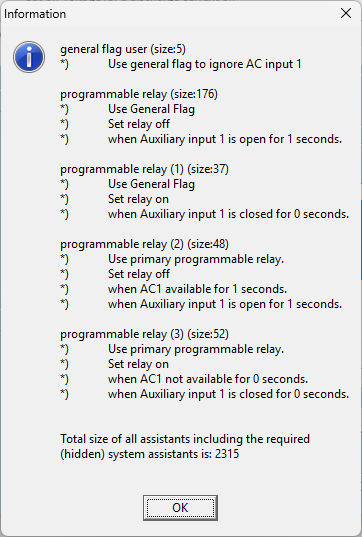
Thanks in advance, and congratulation to this great feature!
Hi. Retrieving photovoltaic production via Modbus-TCP and Enphase is working fine for me, but the dynamic regulation behaves erratically. Sometimes it seems to work correctly, but other times the limit drops to 0. Do you know if a specific grid profile is required for this? Has anyone here worked with the active dynamic power limit on Enphase? Thanks.
It seems related to the initinal “Help-needed” request of the OP.
Just in case this is still being looked at and do avoid crosspostings.
The actual firmware allows to choose the port and the device-id which is great, however, the input for the device-id is limited to 1-247. This does make sense for a ModbusRTU application, but in case of ModbusTCP there are several special cases or implementations not respecting the standard.
The most important device-id in ModbusTCP is 255, this was often used in Modicon networks when talking to a bridge. Some devices expect 255 in any case when using ModbusTCP. I’m working in industrial automation for many years using Gould, AEG, Telemecanique and Schneider Modicon using ModbusPLUS and ModbusTCP.
While trying to integrate a Kostal PIKO20 i am not able to connect, since the device is only listening on id 255, even if the device-id is set between 1-247. Might be due to its firmware.
@mpvader my suggestion on the device-id is to allow the full range of 0-255, or at least to additional allow 0 and 255. The remote device will throw an exeption anyway, when setting a wrong device-id.
We have a Huawei Sun 2000 inverter. Does limiting the power production, in combination with a MP 2, work also for the Huawei? The Huawei
is on the AC-in connected as it does not comply with the factor 1 rule. The MP works in ESS mode. We don’t have a dynamic contract to work
with DESS
I’ve been having issues lately with Dynamic power limiting option disappearing from the SolarEdge (SE16K). It usually happens when SolarEdge is going into sleep or doing a self-reboot. I think that dbus-fronius correctly detects the limiter, but it seems like it’s not activated on the dbus. After that option is no longer available in the UI and device page doesn’t show the limit.
Logs from dbus-fronius
@40000000696861eb128c44a4 warning QAbstractSocket::connectToHost() called when already looking up or connecting/connected to “10.0.0.23”
@40000000696861eb1293c684 warning Lost connection with: “7B0645B2@10.0.0.23:126”
@400000006968624a23981174 info Inverter reactivated: “7B0645B2@10.0.0.23:126”
@400000006968624a2398925c info Using non-sunspec SolarEdge limiter
@400000006968624a23989e14 info Using legacy sunspec protocol: Generic
@400000006968624a2ec0dd4c info Maximum power is 16000 for SolarEdge Inverter: “7B0645B2@10.0.0.23:126”
@400000006968624a2ec1045c info Writing EDPC settings to SolarEdge Inverter: “7B0645B2@10.0.0.23:126”
@400000006969250512d7d464 warning Lost connection with: “7B0645B2@10.0.0.23:126”
@40000000696925610894ad9c info Inverter reactivated: “7B0645B2@10.0.0.23:126”
@4000000069692561089c856c info Using non-sunspec SolarEdge limiter
@400000006969256108aeec5c info Using legacy sunspec protocol: Generic
@40000000696925610ee89cbc info Maximum power is 16000 for SolarEdge Inverter: “7B0645B2@10.0.0.23:126”
@40000000696925610ee8c3cc info Writing EDPC settings to SolarEdge Inverter: “7B0645B2@10.0.0.23:126”
@400000006969b1db1292a18c warning Lost connection with: “7B0645B2@10.0.0.23:126”
@400000006969b23a04c5273c info Inverter reactivated: “7B0645B2@10.0.0.23:126”
@400000006969b23a04c5467c info Using non-sunspec SolarEdge limiter
@400000006969b23a04c55234 info Using legacy sunspec protocol: Generic
@400000006969b23a0928e6ec info Maximum power is 16000 for SolarEdge Inverter: “7B0645B2@10.0.0.23:126”
@400000006969b23a092c9c24 info Writing EDPC settings to SolarEdge Inverter: “7B0645B2@10.0.0.23:126”
I’m new to the venus os and community.
I have the same problem with my SE5K, strange enough it reports the limit to 5250. But according to the code this value is retrieved via the modbus-tcp connection. Unfortunatly there is no time added to the log-lines, it could be related to not enough messages to keep the connection alive, or an invalid/unanswered message to the SolarEdge, resulting in a connection drop. The modbus-tcp connection to the solaredge has been stable for 5 years my simple golang program (to populate my db).
@400000006980cd5d122ea3e4 info Inverter reactivated: "7E0AB9EE@192.168.10.195:126"
@400000006980cd5d122ebf3c info Using non-sunspec SolarEdge limiter
@400000006980cd5d122ec70c info Using legacy sunspec protocol: Generic
@400000006980cd5d143d9654 info Setting 'Ac/MaxPower' and 'Ac/PowerLimit' to 5250 for SolarEdge Inverter: "7E0AB9EE@192.168.10.195:126"
@400000006980cd5d1441fb54 info Writing EDPC settings to SolarEdge Inverter: "7E0AB9EE@192.168.10.195:126"
@400000006980cd951e574bbc warning Lost connection with:  "7E0AB9EE@192.168.10.195:126"
@400000006980cdaa15b935ec info Inverter reactivated: "7E0AB9EE@192.168.10.195:126"
Small update on this:
Installed modbus-proxy-rs on my nas to the SolarEdge, reconfigured the pvinverter. Now the connection stays stable. Not ideal but it’s working.
next time, pipe that through tai64nlocal and you have time in the nanoseconds 