I have a strange phenomena happening with some brand new Cerbo MK-II devices.
When paired with a Discover Helios battery, connected over CANbus, the Cerbo will recognise the battery as “LG Resu battery”, with a product ID of B0004.
When paired with an older Cerbo MK-II, or an older Cerbo-S, the battery is displayed as “Discover AES battery”, with a product ID of B016.
This even happens if I daisy chain the CANbus of the Cerbo-S and the Cerbo-MK II devices together , so they are both connected to the battery at the same time. Both have the same firmware version, 3.55
The MK-II Cerbo’s I have seen that display “LG resu battery” have serial numbers that start with
HQ244.
The MK-II Cerbo that displayed “Discover AES battery” had a serial number starting with:
HQ233
The Helios battery battery does not broadcast it’s own name, the name is derived from a lookup table on the Cerbo, which can be found here:
The codes in this table are:
45060 LG resu battery (0xB004)
45078 Discover AES battery (0xB016)
I’m wondering if the HQ244 Cerbo’s may have a the wrong table, which isn’t corrected by a firmware update?
There are some known issues with mk2’s which are already documented on this forum.
Try the latest beta on one of these systems, let us know if that resolves the issue.
Some fixes were applied in the current prod version, so you need to be current, but iirc additional are in the beta.
The code is common across all devices, there are only some hardware variations.
What you could do is load the large image, add socketcan to nodered and monitor what is being sent from the BMS, it may help narrow it down.
If the battery is not on the supported list and spoofs another, errors can happen and it can also be firmware issues on the BMS that aren’t tested.
We saw issues with batteries spoofing pylontech for example.
As a community team we can’t really escalate issues for batteries that aren’t on the list.
The battery is definitely on the list: B016 is the correct code.
The battery is currently connected to TWO Cerbo devices at once. One shows it as a LG Resu battery, the other as a Discover battery.
Both Cerbo devices will be receiving the same CANBus frame as each other, it must that either one unit has a different lookup table, or that one unit is somehow corrupting the frame when it reads it?
You can’t be sure of that if the BMS is implementing some kind of spoofing, but you can prove it with binary troubleshooting;
Enable ssh on both cerbo.
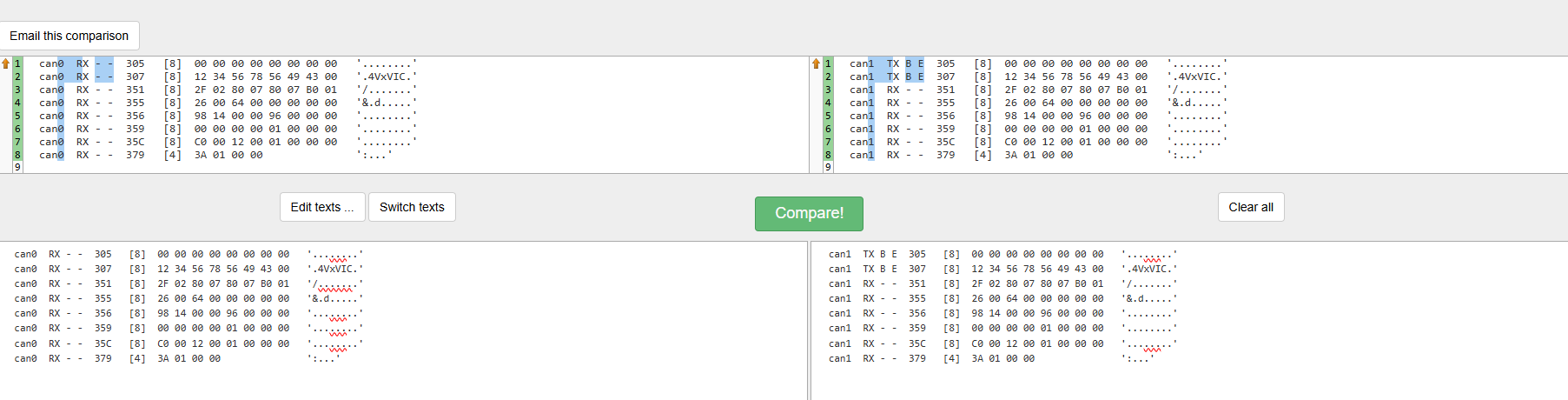
ssh to cerbo #1, run candump -e -n60 -x -a any
ssh to cerbo #2, run candump -e -n60 -x -a any
copy/pasta each result into a file on your machine, trim the top of each result until each one starts with the 305 message from the cerbo;
, then diff the two;
diff -y results1 results2|more
If you get the exact same conversation, then its proven that the two cerbo are acting differently. If you get differences, then the BMS is answering each cerbo differently.
Comms are uni-directional. The GX does not query the BMS, it listens for CAN broadcasts and processes it accordingly.
How they process (or don’t) messages may differ if there is a bug, like has been fixed on the MK2 recently, though that was a different issue resulting in the BMS being lost, even though it was connected and correctly identified.
The conversation is bi-directional - as proved by the TX and RX messages in a CAN conversation.
Its true that most messages are in one direction (from the BMS to the GX), but the GX (according to the spec AFAIK) must announce it is there. Whether you consider this a query or not is semantics, but those 305/307 messages must occur. If you block those messages, some batteries go to sleep after a period of not seeing a 305/307
You can see in this CAN conversation, the 305 and 307 messages are the GX announcing that its a Victron inverter (“4VxVIC”), and then it receives the next 7 messages from the BMS
Ran the comparison, they seem to be identical. The only difference is the Can port used on the device, BMSCan on one Cerbo and the VE.Can port on the Cerbo-S
I think the answer must lie in the lookup table described here:
I managed to run the octal dump vecan-dbus but it didn’t seem to have the register numbers associated. The od command also doesn’t like the width control (-w)
Independent broadcasts and bi-directional comms are not the same thing.
The GX has some victron only capabilities, but while it is announcing itself, it is by no means sending instructions to the third party BMS.
Hence why many batteries need to be preset to use the Victron spec
Perhaps, read-only is a better term as the GX will never control the BMS, it is controlled by the BMS broadcasts.
The exception that I recall is a newly added battery that can be firmware updated via CAN iirc.
@RoarPowerNZ I’m wondering if I can use this technique to find a solution for a different issue… I’ve 6 x DEYE SG5.3 Li Batteries connected to my VE CAN, and being recognized as LG Resu batteries as well… all the batteries parameters (CVL, CCL, DCL) are correct, but the current is inverted… it shows the opposite Amps… charging when it’s discharging, and vice versa… maybe dumping the CAN info could help isolating the issue if I realize that this is a BMS thing other than config?
So far, all debugging suggests that the inverted current sign is a decision the BMS authors have made, and i haven’t seen a BMS yet that allows inverting the sign as a setting, so the best solution is arguably a BMS firmware update.
I have used a CANBus USB device like this in parallel with the CANBus from the battery to the Cerbo:
This will allow you to sniff the canbus data easily, then you just need to translate the hexadecimal code, which isn’t difficult. I think I used SavvyCan to interact with the USB interface.
I think it is unlikely that the Cerbo is transforming a value from positive to negative. More likely to be a BMS issue.
@wandreis Hi, in case you still have this issue: I created a github repository to fix this: GitHub - NorthyIE/victron-virtualbattery-inverted · GitHub however I only have a single battery (Deye RW-F16) so far, I have not tested it with a multi battery setup. Feel free to try it out and if you have any issues let me know so I can fix it