If the JK v19 bms is balancing is this indicated in the Victron software (Victron connect or touchscreen)?
Is the Victron software (Multi RS 6000) no longer controlling anything when charging is supposed to take place via the Jk BMS?
If the JK v19 bms is balancing is this indicated in the Victron software (Victron connect or touchscreen)?
Is the Victron software (Multi RS 6000) no longer controlling anything when charging is supposed to take place via the Jk BMS?
The balancing is not communicated to Victron… neither to the PV inverter nor to the GX.
Why would that be important to you?
However, the V19 can communicate directly with the Victron GX as an inverter BMS… and then also “control” the charge.
The system is running for 5 days now, Multi rs 6000, Mb 31 cell 16kwh battery with the jk bms , cerbo, shunt and touchscreen, no problems.
I want to know if the battery has been balanced or not.. already 4 times charged to full soc, but always at working hours…
Yesterday high voltage cell warning., concern?
I know this problem from my JK19 too… the little 2A balancer just can’t cope…
How high is your charging voltage… I only use a 15S configuration because of my Pylontech… but I only have a charging voltage of 51.5V…
Do you have communication with the GX or does the shunt do all the work?
The shunt is now just for monitoring, 100% soc is 54,56 volt, bms is linked with cerbo with original Victron can bms cable type a.
I have not yet VRM, some minor problems with login.
The charging voltage is great… 
How high is your alarm for the individual cell in the JK?
As I said… the small 2A balancer cannot regulate these high currents. That’s why my balancer always works…
The isolated communication port on the Cerbo is very important! If you are using a Cerbo MK2…
Cell OVP 3.65 volts; start balancing at 3.45 volt.
Cerbo mk2
Isolated Port is No. 1 !!!
Balancing Voltage … in my opinion … too late … I’ll see what my settings say…
I got a 3.1V for Balancing … but at the Moment … no Balancing … perfect Cells at 3.35V at 75% SOC
Check the contact resistance of the cable connection… there may be a deviation here.
I would lower the balacing voltage to 3.4 volt - no need to start earlier.
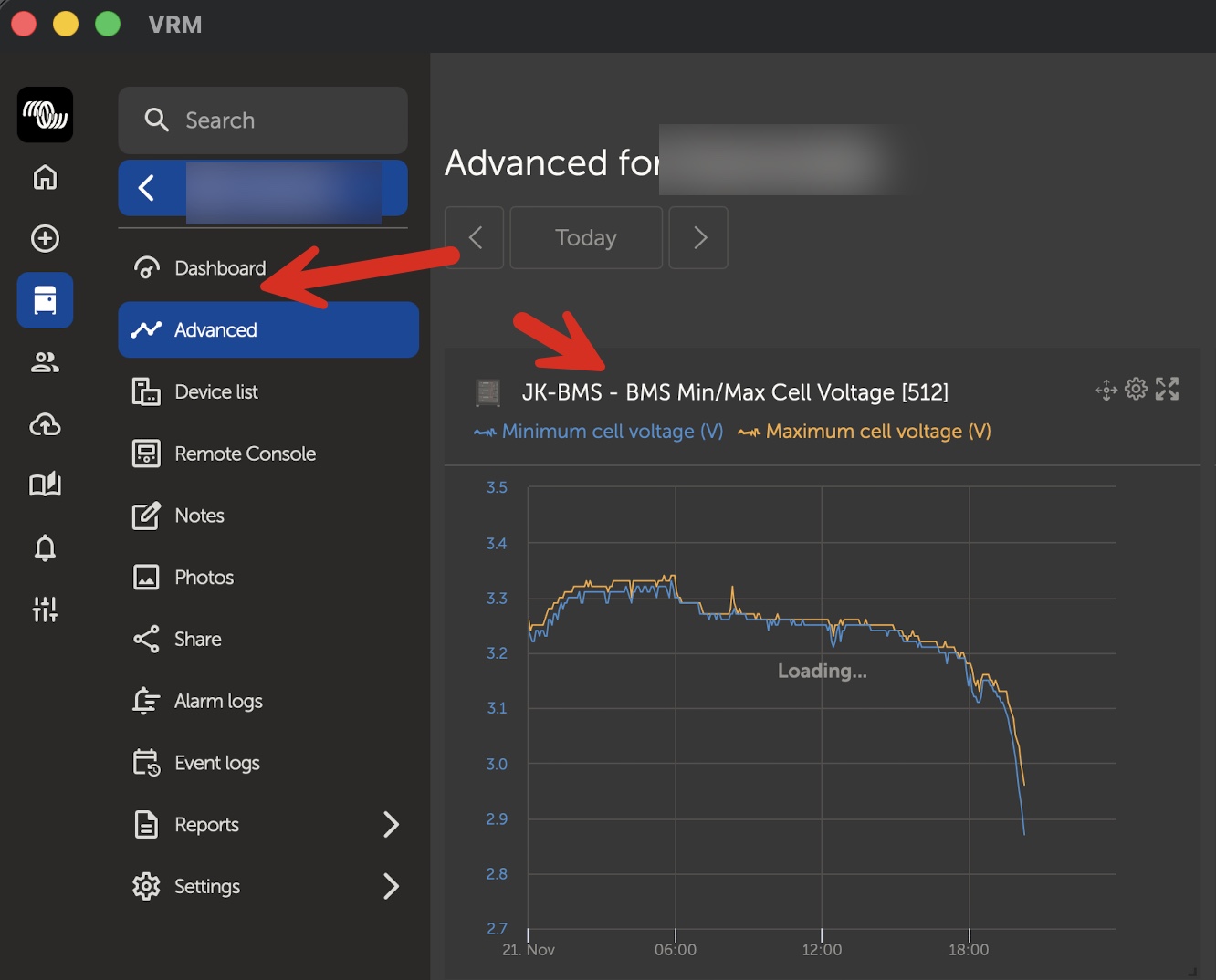
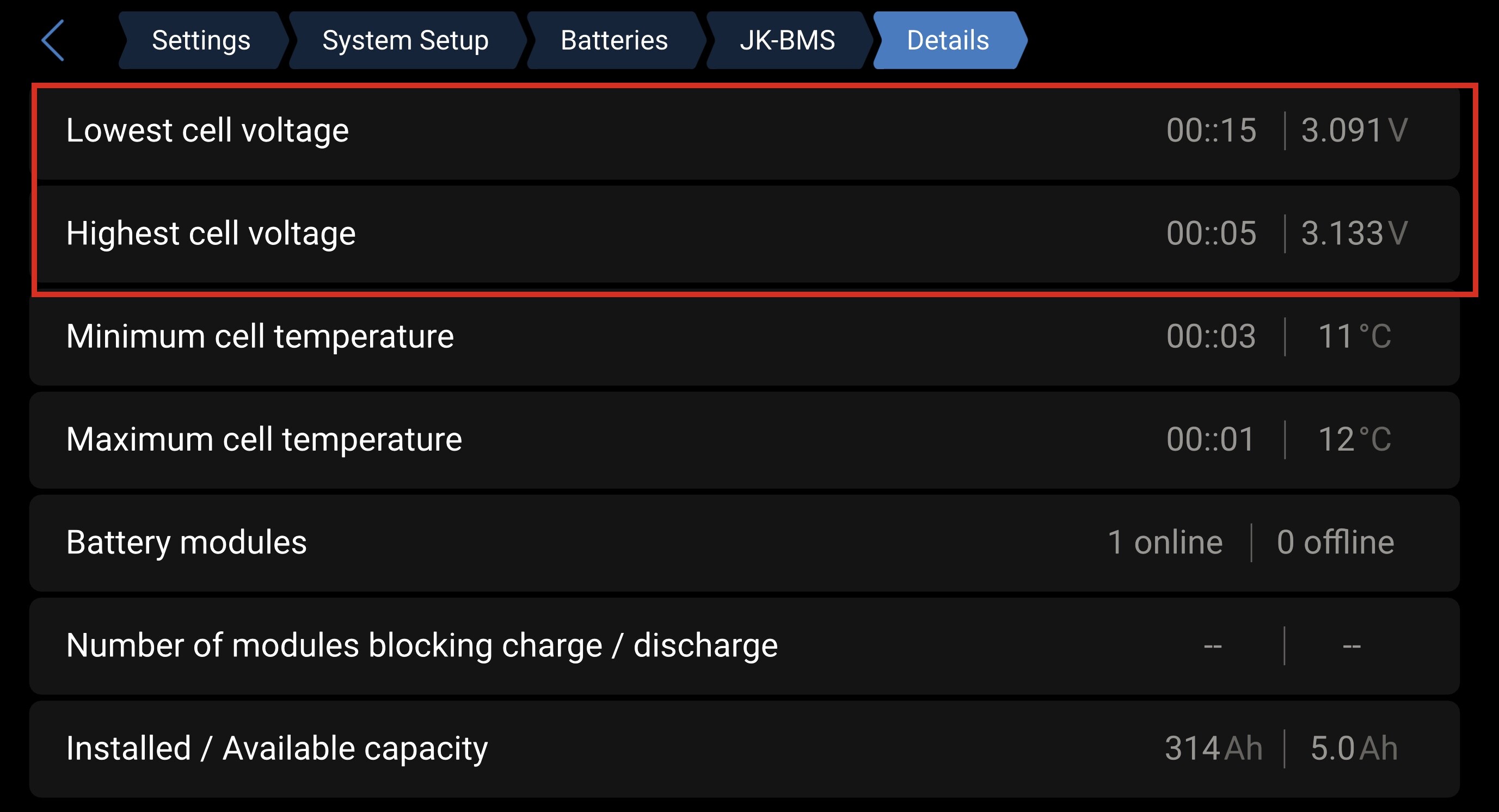
Regarding your question - if you have connected the JK BMS your GX device (Cerbo in your case) You can check balancing in the advanced tab… just activate “BMS Min/Max Voltage” for that. There you would see the max deviation between the cell with the lowest and the cell with the highest voltage.. I hope that helps.
That graph is in VRM i guess…I have not yet fully access to Vrm, I have installed the app without reading the vrm manual first…
Yes this is part of VRM.. I think most of the things you want to find would be in VRM.
If you have no VRM you can find this section in the remote console too… just without history..
Here is my example.. yes battery just did hit 0%… that’s why the cells are a little bit off.. this will solve itself in the next few minutes.